

 Stripe Integration
Turn Stripe payments data into a causal system that shows why revenue moves and who owns the response.
Stripe processes every charge, subscription, refund, dispute, and payout.Stripe processes every charge, subscription, refund, dispute, and payout. KPI Tree consumes Stripe data through Stripe's own official MCP server at `mcp.stripe.com` (one of the most mature vendor-shipped MCP servers in production today), through your existing data warehouse where Stripe data already lands via Fivetran or a custom ELT, or through a professional services engagement where our team builds the full data foundation for you. Once connected, KPI Tree builds what no payments dashboard offers: causal metric trees that decompose revenue into its drivers, assign ownership at every level, and alert the right person when something shifts. Gross revenue, net revenue, payment success rate, refund rate, dispute rate, subscription churn, each becomes a node in a tree with an owner, statistical monitoring, and a direct line to action. Your payments data stops being a ledger and starts being an accountability system.
From payment events to owned metric trees
Connect your Stripe data
Three ways to get started, depending on your stack.

Pull metrics from Stripe directly through the Model Context Protocol.



Connect your existing warehouse where Stripe data already lands.


Our professional services team can build you turn-key AI foundations in a matter of weeks. Data warehouse on Snowflake/BigQuery, ELT with Fivetran, all modelled in dbt with a semantic layer.
Define payment and revenue metrics
Create metrics from your Stripe tables - gross revenue, net revenue, payment success rate, refund rate, dispute rate, average transaction value, subscription MRR, payout timing, and more. Write SQL against your existing tables or sync definitions from your dbt semantic layer.
Build revenue trees and assign ownership
Arrange payment metrics into parent-child trees that model causal relationships. Net revenue decomposes into gross revenue minus refunds, disputes, and fees. Each metric gets a RACI owner, trend analysis, and alerts. When payment success rate drops, the owner knows immediately - with context on what else changed.
Payment intelligence that goes beyond the Stripe Dashboard
Revenue decomposition from charges to net revenue
Payment health metrics with statistical monitoring
Cross-metric alerts with causal context
Revenue waterfall from gross charges to what you actually keep.
- Gross charges, refunds, disputes, and fees modelled as causal tree nodes
- Each component decomposable by payment method, currency, product, or segment
- Period-over-period comparison isolates which component drove the change
- RACI ownership ensures every component has an accountable team
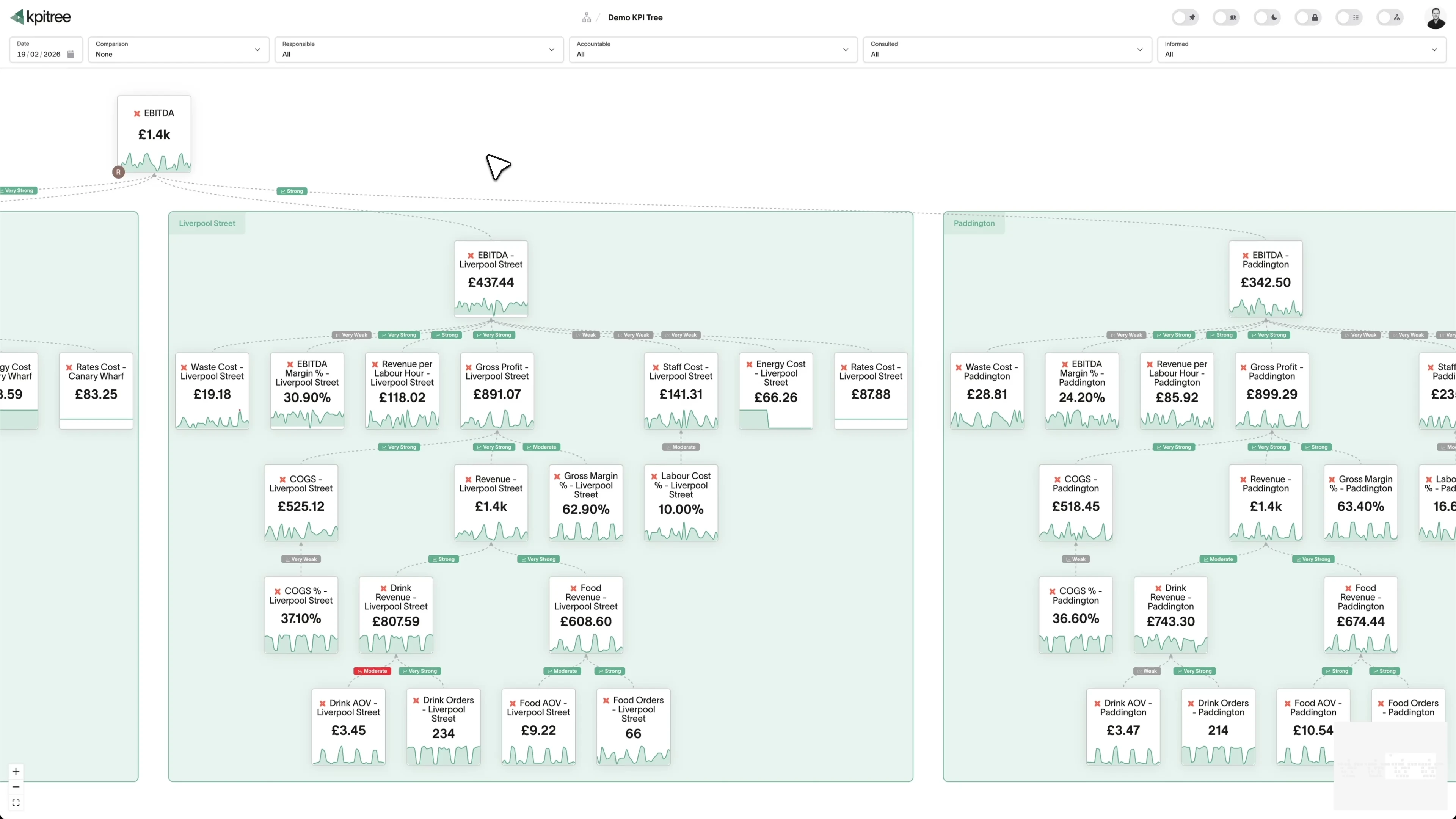
Payment success rate treated as the metric it deserves to be.
- Payment success rate tracked with statistical outlier detection
- Decomposition by card network, issuing country, authentication method
- Decline reason codes surfaced as dimension breakdowns
- Correlated with downstream revenue metrics to quantify business impact
Subscription and recurring revenue metrics alongside one-off charges.
- Stripe Billing MRR, churn, and expansion in the same tree as one-off revenue
- Failed renewal payments linked causally to dunning and retry metrics
- Subscription lifecycle events tracked as owned metrics
- Blended view of recurring and transactional revenue with full decomposition
Combine Stripe with every other revenue signal in your warehouse.
- Stripe metrics in the same tree as marketing, sales, and product metrics
- Correlation analysis across tools surfaces cross-functional relationships
- End-to-end revenue attribution from acquisition to payment
- Each metric node carries ownership regardless of its data source




What KPI Tree adds that Stripe's Dashboard cannot
Stripe's Dashboard is built for payment operations. KPI Tree is built for understanding why revenue metrics move and holding people accountable for the response.
Data warehouses
The numbers





Semantic layers
The definitions


Business apps
Launches, decisions, blockers




Org structure
Directory-synced




For humans
Answers, briefings and pushes
 @
@Read and write over MCP
Anthropic: 21% → ~95% with curated context



Canopy Agentic Workflows the metrics start them, humans gate them
Canopy Agents four out of the box, any model, your keys
Canopy
The business context layer
Structural context The causal tree, the org chart
Temporal context What was true when, plan against actual
Behavioural context What people did, what worked
Operational context RACI, workflows, approvals
Strategic context Objectives, key results, initiatives
Map & Measure
Metric Trees
Business Models
Prove & Act
Root Cause
Ownership
Verified Impact
Strategy
Grounded in proven causality
Verified proof
Meta spend → Revenue, +£32k vs forecast, q < 0.01
Personalised Action Plans 31 experiments running
hypothesis → a real person’s plan → measure the change
Causation the test cascade
ADF p 0.02 → Granger p 0.003 → q < 0.05, 87 of 1,204 survive
Correlation
22,791 pairs tested nightly, NPS – Churn r 0.71
Data warehouses
The numbers
Semantic layers
The definitions
Business apps
Launches, decisions, blockers
Org structure
Directory-synced
Causal revenue trees, not transaction tables
Ownership that extends beyond the payments team
Cross-tool analysis Stripe cannot do alone
Metrics you can track. Ready to add to your metric trees.
Average Revenue Per Transaction
PaymentsAvg Revenue Per Transaction = Total Revenue / Number of Successful Transactions
Average revenue per transaction measures the mean monetary value of each successful payment processed through Stripe. It reflects pricing effectiveness and purchase behaviour across your customer base.
View metricCharge Success Rate
PaymentsCharge Success Rate = (Successful Charges / Total Charge Attempts) × 100
Charge success rate is the percentage of payment attempts that are successfully authorised and captured. It encompasses card network approvals, 3D Secure completions, and gateway processing outcomes.
View metricChargeback Rate
PaymentsChargeback Rate = (Chargebacks / Total Transactions) × 100
Chargeback rate is the percentage of transactions that result in a customer-initiated dispute with their card issuer. Keeping this rate below card network thresholds is essential to maintaining processing privileges.
View metricCustomer Lifetime Value
PaymentsLTV = Average Revenue Per Customer × Average Customer Lifespan
Customer lifetime value (LTV) estimates the total revenue a customer will generate across all transactions over their relationship. For Stripe users, it aggregates both one-time and recurring payments into a comprehensive value figure.
View metricDispute Resolution Rate
PaymentsDispute Resolution Rate = (Disputes Won / Total Disputes) × 100
Dispute resolution rate measures the percentage of chargebacks and disputes that are resolved in your favour after evidence submission. It reflects the effectiveness of your dispute management process.
View metricFailed Payment Recovery Rate
PaymentsRecovery Rate = (Recovered Payments / Total Failed Payments) × 100
Failed payment recovery rate measures the percentage of initially declined payments that are subsequently collected through retry attempts, card updates, or customer outreach. It quantifies revenue saved from potential loss.
View metricFraud Detection Rate
PaymentsFraud Detection Rate = (Blocked Fraudulent Transactions / Total Fraudulent Attempts) × 100
Fraud detection rate measures the percentage of fraudulent transactions correctly identified and blocked before processing. It reflects the effectiveness of fraud prevention rules and machine learning models.
View metricGross Payment Volume
PaymentsGPV = Sum of All Successful Transaction Amounts
Gross payment volume (GPV) is the total monetary value of all transactions processed through Stripe before deducting fees, refunds, and chargebacks. It represents the overall scale of payment activity.
View metricMonthly Recurring Revenue
PaymentsMRR = Sum of (Active Subscription Monthly Value)
Monthly recurring revenue (MRR) is the normalised monthly value of all active Stripe subscriptions. It standardises different billing intervals into a consistent monthly figure for tracking subscription revenue momentum.
View metricNet Revenue
PaymentsNet Revenue = Gross Payment Volume - Fees - Refunds - Chargebacks
Net revenue is the total payment volume minus Stripe processing fees, refunds, chargebacks, and other deductions. It represents the actual revenue retained from payment processing activity.
View metricPayment Method Distribution
PaymentsPayment method distribution shows the share of transactions processed via each payment method, including cards, bank transfers, digital wallets, and local payment methods. It reveals customer payment preferences.
View metricPayout Timing Analysis
PaymentsPayout timing analysis measures the interval between payment capture and fund settlement to your bank account. It tracks payout schedules, holds, and any delays that affect cash flow predictability.
View metricRecurring vs One-Time Revenue
PaymentsRecurring vs one-time revenue analysis separates subscription-based revenue from single purchases to show the balance between predictable and transactional income streams. It measures the stability of your revenue base.
View metricRefund Rate
PaymentsRefund Rate = (Refunded Transactions / Total Transactions) × 100
Refund rate is the percentage of transactions that are refunded, either fully or partially. It indicates customer satisfaction issues, product problems, or policy-related returns.
View metricRevenue by Currency
PaymentsRevenue by currency segments total payment volume by the transaction currency. It reveals international revenue composition and helps quantify foreign exchange exposure for businesses operating across multiple markets.
View metricRevenue by Product
PaymentsRevenue by product breaks down total payment volume by product or service line. It shows which offerings contribute most to revenue and how the product mix evolves over time.
View metricRevenue Growth Rate
PaymentsRevenue Growth Rate = ((Current Period Revenue - Prior Period Revenue) / Prior Period Revenue) × 100
Revenue growth rate measures the percentage change in total revenue between periods. It captures the combined effect of new customer acquisition, existing customer expansion, and churn on overall revenue trajectory.
View metricRevenue Per Customer
PaymentsRevenue Per Customer = Total Revenue / Unique Paying Customers
Revenue per customer divides total revenue by the number of unique paying customers. It captures how effectively you monetise each customer relationship through pricing, upselling, and cross-selling.
View metricSubscription Churn Rate
PaymentsSubscription Churn Rate = (Cancelled Subscriptions / Start-of-Period Subscriptions) × 100
Subscription churn rate is the percentage of active subscriptions that are cancelled within a given period. It measures the rate of subscriber attrition and is a core indicator of product-market fit and customer satisfaction.
View metricSubscription Growth Rate
PaymentsSubscription Growth Rate = ((End Subscriptions - Start Subscriptions) / Start Subscriptions) × 100
Subscription growth rate measures the net percentage change in active subscriptions over a period. It reflects the balance between new subscriptions acquired and existing subscriptions lost to churn.
View metricSubscription Upgrade Rate
PaymentsUpgrade Rate = (Upgrades in Period / Active Subscribers at Start) × 100
Subscription upgrade rate is the percentage of subscribers who move to a higher-value plan within a given period. It reflects the effectiveness of upsell motions and product tier design.
View metricTransaction Fee Analysis
PaymentsTransaction fee analysis examines the total and per-transaction cost of payment processing, including Stripe platform fees, card network fees, and currency conversion charges. It reveals the true cost of accepting payments.
View metricTransfer Volume Analysis
PaymentsTransfer volume analysis tracks the total value and frequency of transfers between Stripe accounts, particularly relevant for Connect platforms. It measures marketplace payment flow health and connected account activity.
View metricTrial Conversion Rate
PaymentsTrial Conversion Rate = (Trials Converted to Paid / Total Trials Ended) × 100
Trial conversion rate measures the percentage of trial subscriptions that convert to paid plans at the end of the trial period. It is a critical indicator of product-market fit and onboarding effectiveness.
View metricVolume by Payment Method
PaymentsVolume by payment method measures the total transaction value processed through each payment method type. It quantifies the financial weight of each method beyond simple transaction counts.
View metricCard Decline Rate
PaymentsCard Decline Rate = (Declined Card Transactions / Total Card Transaction Attempts) × 100
Card decline rate is the percentage of card payment attempts that are refused by the issuing bank or card network. It captures both soft declines, which may succeed on retry, and hard declines, which require customer action to resolve.
View metricCohort Revenue Analysis
PaymentsCohort revenue analysis groups customers by the period in which they made their first Stripe payment and tracks the revenue each cohort generates over subsequent months. It reveals how monetisation and retention evolve for different acquisition vintages.
View metricCustomer Acquisition Cost
PaymentsCAC = Total Sales & Marketing Spend / New Paying Customers Acquired
Customer acquisition cost (CAC) is the total sales and marketing expenditure required to acquire one new paying customer. When paired with Stripe payment data, it links spend to verified first-payment events rather than sign-ups alone.
View metricDispute Rate
PaymentsDispute Rate = (Disputes Initiated / Total Transactions) × 100
Dispute rate measures the percentage of transactions that customers formally dispute through their card issuer. Unlike chargeback rate, which focuses on completed chargebacks, dispute rate includes all initiated disputes regardless of outcome.
View metricGross Profit Margin
PaymentsGross Profit Margin = ((Revenue - Cost of Goods Sold) / Revenue) × 100
Gross profit margin is the percentage of revenue remaining after deducting the direct costs of delivering your product or service, including Stripe processing fees. It measures how efficiently you convert revenue into profit before operating expenses.
View metricRepeat Customer Rate
PaymentsRepeat Customer Rate = (Customers with 2+ Purchases / Total Unique Customers) × 100
Repeat customer rate is the percentage of customers who make more than one purchase within a defined period. It reflects customer loyalty, product satisfaction, and the effectiveness of retention and re-engagement programmes.
View metricAverage Revenue Per User
RevenueAverage Revenue Per User = Total Revenue in Period / Number of Active Paying Customers in Period
Average Revenue Per User measures the mean revenue generated by each active paying customer in your Stripe account over a defined period. Using Stripe charge, invoice and subscription data, it divides total recognised revenue by the count of distinct paying customers, giving a per-customer view of monetisation. It strips out volume effects so you can see whether each account is contributing more or less over time.
View metricCAC Payback Period
FinanceCAC Payback Period = Customer Acquisition Cost / (Average Monthly Recurring Revenue per Customer x Gross Margin)
CAC Payback Period measures the number of months it takes to recover the cost of acquiring a customer from the gross margin that customer generates. With Stripe as the system of record for charges, subscriptions and invoices, the recurring revenue side of the calculation comes straight from settled payment data, while acquisition cost is supplied from your sales and marketing spend. It tells you how quickly each new customer turns from a cost into a contributor.
View metricChurn Rate
RevenueChurn Rate = Subscriptions Cancelled in Period / Active Subscriptions at Start of Period x 100
Churn Rate measures the proportion of active Stripe subscriptions that cancel or lapse within a given period. In Stripe terms it is derived from subscription status transitions, where a subscription moving to canceled or unpaid counts as churn against the base of subscriptions that were active at the start of the period. It can be expressed as customer churn, counting lost subscribers, or as revenue churn, weighting each loss by its monthly recurring revenue.
View metricCohort Analysis
RevenueCohort Retention Rate = Active Customers from Cohort in Period N / Total Customers in Cohort at Period 0 x 100
Cohort Analysis groups Stripe customers by the period in which their first successful charge or subscription started, then follows each group over time. Using Stripe charge, subscription, and customer records, it shows how each cohort retains, expands, or churns across subsequent months. This turns a flat revenue figure into a view of how customer behaviour changes depending on when they joined.
View metricCoupon Effectiveness Analysis
RevenueCoupon Effectiveness = (Net Revenue From Redeemed Coupons - Total Discount Given) / Total Discount Given x 100
Coupon Effectiveness Analysis measures the revenue, conversions and retention generated by each Stripe coupon or promotion code against the discount value given away. In Stripe, every applied coupon is recorded on invoices, subscriptions and charges, so you can attribute redemptions to specific codes and compare net revenue after discount to the gross value of the offer. It tells you which promotions grow durable revenue and which simply hand margin to customers who would have paid full price.
View metricCustomer Segmentation Analysis
RevenueSegment Revenue Share = Revenue from Segment / Total Revenue x 100 (computed per segment across all customers)
Customer Segmentation Analysis groups your Stripe customers into meaningful cohorts based on attributes already present in Stripe data, such as total spend, subscription plan, billing frequency, signup month, and payment behaviour. Rather than treating every customer as the same, it reveals how revenue, retention, and risk differ across segments. In Stripe terms, it draws on the customers, charges, invoices, and subscriptions objects to assign each customer to a segment and then measures performance within each one.
View metricFailed Payment Analysis
RevenueFailed Payment Rate = Failed Charges / Total Charge Attempts x 100
Failed Payment Analysis measures the volume and value of Stripe charges that do not succeed, broken down by the failure reason Stripe returns, such as insufficient funds, expired card, do not honour or fraud block. In Stripe data, each failed charge carries an outcome and a decline code, so the analysis groups failures by cause, card network, customer and whether the payment was a first attempt or a renewal. It turns raw failure events into a clear picture of how much revenue is at risk and which causes are recoverable.
View metricGross Revenue Retention
RevenueGross Revenue Retention = (Starting MRR - Churned MRR - Downgrade MRR) / Starting MRR x 100
Gross Revenue Retention measures the percentage of recurring revenue you retain from an existing cohort of Stripe customers over a period, before any expansion is counted. It uses Stripe subscription, invoice and cancellation data to subtract churn and downgrades from the starting recurring revenue. Because expansion is excluded, the figure can never exceed 100 per cent, which makes it a clean read on revenue leakage.
View metricInvoluntary Churn Rate
RevenueInvoluntary Churn Rate = Subscriptions Lost to Failed Payments in Period / Active Subscriptions at Start of Period x 100
Involuntary Churn Rate measures the share of subscription customers lost because a renewal payment failed rather than because they chose to cancel. In Stripe, it is derived from failed invoice and charge events on active subscriptions, typically caused by expired cards, insufficient funds, or issuer declines. It separates payment-driven loss from deliberate cancellation so the team can see how much churn is recoverable through better billing operations.
View metricNet Revenue Retention
RevenueNet Revenue Retention = (Starting MRR + Expansion MRR - Contraction MRR - Churned MRR) / Starting MRR x 100
Net Revenue Retention measures how much recurring revenue you keep and grow from an existing cohort of Stripe customers over a period, before any new customers are counted. Using Stripe subscription, invoice and credit note data, it nets expansion from plan upgrades and added quantity against contraction from downgrades and cancellations. A value above 100 percent means your existing base is growing on its own, even with some churn.
View metricPayment Method Performance
FinancePayment Method Success Rate = Successful Charges for Method / Total Charge Attempts for Method x 100
Payment Method Performance measures how each payment method captured in Stripe, such as cards by brand, digital wallets, bank debits and buy now pay later, performs across authorisation success, average transaction value and dispute frequency. It is built from the payment_method and payment_method_details fields on Stripe charges and PaymentIntents, grouped by method type. The metric turns a single blended success rate into a per-method view so you can see exactly where authorisations and revenue are won or lost.
View metricPayment Retry Success Rate
RevenuePayment Retry Success Rate = Failed Charges Recovered by a Later Retry / Total Failed Charges Eligible for Retry x 100
Payment Retry Success Rate measures the share of failed Stripe charges that succeed on a subsequent retry attempt within a defined window. In Stripe, this draws on the charges and invoices objects, where an initial decline (for example insufficient funds or an expired card) is followed by a Smart Retries or scheduled dunning attempt that ultimately clears. It isolates how effectively your retry logic recovers payments that would otherwise be lost.
View metricPayment Success Rate
RevenuePayment Success Rate = Successful Payment Attempts / Total Payment Attempts x 100
Payment Success Rate measures the proportion of Stripe payment attempts that complete successfully against the total number of attempts made over a period. In Stripe terms, it compares PaymentIntents and Charges that reach a succeeded status with all attempts, including those that fail at authorisation. It is a direct read on how reliably your checkout converts intent into captured revenue.
View metricPlan Migration Analysis
RevenueNet Migration MRR Impact = Sum of MRR Gained from Upgrades - Sum of MRR Lost from Downgrades
Plan Migration Analysis measures how Stripe subscribers move between pricing plans over a period, breaking movements into upgrades, downgrades and lateral switches. It draws on Stripe subscription and subscription_item events, where a change in the linked price or plan against an existing subscription marks a migration. The metric quantifies both the count of each movement type and the net recurring revenue gained or lost as customers change tier.
View metricRevenue Cohort Analysis
RevenueCohort Revenue Retention (period n) = Revenue from Cohort in Period n / Revenue from Cohort in Period 0 x 100
Revenue Cohort Analysis groups Stripe customers by the period in which they first paid, then follows the revenue each group generates in every period that follows. Using Stripe charge, invoice, and subscription data, it shows how much of a cohort revenue persists, expands, or churns months after acquisition. Each cohort becomes a row, and each later period becomes a column, so retention and expansion curves are visible at a glance.
View metricRevenue Concentration Analysis
RevenueRevenue Concentration = Revenue from Top N Customers / Total Revenue in Period x 100
Revenue Concentration Analysis measures how much of your total Stripe revenue is generated by your largest customers over a defined period. Using Stripe charge, invoice and subscription records grouped by customer, it shows the share of revenue held by your top accounts, typically the top 10 percent or a fixed top N. A high concentration means a small number of customers carry most of your income, which raises the risk that a single churn or dispute materially dents the business.
View metricSeasonal Revenue Patterns
RevenueSeasonal Index for Period = Average Revenue in Period / Average Revenue Across All Periods x 100
Seasonal Revenue Patterns measure how Stripe revenue rises and falls across recurring calendar periods such as months, quarters, or holidays. By aggregating successful charges and invoices from Stripe over multiple years and comparing the same period against its historical average, you isolate the seasonal component from underlying growth. This shows whether a given month is naturally stronger or weaker rather than reflecting a real change in trajectory.
View metricSubscription Change Analysis
RevenueNet Subscription Change MRR = Upgrade MRR + Quantity Increase MRR - Downgrade MRR - Quantity Decrease MRR - Cancelled MRR
Subscription Change Analysis measures the volume and revenue impact of changes to Stripe subscriptions over a period, broken down into upgrades, downgrades, quantity changes, interval switches and cancellations. It reads Stripe subscription and subscription_item events to classify each change and attach the monthly recurring revenue it added or removed. The result is a clear view of whether plan movement across your customer base is net expansionary or net contractionary.
View metricSubscription Renewal Rate
RevenueSubscription Renewal Rate = Subscriptions Renewed in Period / Subscriptions Due to Renew in Period x 100
Subscription Renewal Rate measures the proportion of Stripe subscriptions due to renew in a period that actually renew rather than cancel or lapse. In Stripe terms it counts subscriptions whose billing cycle advances with a successful invoice payment, against all subscriptions that reached a renewal point in the same window. It is read directly from Stripe subscription, invoice and event data, so it reflects both voluntary cancellations and involuntary lapses from failed payments.
View metricTime To First Payment
RevenueTime To First Payment = Timestamp of First Succeeded Charge - Customer Created Timestamp
Time To First Payment measures the elapsed time between when a customer record is created in Stripe and when that customer completes their first successful charge. Using the Stripe customer created timestamp and the timestamp of the earliest succeeded charge, it captures how quickly new accounts convert into paying customers. A shorter time indicates a smoother path from sign-up to revenue.
View metricRelated integrations. More sources that work with KPI Tree.

Common questions
How does Stripe data reach KPI Tree?
Stripe runs an official MCP server at `mcp.stripe.com` that exposes around 25 tools across customers, charges, payment intents, products, prices, invoices, subscriptions, refunds, disputes, and balance. It is one of the most mature vendor-shipped MCP servers in production today, uses OAuth with granular consent, and is the fastest way to get Stripe into a metric tree. The warehouse path is the right choice for teams that already replicate Stripe to Snowflake, BigQuery, or Databricks via Fivetran, Airbyte, or a custom ELT; KPI Tree reads those tables in place so attribution and period comparisons work against the copy your finance team trusts. And if you do not yet have a warehouse, our professional services team builds the full stack for you as a fixed-scope engagement, including the dbt semantic layer for payments analytics.
What Stripe metrics can I track?
Any metric computable from Stripe data in your warehouse: gross revenue, net revenue, payment success rate, decline rate by reason code, refund rate, dispute rate, average transaction value, Stripe Billing MRR, subscription churn, payout timing, fee percentage by payment method, and more. If it can be expressed as SQL against your Stripe tables, it can be a KPI Tree metric.
Does this work with Stripe Billing subscriptions?
Yes. If you use Stripe Billing, subscription metrics (MRR, churn, expansion, contraction) live alongside one-off payment metrics in the same tree. KPI Tree models both recurring and transactional revenue components and their causal relationships.
How long does setup take?
It depends on your connection method. With MCP, you can be pulling Stripe metrics in minutes - no warehouse required. If your data is already in a warehouse, connecting KPI Tree takes under an hour. Teams with a dbt semantic layer can sync Stripe metrics automatically. For Professional Services engagements where we build the AI foundations, timelines depend on scope but typically take a few weeks.
Does KPI Tree replace the Stripe Dashboard?
No. Stripe's Dashboard is designed for payment operations - managing charges, refunds, disputes, and payouts. KPI Tree serves a different purpose: modelling how payment metrics causally drive revenue, assigning ownership, and creating accountability. Most teams use both.
Can I combine Stripe data with other revenue sources?
Yes. A single metric tree can include Stripe payment data alongside Chargebee subscription data, Shopify e-commerce data, marketing spend, and product usage metrics. KPI Tree's correlation engine analyses relationships across all sources in your warehouse.
Is my payment data secure?
KPI Tree connects to your warehouse, not directly to Stripe. Your warehouse security model - RSA key-pair authentication, service accounts, network policies - remains fully enforced. KPI Tree queries aggregated metric data, not individual payment card details.
Do I need a dbt semantic layer?
No. You can define metrics directly with SQL against your Stripe warehouse tables. If you do use dbt with Stripe source models, KPI Tree can sync those metric definitions automatically via the dbt Cloud or dbt Core integration.
Related guides. Frameworks and metrics in depth.

How to build a metric tree
A step-by-step metric tree and KPI tree template from North Star to daily levers
Metric trees for finance teams
From DuPont analysis to modern decomposition
Monthly recurring revenue: a metric tree decomposition
The predictable monthly revenue from active subscriptions and how to decompose it into growth drivers
Net revenue retention: formula, benchmarks and levers
Decompose net revenue retention into the drivers that move it
Churn rate analysis: formulas, benchmarks and fixes
Run a churn rate analysis that finds causes, not just symptoms
Your payments data tells a bigger story than a transaction log.
Connect your warehouse to KPI Tree and turn Stripe payment events into causal revenue trees with ownership, statistical analysis, and accountability across your entire organisation.










