

 Shopify Integration
Turn Shopify order data into a causal model of what drives your e-commerce revenue, and who owns each lever.
Shopify captures every order, product view, cart event, customer record, and fulfilment step.Shopify captures every order, product view, cart event, customer record, and fulfilment step. KPI Tree connects to Shopify through the official Shopify Storefront MCP and Customer Accounts MCP servers that ship with every store, through your data warehouse where Shopify Admin data already lands via Fivetran or Hightouch, or through a professional services engagement that builds the stack for you. Once connected, KPI Tree builds what no e-commerce dashboard can: causal metric trees that model how GMV, average order value, conversion rate, repeat purchase rate, and customer lifetime value drive each other. Every metric gets an owner, statistical monitoring, and a direct line to action. Your e-commerce data stops sitting in reports and starts driving accountability across marketing, product, and operations.
From order events to accountable revenue trees
Connect your Shopify data
Three ways to get started, depending on your stack.

Pull metrics from Shopify directly through the Model Context Protocol.



Connect your existing warehouse where Shopify data already lands.


Our professional services team can build you turn-key AI foundations in a matter of weeks. Data warehouse on Snowflake/BigQuery, ELT with Fivetran, all modelled in dbt with a semantic layer.
Define e-commerce metrics from Shopify tables
Create metrics from your Shopify data - GMV, net revenue, average order value, units per order, conversion rate, cart abandonment rate, repeat purchase rate, customer lifetime value, refund rate, and more. Write SQL against your existing tables or sync metric definitions from your dbt semantic layer.
Build revenue trees and assign ownership
Arrange metrics into parent-child trees that model how they causally drive each other. GMV decomposes into orders multiplied by average order value. Orders decompose into traffic multiplied by conversion rate. Each node gets a RACI owner, statistical monitoring, and personalised alerts. When AOV drops, the merchandising team knows before the weekly review.
E-commerce intelligence your storefront analytics cannot deliver
Revenue decomposition trees from order data
Causal analysis across the e-commerce funnel
Customer cohort metrics with ownership
The classic e-commerce equation, modelled as a causal tree.
- GMV decomposed into traffic, conversion rate, and average order value
- Each component breaks further by channel, device, product, and geography
- RACI ownership at every level connects metrics to accountable teams
- Period-over-period comparison identifies which component drove the change
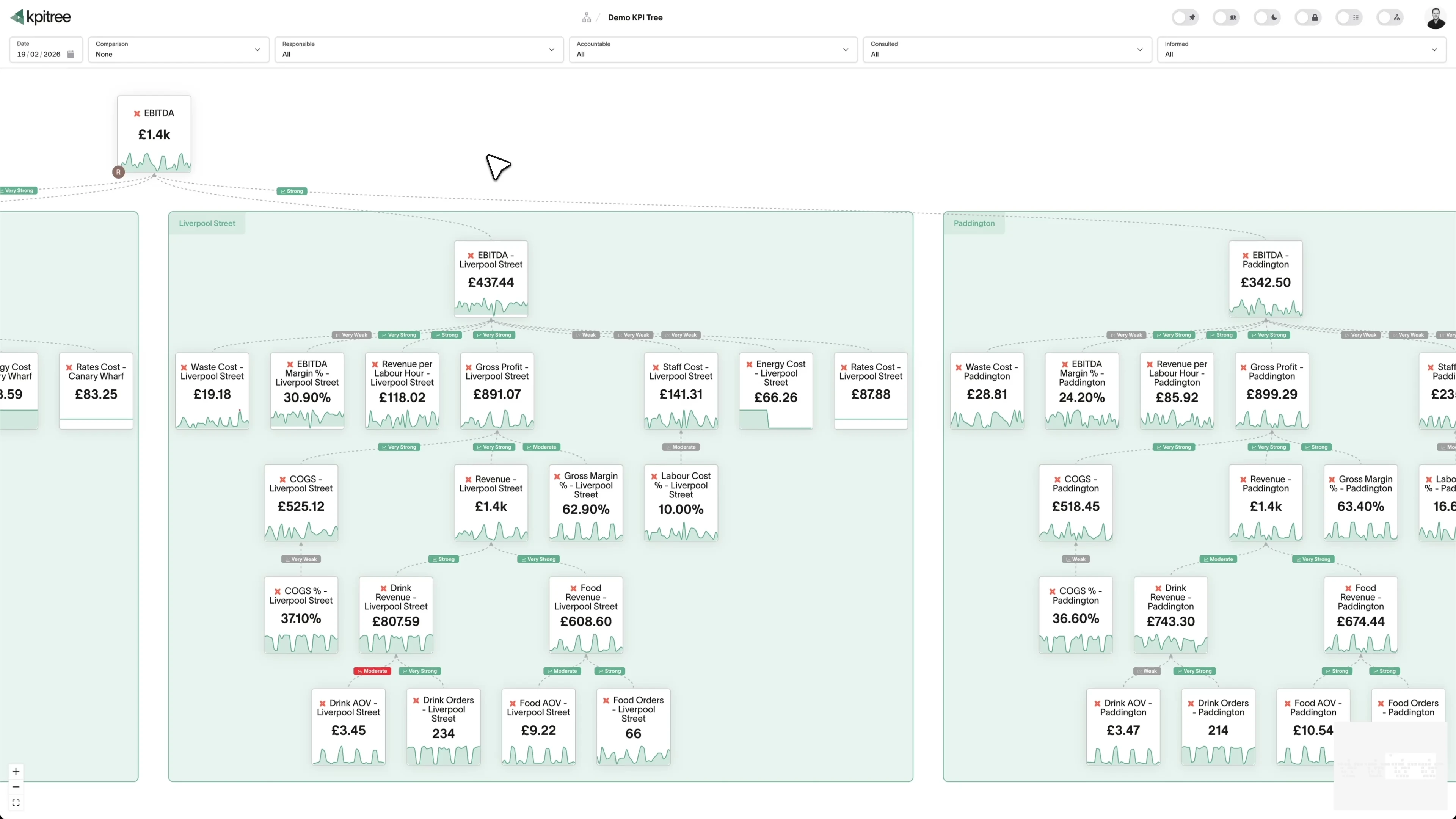
Customer lifetime value as a metric tree, not a single number.
- LTV decomposed into first-purchase AOV, repeat rate, frequency, and margin
- Cohort-based LTV tracking with statistical comparison between cohorts
- Each driver links to the team responsible - marketing, merchandising, or CX
- Leading indicators surface LTV problems before they compound
Product and category performance with accountability.
- Product category contribution modelled as metric tree nodes
- Attach rate, conversion rate, and return rate tracked per category
- Ownership assigned to merchandising, product, and marketing by metric
- Category-level changes automatically surface in parent revenue metrics
Combine Shopify with marketing, payments, and fulfilment data.
- Shopify order data alongside marketing, payments, and fulfilment metrics
- End-to-end attribution from acquisition spend to customer lifetime value
- Cross-tool correlation surfaces relationships invisible in individual dashboards
- Every metric carries ownership regardless of which tool generated the data




What KPI Tree adds that Shopify Analytics cannot
Shopify Analytics is built for store operations. KPI Tree is built for understanding why e-commerce metrics move and holding cross-functional teams accountable.
Data warehouses
The numbers





Semantic layers
The definitions


Business apps
Launches, decisions, blockers




Org structure
Directory-synced




For humans
Answers, briefings and pushes
 @
@Read and write over MCP
Anthropic: 21% → ~95% with curated context



Canopy Agentic Workflows the metrics start them, humans gate them
Canopy Agents four out of the box, any model, your keys
Canopy
The business context layer
Structural context The causal tree, the org chart
Temporal context What was true when, plan against actual
Behavioural context What people did, what worked
Operational context RACI, workflows, approvals
Strategic context Objectives, key results, initiatives
Map & Measure
Metric Trees
Business Models
Prove & Act
Root Cause
Ownership
Verified Impact
Strategy
Grounded in proven causality
Verified proof
Meta spend → Revenue, +£32k vs forecast, q < 0.01
Personalised Action Plans 31 experiments running
hypothesis → a real person’s plan → measure the change
Causation the test cascade
ADF p 0.02 → Granger p 0.003 → q < 0.05, 87 of 1,204 survive
Correlation
22,791 pairs tested nightly, NPS – Churn r 0.71
Data warehouses
The numbers
Semantic layers
The definitions
Business apps
Launches, decisions, blockers
Org structure
Directory-synced
Causal decomposition, not flat reports
Cross-functional ownership of revenue metrics
Statistical analysis across the full data stack
Metrics you can track. Ready to add to your metric trees.
Average Order Value
E-commerceAOV = Total Revenue / Number of Orders
Average order value (AOV) is the mean monetary value of each completed order. It captures the combined effect of pricing, bundling, upselling, and promotional strategies on basket size.
View metricCart Abandonment Rate
E-commerceCart Abandonment Rate = ((Carts Created - Completed Orders) / Carts Created) × 100
Cart abandonment rate is the percentage of shopping carts created that are not converted into completed orders. It measures friction and hesitation between add-to-cart and purchase completion.
View metricCheckout Conversion Rate
E-commerceCheckout Conversion Rate = (Completed Orders / Checkout Starts) × 100
Checkout conversion rate is the percentage of visitors who begin the checkout process and successfully complete a purchase. It isolates conversion performance at the critical final stage of the buying journey.
View metricCustomer Acquisition Cost
E-commerceCAC = Total Acquisition Spend / New Customers Acquired
Customer acquisition cost (CAC) measures the total marketing and sales spend required to acquire a new customer. It encompasses ad spend, creative costs, agency fees, and any other direct acquisition expenses.
View metricCustomer Lifetime Value
E-commerceLTV = AOV × Purchase Frequency × Average Customer Lifespan
Customer lifetime value (LTV) estimates the total revenue a customer will generate over their entire relationship with your store. It combines average order value, purchase frequency, and customer lifespan into a single value figure.
View metricCustomer Repeat Rate
E-commerceRepeat Rate = (Customers with 2+ Orders / Total Customers) × 100
Customer repeat rate is the percentage of customers who make more than one purchase within a defined period. It measures customer loyalty and the effectiveness of retention and re-engagement efforts.
View metricDiscount Usage Analysis
E-commerceDiscount usage analysis measures the frequency, value, and impact of discount codes and automatic discounts applied to orders. It quantifies how promotions affect revenue, margins, and customer behaviour.
View metricFulfilment Speed
E-commerceFulfilment Speed = Average (Shipment Date - Order Date)
Fulfilment speed measures the average time between order placement and shipment. It captures warehouse efficiency, inventory availability, and operational capacity to meet customer delivery expectations.
View metricGross Merchandise Volume
E-commerceGMV = Sum of All Order Values (Before Returns and Discounts)
Gross merchandise volume (GMV) is the total value of all merchandise sold through your Shopify store before deducting returns, discounts, and fees. It represents the top-line scale of your e-commerce operation.
View metricInventory Turnover
E-commerceInventory Turnover = Cost of Goods Sold / Average Inventory Value
Inventory turnover rate measures how many times inventory is sold and replaced within a period. Higher turnover indicates efficient inventory management and strong demand, while low turnover suggests overstocking or weak sales.
View metricMarketing Channel Attribution
E-commerceMarketing channel attribution assigns revenue credit to the marketing channels that influenced each purchase. It helps determine which channels, such as paid search, social, email, or organic, deliver the best return on investment.
View metricNew vs Returning Customers
E-commerceNew vs returning customers measures the proportion of orders and revenue coming from first-time buyers versus repeat purchasers. It reveals whether growth is driven by acquisition or loyalty.
View metricOrder Frequency
E-commerceOrder Frequency = Total Orders / Unique Customers (in Period)
Order frequency measures the average number of orders placed by a customer within a defined period. It indicates purchasing cadence and is a key component of customer lifetime value calculations.
View metricOrders Per Customer
E-commerceOrders Per Customer = Total Lifetime Orders / Total Unique Customers
Orders per customer measures the cumulative average number of orders placed per customer across their entire relationship. Unlike order frequency which measures a period, this tracks lifetime purchase depth.
View metricProduct Performance Analysis
E-commerceProduct performance analysis evaluates each product on revenue, units sold, margin, return rate, and conversion rate. It identifies which products drive value and which underperform across multiple dimensions.
View metricProduct Return Rate
E-commerceReturn Rate = (Returned Units / Sold Units) × 100
Product return rate is the percentage of sold units that are returned by customers. It reflects product quality, description accuracy, and how well customer expectations are met.
View metricProfit Margin by Product
E-commerceProfit Margin = ((Revenue - COGS) / Revenue) × 100
Profit margin by product measures the percentage of revenue retained as profit after deducting cost of goods sold for each product. It reveals which products generate healthy margins and which are margin-dilutive.
View metricRevenue by Channel
E-commerceRevenue by channel segments total sales by the channel through which they occur, including online store, point of sale, social commerce, marketplaces, and wholesale. It shows channel contribution and diversification.
View metricRevenue by Geography
E-commerceRevenue by geography breaks down sales by customer location, including country, region, or city. It reveals market penetration, identifies growth opportunities, and highlights geographic concentration risk.
View metricRevenue Per Visitor
E-commerceRPV = Total Revenue / Unique Visitors
Revenue per visitor (RPV) divides total revenue by the number of unique site visitors. It combines conversion rate and average order value into a single efficiency metric that reflects overall store performance.
View metricSessions to Purchase Ratio
E-commerceSessions to Purchase Ratio = Total Sessions / Total Purchases
Sessions to purchase ratio measures how many site sessions are needed, on average, before a visitor makes a purchase. It captures the consideration cycle length and browsing behaviour of your customers.
View metricShipping Cost Analysis
E-commerceShipping cost analysis measures total shipping expenditure and cost per order across carriers, destinations, and service levels. It reveals the true logistics cost of fulfilling customer orders.
View metricStore Conversion Rate
E-commerceStore Conversion Rate = (Purchasing Visitors / Total Unique Visitors) × 100
Store conversion rate is the percentage of unique visitors who complete at least one purchase. It is the broadest measure of how effectively your store converts browsing traffic into paying customers.
View metricTop Selling Products Analysis
E-commerceTop selling products analysis ranks products by revenue, units sold, or order count to identify the items that drive the most business value. It highlights heroes, rising stars, and declining performers.
View metricTraffic Source Performance
E-commerceTraffic source performance evaluates each traffic source on volume, conversion rate, revenue contribution, and customer quality. It compares organic, paid, social, email, direct, and referral channels holistically.
View metricAbandoned Cart Recovery Rate
E-commerceAbandoned Cart Recovery Rate = (Recovered Carts / Total Abandoned Carts) × 100
Abandoned cart recovery rate is the percentage of abandoned carts that are subsequently converted into completed orders through recovery efforts such as email sequences, SMS reminders, or retargeting campaigns. It quantifies the effectiveness of your win-back automation.
View metricAverage Product Rating
E-commerceAverage Product Rating = Sum of All Ratings / Number of Reviews
Average product rating is the mean star rating across all customer reviews for a given product or your entire catalogue. It serves as a proxy for customer satisfaction and product quality perception.
View metricCart Conversion Rate
E-commerceCart Conversion Rate = (Completed Orders / Sessions with Add-to-Cart) × 100
Cart conversion rate is the percentage of visitors who add items to their cart and subsequently complete a purchase. It isolates the effectiveness of the post-browse, pre-checkout stage of the buying journey.
View metricCheckout Abandonment Rate
E-commerceCheckout Abandonment Rate = ((Checkout Starts - Completed Orders) / Checkout Starts) × 100
Checkout abandonment rate is the percentage of visitors who initiate the checkout process but leave before completing payment. Unlike cart abandonment, it focuses exclusively on drop-off after the buyer has committed to purchasing.
View metricCollection Performance Analysis
E-commerceCollection performance analysis evaluates each Shopify collection on revenue contribution, conversion rate, average order value, and traffic volume. It reveals which product groupings resonate with customers and which underperform.
View metricCustomer Cohort Analysis
E-commerceCustomer cohort analysis groups customers by their acquisition period and tracks their purchasing behaviour over subsequent time intervals. It reveals how retention, order frequency, and revenue evolve for each cohort as they mature.
View metricCustomer Segmentation Analysis
E-commerceCustomer segmentation analysis divides your customer base into distinct groups based on purchasing behaviour, order value, frequency, recency, and product preferences. It enables targeted strategies for each segment rather than a one-size-fits-all approach.
View metricPayment Method Distribution
E-commercePayment method distribution measures the share of transactions completed via each payment method, including credit cards, digital wallets, buy-now-pay-later, and alternative payment options. It reveals customer payment preferences and potential friction points.
View metricRevenue Growth Rate
E-commerceRevenue Growth Rate = ((Current Period Revenue - Previous Period Revenue) / Previous Period Revenue) × 100
Revenue growth rate measures the percentage change in revenue between comparable periods, typically month-over-month or year-over-year. It captures the overall trajectory of your business and whether growth is accelerating or decelerating.
View metricSeasonal Trend Analysis
E-commerceSeasonal trend analysis examines recurring patterns in sales, traffic, and customer behaviour across different time periods such as weekly, monthly, and annually. It identifies predictable demand cycles that inform planning decisions.
View metricCohort Analysis
RevenueCohort Retention Rate (Month N) = Customers from Cohort Who Ordered in Month N / Total Customers in Cohort x 100
Cohort Analysis groups your Shopify customers by the period of their first order, then tracks how each group behaves in the months that follow. Using Shopify order and customer data, it measures repeat purchase rates, retained customers and cumulative revenue for every cohort. This turns a single revenue figure into a view of how customer value develops after the first purchase.
View metricConversion Rate
RevenueConversion Rate = Orders in Period / Sessions in Period x 100
Conversion Rate measures the percentage of Shopify store sessions that end in a completed order. It uses session counts from Shopify analytics alongside order records, so it reflects how effectively your storefront, product pages and checkout turn traffic into paying customers. Unlike a raw order count, it normalises for traffic volume, which makes performance comparable across days, channels and campaigns.
View metricCross Sell Analysis
RevenueCo-Purchase Rate (Product A and B) = Orders Containing Both A and B / Orders Containing A x 100
Cross Sell Analysis examines Shopify order line items to find which products are bought together in the same checkout. By reading each order is set of line items, it surfaces the pairs and groups of products that frequently co-occur, so the team can build bundles, recommendation blocks and post-purchase offers from real basket data. It turns raw Shopify order history into a ranked view of which products pull each other into the cart.
View metricCustomer Churn Rate
RevenueCustomer Churn Rate = Customers Who Did Not Reorder in Period / Customers Active at Start of Period x 100
Customer Churn Rate measures the share of Shopify customers who were active in one period but did not place another order in the following period. Using the customer and order data in your Shopify store, it tells you how many buyers have lapsed rather than returning to purchase again. It is the inverse of customer retention and a direct read on how well your store holds onto its existing base.
View metricDiscount Effectiveness
RevenueDiscount Effectiveness = Net Revenue from Discounted Orders / Total Discount Amount Given
Discount Effectiveness measures how much net revenue your Shopify discount codes and automatic discounts generate relative to the discount value given away. Shopify records the applied discount amount, the code used, and the resulting order total on every checkout, so you can compare what a promotion brought in against what it cost in reduced margin. A high score means a discount drove orders that would not otherwise have closed, rather than simply cutting the price on sales you would have won anyway.
View metricDraft Order Conversion Rate
SalesDraft Order Conversion Rate = Completed Draft Orders in Period / Total Draft Orders Created in Period x 100
Draft Order Conversion Rate measures the proportion of Shopify draft orders that are completed and paid within a defined period. In Shopify, draft orders are manually created carts for wholesale buyers, phone orders, or custom quotes, and each one carries a status that moves from open to completed once payment is captured or an invoice is settled. The metric tells you what share of these manually built orders actually turn into revenue.
View metricFulfilment Time Analysis
ProductAverage Fulfilment Time = Sum of (Fulfilment Timestamp - Order Created Timestamp) / Number of Fulfilled Orders
Fulfilment Time Analysis measures the elapsed time between when a Shopify order is placed and when it is marked as fulfilled, using the order created_at and fulfillment created_at timestamps. It can be broken down by location, fulfilment service, product, or shipping method so you can see where delays build up. The metric is usually expressed as an average or a percentile, since a small number of very slow orders can hide behind a healthy mean.
View metricGift Card Utilisation Rate
RevenueGift Card Utilisation Rate = Total Gift Card Value Redeemed / Total Gift Card Value Issued x 100
Gift Card Utilisation Rate measures the proportion of total gift card value issued in your Shopify store that has been redeemed at checkout. It uses the gift card balance and redemption data Shopify records for every card sold or issued, comparing the value spent against the value originally loaded. A high rate means gift cards are converting into orders, while a low rate signals balances sitting idle in customer wallets.
View metricInventory Turnover Rate
RevenueInventory Turnover Rate = Cost of Goods Sold in Period / Average Inventory Value in Period
Inventory Turnover Rate measures how many times your Shopify stock is sold and replaced over a defined period, calculated from Shopify order line items and inventory level snapshots. It reveals how efficiently capital tied up in stock converts into sales, product by product or across the whole catalogue. A high rate signals brisk sell-through, while a low rate points to overstocked or slow-moving SKUs.
View metricLocation Based Sales Analysis
RevenueSales by Location = Sum of Order Revenue for Orders Shipped to a Given Location, grouped by country, region, state, or city
Location Based Sales Analysis breaks down Shopify order revenue by geography, using the shipping or billing address on each order to group sales by country, region, state, or city. It reveals which locations drive the most revenue, how order value differs across markets, and where demand is concentrated or thin. In Shopify, this draws on order, line item, and address data rather than a single store-level total.
View metricPurchase Funnel Analysis
RevenueStage Conversion Rate = Sessions Reaching Stage / Sessions Reaching Previous Stage x 100; Overall Funnel Conversion = Completed Orders / Total Sessions x 100
Purchase Funnel Analysis maps the proportion of Shopify shoppers who progress through each stage of the buying journey, from store session to product view, add to cart, checkout started and completed order. It uses Shopify session, cart and order data to expose the conversion rate at every step rather than only the final order rate. The analysis turns a single headline conversion number into a stage by stage view of where shoppers stall.
View metricRefund Rate
RevenueRefund Rate = Total Refunded Amount in Period / Gross Sales in Period x 100
Refund Rate measures the proportion of your Shopify sales that gets returned to customers as refunds within a given period. It draws on the refund records attached to Shopify orders, so it captures both full order refunds and partial line-item adjustments. Tracked as a percentage of gross sales, it shows how much of your revenue does not stick.
View metricRepeat Purchase Rate
RevenueRepeat Purchase Rate = Customers with More Than One Order / Total Customers with at Least One Order x 100
Repeat Purchase Rate measures the proportion of your Shopify customers who have placed more than one order over a defined period. It is derived from the customer and order records in your Shopify store, counting each customer once and checking whether their lifetime order count is greater than one. A higher rate signals that your store retains buyers rather than relying entirely on first-time purchases.
View metricRevenue Per Customer
RevenueRevenue Per Customer = Total Order Revenue in Period / Number of Distinct Customers in Period
Revenue Per Customer measures the average total revenue your Shopify store generates from each unique customer over a chosen period. It is built from Shopify order data grouped by customer record, summing the value of every order a shopper has placed and dividing by the number of distinct customers. Unlike average order value, which looks at single transactions, this metric captures the full spend of each customer across repeat purchases.
View metricRFM Segmentation
MarketingRFM Score = Recency Score (1-5) and Frequency Score (1-5) and Monetary Score (1-5), assigned by quintile rank across all customers
RFM Segmentation groups your Shopify customers using three behaviours drawn from order history: recency (how recently they last purchased), frequency (how many orders they have placed) and monetary value (how much they have spent in total). Each customer is scored on each dimension and placed into a segment such as champions, loyal customers, at-risk or lost. In Shopify, these scores come straight from the customer and order objects, so the segmentation reflects real transaction data rather than survey responses or guesses.
View metricStock Out Frequency
ProductStock Out Frequency = Number of Stock Out Events in Period / Total Active Variants x 100
Stock Out Frequency measures how often products in your Shopify catalogue reach zero available inventory across a defined period. Using Shopify inventory level and variant data, it counts the number of distinct stock out events, where a sellable variant drops to zero available units, against the size of your active catalogue. It tells you how frequently customers land on an out of stock product rather than a buyable one.
View metricTransaction Success Rate
RevenueTransaction Success Rate = Successful Transactions / Total Transaction Attempts x 100
Transaction Success Rate measures the proportion of payment attempts in Shopify that complete successfully, against every attempt that was initiated at checkout. In Shopify terms, it compares successful transactions recorded against orders with the failed, voided, or error transactions captured by Shopify Payments and any third party gateway. It isolates payment reliability from earlier funnel drop off, so a fall here points to gateway or processing problems rather than browsing behaviour.
View metricVariant Performance Analysis
ProductVariant Revenue Share = Variant Net Revenue / Parent Product Net Revenue x 100; Variant Sell-Through = Variant Units Sold / (Variant Units Sold + Variant Units On Hand) x 100
Variant Performance Analysis measures how each Shopify product variant, defined by options such as size, colour, or material, contributes to sales relative to its siblings and to the catalogue as a whole. In Shopify, every variant carries its own SKU, price, inventory level, and order line items, so the data lets you rank variants by revenue, units sold, and sell-through rather than judging a product only at the parent level. It surfaces which specific options carry a product and which sit dormant tying up stock.
View metricRelated integrations. More sources that work with KPI Tree.


Common questions
How does Shopify data reach KPI Tree?
Shopify ships two official MCP servers with every store: the Storefront MCP for products, cart, and checkout, and the Customer Accounts MCP for order history and account data. KPI Tree can consume both for shopper-facing and customer-account analytics. For full merchant analytics like historical GMV, cohort retention, and product-level margin, most teams replicate Shopify Admin data to Snowflake, BigQuery, or Databricks via Fivetran, Hightouch, or the Shopify Data Export, and KPI Tree reads those tables directly. Teams without a warehouse engage our professional services team, which stands up the pipeline and ships dbt models for the full order lifecycle.
What Shopify metrics can I track?
Any metric computable from Shopify data in your warehouse: GMV, net revenue, average order value, units per order, conversion rate, cart abandonment rate, repeat purchase rate, customer lifetime value, refund rate, product category mix, discount usage rate, fulfilment time, and more. If it can be expressed as SQL against your Shopify tables, it can be a KPI Tree metric.
Does this work with Shopify Plus?
Yes. KPI Tree connects to your warehouse, not directly to Shopify, so it works identically for standard Shopify and Shopify Plus stores. Any additional data that Shopify Plus provides - such as more granular checkout and script data - is usable as long as it reaches your warehouse.
How long does setup take?
It depends on your connection method. With MCP, you can be pulling Shopify metrics in minutes - no warehouse needed. If your data is already in a warehouse, connecting KPI Tree takes under an hour. Teams with a dbt semantic layer can sync Shopify metrics in one click. For Professional Services engagements where we build the AI foundations, timelines depend on scope but typically take a few weeks.
Does KPI Tree replace Shopify Analytics?
No. Shopify Analytics is designed for day-to-day store operations - order management, product performance, traffic reports. KPI Tree serves a different purpose: modelling how e-commerce metrics causally drive each other, assigning ownership across teams, and creating accountability loops. Most teams use both.
Can I track metrics across multiple Shopify stores?
Yes. If data from multiple Shopify stores lands in the same warehouse, you can create metrics that span stores or build separate trees per store. Each metric carries its own ownership and monitoring regardless of which store generated the data.
Is my store data secure?
KPI Tree connects to your warehouse, not directly to Shopify. Your warehouse security model - RSA key-pair authentication, service accounts, network policies - remains fully enforced. KPI Tree queries aggregated metric data, not individual customer PII.
Do I need a dbt semantic layer?
No. You can define metrics directly with SQL against your Shopify warehouse tables. If you use dbt with Shopify source models (such as the dbt-shopify package), KPI Tree can sync those metric definitions automatically via the dbt Cloud or dbt Core integration.
Related guides. Frameworks and metrics in depth.

How to build a metric tree
A step-by-step metric tree and KPI tree template from North Star to daily levers
Metric trees for e-commerce
Decompose revenue into the levers your teams actually control
Average order value: a metric tree decomposition
Understand the levers that drive how much customers spend per transaction and how to increase it sustainably
Customer lifetime value: a metric tree decomposition
Decompose LTV into ARPU, gross margin, retention and expansion so you can see exactly which levers drive the value of every customer
Repeat customer rate: a metric tree decomposition
Understand what percentage of your customers come back for a second purchase and what drives that critical decision
Your store generates the data. Make sure your team acts on it.
Connect your warehouse to KPI Tree and turn Shopify order data into causal metric trees with ownership, statistical analysis, and accountability across marketing, merchandising, and operations.










