

 Google Analytics Integration
Google Analytics shows you what happened on your site. KPI Tree shows you why it matters.
GA4 gives you sessions, page views, conversions, and engagement metrics.GA4 gives you sessions, page views, conversions, and engagement metrics. But web analytics in isolation is a reporting exercise - it tells you traffic went up or conversions went down without connecting those movements to the business outcomes they drive. KPI Tree takes your Google Analytics data and maps it into causal metric trees: sessions feed into signups, signups feed into activation, activation feeds into revenue. Each metric has an owner. Each movement triggers investigation. Each action is tracked. Connect via MCP to pull GA4 data directly, point KPI Tree at your existing data warehouse where GA4 data already lands, or let our Professional Services team build the AI foundations for you. KPI Tree turns traffic reports into an accountability system.
From connection to web analytics accountability in under an hour
Connect your Google Analytics data
Three ways to get started, depending on your stack.

Pull metrics from Google Analytics directly through the Model Context Protocol.



Connect your existing warehouse where Google Analytics data already lands.


Our professional services team can build you turn-key AI foundations in a matter of weeks. Data warehouse on Snowflake/BigQuery, ELT with Fivetran, all modelled in dbt with a semantic layer.
Map metrics from your Google Analytics data
Define metrics from your GA4 tables - sessions, users, page views, bounce rate, engagement rate, conversion rate by goal, e-commerce revenue, events per session, and any custom event you track. Use SQL, your dbt semantic layer, or natural language with Cortex Analyst.
Build metric trees and assign ownership
Arrange web analytics metrics into causal trees. Link traffic sources to engagement, engagement to conversions, conversions to signups or purchases. Assign RACI owners - your SEO lead owns organic session metrics, your content team owns engagement rates, your growth team owns conversion rates. When something moves, the right person knows and acts.
Web analytics metrics that connect to revenue, not just reports
Causal trees from traffic to revenue
Statistical analysis beyond GA4's built-in reporting
Ownership for every web metric that matters
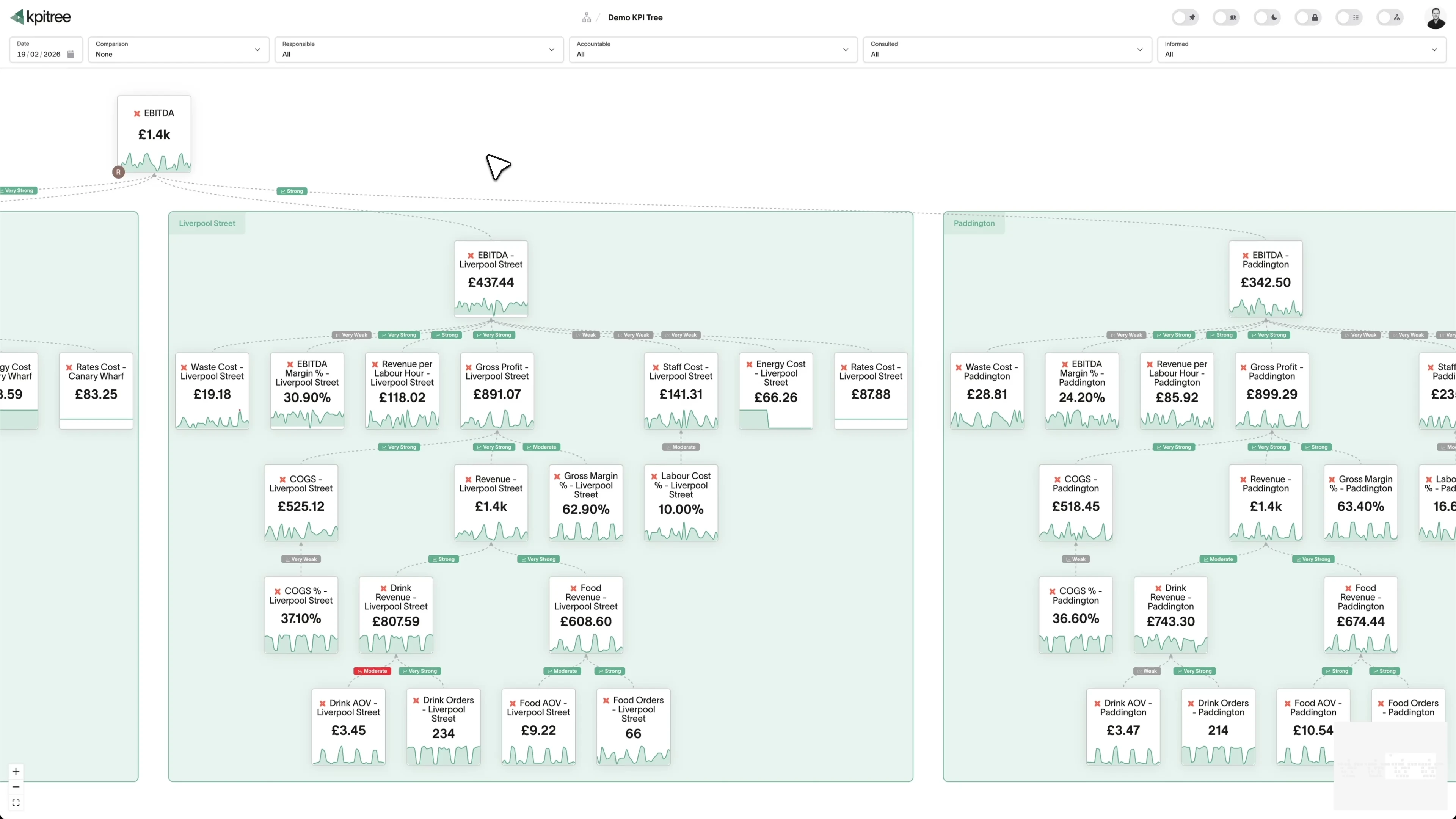
Connect web behaviour to business outcomes in a single tree.
- Causal trees linking sessions, engagement, conversions, and revenue
- Combine GA4 data with CRM and product data in a unified tree
- Projected impact analysis when upstream metrics change
- Period-over-period comparisons with statistical significance
Correlations that reveal which channels and content actually drive growth.
- Statistical correlation between page-level engagement and conversion
- Causality testing to identify leading traffic indicators
- Channel-level analysis showing which sources drive high-value users
- Partial correlations controlling for seasonality and campaign effects
Every web metric has an owner. Every anomaly gets a response.
- RACI ownership from traffic-level metrics to conversion goals
- Push notifications via Slack or email
- Action tracking tied to specific web metric movements
- Impact verification closes the loop between change and outcome
GA4 event data, analysed without querying your warehouse on every page load.
- One scheduled query per metric, regardless of team size
- Correlations, regressions, and outlier detection run off-warehouse
- Avoids expensive full-table scans on GA4 BigQuery export tables
- Works alongside your existing dbt semantic layer if you have one
How KPI Tree uses Google Analytics data differently
GA4 has powerful built-in exploration tools. BI tools create dashboards from GA4 data. KPI Tree connects web behaviour to business outcomes with causation, ownership, and accountability.
Data warehouses
The numbers





Semantic layers
The definitions


Business apps
Launches, decisions, blockers




Org structure
Directory-synced




For humans
Answers, briefings and pushes
 @
@Read and write over MCP
Anthropic: 21% → ~95% with curated context



Canopy Agentic Workflows the metrics start them, humans gate them
Canopy Agents four out of the box, any model, your keys
Canopy
The business context layer
Structural context The causal tree, the org chart
Temporal context What was true when, plan against actual
Behavioural context What people did, what worked
Operational context RACI, workflows, approvals
Strategic context Objectives, key results, initiatives
Map & Measure
Metric Trees
Business Models
Prove & Act
Root Cause
Ownership
Verified Impact
Strategy
Grounded in proven causality
Verified proof
Meta spend → Revenue, +£32k vs forecast, q < 0.01
Personalised Action Plans 31 experiments running
hypothesis → a real person’s plan → measure the change
Causation the test cascade
ADF p 0.02 → Granger p 0.003 → q < 0.05, 87 of 1,204 survive
Correlation
22,791 pairs tested nightly, NPS – Churn r 0.71
Data warehouses
The numbers
Semantic layers
The definitions
Business apps
Launches, decisions, blockers
Org structure
Directory-synced
From traffic reports to causal understanding
Statistical analysis that crosses tool boundaries
Accountability, not just visibility
Metrics you can track. Ready to add to your metric trees.
Attribution Modelling
Web AnalyticsAttribution modelling assigns credit for conversions to the marketing channels and touchpoints that contributed to them within Google Analytics. It evaluates how different models - last-click, first-click, linear, time-decay, and data-driven - change the perceived value of each channel in your acquisition mix.
View metricAudience Segmentation
Web AnalyticsAudience segmentation divides Google Analytics users into distinct groups based on demographics, behaviour, technology, or acquisition source. It enables comparison of how different user segments interact with your site and convert, revealing which audiences deliver the most value.
View metricBounce Rate
Web AnalyticsBounce Rate = (Single-Page Non-Engaged Sessions / Total Sessions) x 100
Bounce rate measures the percentage of Google Analytics sessions where the user viewed only a single page and triggered no additional events before leaving. In GA4, it is the inverse of engagement rate - a bounced session is one that was not engaged, meaning it lasted less than 10 seconds, had no conversion event, and had fewer than 2 page views.
View metricCampaign Performance ROI
Web AnalyticsCampaign ROI = ((Campaign Revenue - Campaign Cost) / Campaign Cost) x 100
Campaign performance ROI measures the return on investment for marketing campaigns tracked in Google Analytics by comparing attributed revenue or conversion value against campaign costs. It evaluates the financial effectiveness of campaigns across all channels - paid, email, social, and referral.
View metricCohort Analysis
Web AnalyticsCohort analysis groups Google Analytics users by their acquisition date or shared characteristic and tracks their behaviour over time. It reveals how engagement, retention, and conversion patterns evolve for different user groups, distinguishing between changes in user quality and changes in product experience.
View metricContent Performance Analysis
Web AnalyticsContent performance analysis evaluates how individual pages and content types perform in Google Analytics across engagement, conversion, and revenue metrics. It identifies which content drives meaningful outcomes and which attracts traffic without contributing to business goals.
View metricConversion Rate
Web AnalyticsConversion Rate = (Conversions / Sessions) x 100
Conversion rate measures the percentage of Google Analytics sessions or users that complete a defined conversion event - such as a purchase, signup, form submission, or key feature interaction. It quantifies how effectively your website turns visitors into customers or leads.
View metricCustom Event Conversion Rate
Web AnalyticsCustom Event Conversion Rate = (Sessions with Custom Event / Total Sessions) x 100
Custom event conversion rate measures the percentage of sessions where users trigger a specific custom-defined event in GA4, such as video completions, file downloads, calculator interactions, or in-app actions. It extends standard conversion tracking to business-specific interactions that standard events do not cover.
View metricEvent Tracking Rate
Web AnalyticsEvent Tracking Rate = (Sessions with Event / Total Sessions) x 100
Event tracking rate measures the percentage of sessions that trigger specific GA4 events, indicating how actively users interact with tracked elements on your site. It serves as both an engagement indicator and an instrumentation health metric, revealing whether your tracking captures the interactions that matter.
View metricExit Rate
Web AnalyticsExit Rate = (Exits from Page / Total Page Views for Page) x 100
Exit rate measures the percentage of page views that were the last in a session for a specific page in Google Analytics. Unlike bounce rate, which considers only single-page sessions, exit rate applies to all sessions and identifies the pages where users most frequently end their visit.
View metricFunnel Analysis
Web AnalyticsFunnel analysis tracks user progression through defined conversion paths in Google Analytics - from initial landing through intermediate steps to final conversion. It identifies where users drop off at each stage, quantifying the conversion loss at every step and revealing the most impactful optimisation opportunities.
View metricGeographic Performance
Web AnalyticsGeographic performance analysis examines how Google Analytics engagement, conversion, and revenue metrics vary across countries, regions, and cities. It identifies locations where your site performs strongest and weakest, revealing opportunities for localisation and geographic targeting.
View metricGoal Completion Rate
Web AnalyticsGoal Completion Rate = (Goal Completions / Sessions) x 100
Goal completion rate measures the percentage of Google Analytics sessions that complete a predefined goal - such as reaching a destination page, meeting a session duration threshold, or triggering a specific event sequence. It quantifies how effectively your site achieves its defined business objectives.
View metricMobile vs Desktop Performance
Web AnalyticsMobile vs desktop performance compares Google Analytics engagement, conversion, and revenue metrics across device types. It identifies whether mobile and desktop users experience your site differently and quantifies the performance gap between devices.
View metricNew User Rate
Web AnalyticsNew User Rate = (New Users / Total Users) x 100
New user rate measures the percentage of Google Analytics users who are visiting your site for the first time within a given period. It indicates the balance between acquisition of new audiences and retention of existing ones, revealing the composition of your traffic.
View metricPage Load Time Impact
Web AnalyticsPage load time impact measures how website loading speed - tracked via Google Analytics Core Web Vitals and page timing data - correlates with user engagement, bounce rates, and conversion outcomes. It quantifies the business cost of slow page performance.
View metricPages per Session
Web AnalyticsPages per Session = Total Page Views / Total Sessions
Pages per session measures the average number of pages viewed during a single Google Analytics session. It indicates how deeply users engage with your site content and how effectively your navigation and internal linking guide users through multiple pages.
View metricReal-Time Monitoring
Web AnalyticsReal-time monitoring tracks live Google Analytics data - current active users, pages being viewed, events firing, and conversions happening - as they occur. It provides immediate visibility into site activity during campaigns, launches, incidents, and normal operations.
View metricReturn Visitor Rate
Web AnalyticsReturn Visitor Rate = (Returning Users / Total Users) x 100
Return visitor rate measures the percentage of Google Analytics users who have visited your site before within a defined period. It indicates site stickiness and content value - whether users find enough reason to come back after their initial visit.
View metricSearch Query Performance
Web AnalyticsSearch query performance analyses the organic search queries that drive traffic to your site, combining Google Analytics session data with Search Console query data. It evaluates which search terms deliver engaged visitors and conversions versus those that drive low-quality traffic.
View metricSession Duration
Web AnalyticsAverage Session Duration = Total Session Time / Total Sessions
Session duration measures the average time users spend on your site during a single Google Analytics session. In GA4, it is calculated as the time between the first and last event in a session, providing a measure of how long users actively engage with your content.
View metricTime-Based Trend Analysis
Web AnalyticsTime-based trend analysis examines how Google Analytics metrics change over days, weeks, months, and years. It identifies growth trajectories, seasonal patterns, and anomalies in traffic, engagement, and conversion metrics to inform strategic planning and immediate response.
View metricTraffic Source Analysis
Web AnalyticsTraffic source analysis examines how different acquisition channels - organic search, paid search, direct, referral, social, and email - contribute to sessions, engagement, and conversions in Google Analytics. It evaluates channel quality beyond volume by connecting source-level metrics to downstream outcomes.
View metricUser Acquisition Cost
Web AnalyticsUser Acquisition Cost = Total Marketing Spend / New Users Acquired
User acquisition cost measures the average cost to acquire a new user to your website by combining Google Analytics traffic data with marketing spend data. It calculates the cost per new visitor or per converting user across channels to evaluate acquisition efficiency.
View metricUser Flow Analysis
Web AnalyticsUser flow analysis maps the paths users take through your website in Google Analytics, from entry page through subsequent page views to exit or conversion. It identifies the most common navigation patterns, unexpected detours, and the paths that most frequently lead to conversion.
View metricRelated integrations. More sources that work with KPI Tree.


Common questions
Should I use the GA4 Data API or the BigQuery Export with KPI Tree?
Use whichever you already run. The GA4 Data API (surfaced through MCP) is the quickest start because nothing new has to be configured on Google Cloud. You will see sessions, users, bounce rate, engagement rate, conversion rate, and e-commerce revenue flowing into a metric tree within minutes, subject to the Data API quota and the aggregation limits Google imposes. The GA4 BigQuery Export is the right choice for teams that care about event-level analysis, custom metric calculations that exceed the Data API limits, and historical queries that predate the API retention window. KPI Tree reads the BigQuery Export tables directly so you get full event-level fidelity. If you want the BigQuery Export configured and modelled for you, our professional services team will stand it up and ship the dbt semantic layer for marketing metrics.
What Google Analytics metrics can I track?
Any metric you can derive from your GA4 warehouse tables - sessions, users, new users, page views, engagement rate, bounce rate, average session duration, conversion rate by goal, e-commerce revenue, events per session, and any custom event. If it is in your warehouse, you can build a metric from it.
Does KPI Tree work with GA4 BigQuery Export?
Yes, and this is the recommended path for BigQuery users. GA4's native BigQuery Export gives you raw event-level data with no additional ETL cost. KPI Tree connects to BigQuery and queries your GA4 tables directly. If you use dbt to model your GA4 events into clean metrics, KPI Tree can sync those via the dbt semantic layer.
Can I combine Google Analytics data with data from other tools?
Yes - that is where KPI Tree adds the most value. Build a metric tree where GA4 web behaviour feeds into the same funnel as paid media from Google Ads, email engagement from Klaviyo, product analytics from PostHog, and revenue from Stripe. KPI Tree runs correlations across all of them.
How long does setup take?
If you use MCP or already have GA4 data in a warehouse KPI Tree supports, setup takes under an hour. Connect via MCP or point KPI Tree at your warehouse, define metrics from your GA4 data, and start building trees. If you need a warehouse built from scratch, our Professional Services team handles that for you.
Does KPI Tree replace Google Analytics?
No. GA4 is essential for real-time web analytics, user exploration, audience building, and ad platform integration. KPI Tree adds the layer above: connecting web metrics to business outcomes with causal trees, RACI ownership, and statistical analysis that GA4 was not designed to provide.
Will querying GA4 BigQuery tables be expensive?
KPI Tree runs one scheduled query per metric on a configurable schedule. All downstream analytics run off-warehouse. This is significantly cheaper than BI tools that query GA4's large event tables on every dashboard load. Most teams define metrics using pre-aggregated dbt models or materialised views to further reduce query costs.
What if I do not have a data warehouse?
You have two options. Use MCP to pull GA4 data directly into KPI Tree - no warehouse needed, ideal for getting started quickly. Or engage our Professional Services team, who will build a production-grade data foundation (Snowflake/BigQuery, Fivetran, and dbt) tailored to your stack, giving you raw event-level granularity and the ability to join web data with revenue and product data in the same warehouse.
Related guides. Frameworks and metrics in depth.

How to build a metric tree
A step-by-step metric tree and KPI tree template from North Star to daily levers
Metric trees for marketing teams
Connect every campaign to revenue impact
Revenue by traffic source: a metric tree decomposition
Attribute revenue to the channels that generate it and understand how channel mix shapes your growth and profitability
Your GA4 data is more than a traffic report. Treat it that way.
Connect your warehouse to KPI Tree and turn Google Analytics session, engagement, and conversion metrics into causal trees with ownership, statistical analysis, and accountability. See how web behaviour drives your business - and who is responsible for each metric.










