

 PostHog Integration
PostHog tells you what users do in your product. KPI Tree tells you what that means for your business.
PostHog gives you event analytics, funnels, feature flag experiments, and session replays. Powerful for product teams - but product metrics in isolation miss the full picture.PostHog gives you event analytics, funnels, feature flag experiments, and session replays. Powerful for product teams - but product metrics in isolation miss the full picture. KPI Tree takes your PostHog data and maps it into causal metric trees: feature adoption feeds into engagement, engagement feeds into retention, retention feeds into expansion revenue. Each metric has an owner. Statistical correlations connect product behaviour to business outcomes. You stop shipping features and hoping - you start measuring what they actually drive. Connect via MCP to pull PostHog data directly, point KPI Tree at your existing data warehouse where PostHog data already lands, or let our Professional Services team build the AI foundations for you.
From connection to product analytics accountability in under an hour
Connect your PostHog data
Three ways to get started, depending on your stack.

Pull metrics from PostHog directly through the Model Context Protocol.



Connect your existing warehouse where PostHog data already lands.


Our professional services team can build you turn-key AI foundations in a matter of weeks. Data warehouse on Snowflake/BigQuery, ELT with Fivetran, all modelled in dbt with a semantic layer.
Map metrics from your PostHog data
Define metrics from your PostHog tables - daily active users, feature adoption rates, funnel conversion rates, time to activation, session frequency, retention cohorts, and custom event counts. Use SQL, your dbt semantic layer, or natural language with Cortex Analyst.
Build metric trees and assign ownership
Arrange product analytics metrics into causal trees. Link feature adoption to engagement. Connect engagement to retention. Map retention to expansion and revenue. Assign RACI owners - your product manager owns feature adoption metrics, your growth engineer owns activation funnel metrics, your VP Product owns retention and revenue contribution.
Product analytics metrics that connect to revenue, not just usage
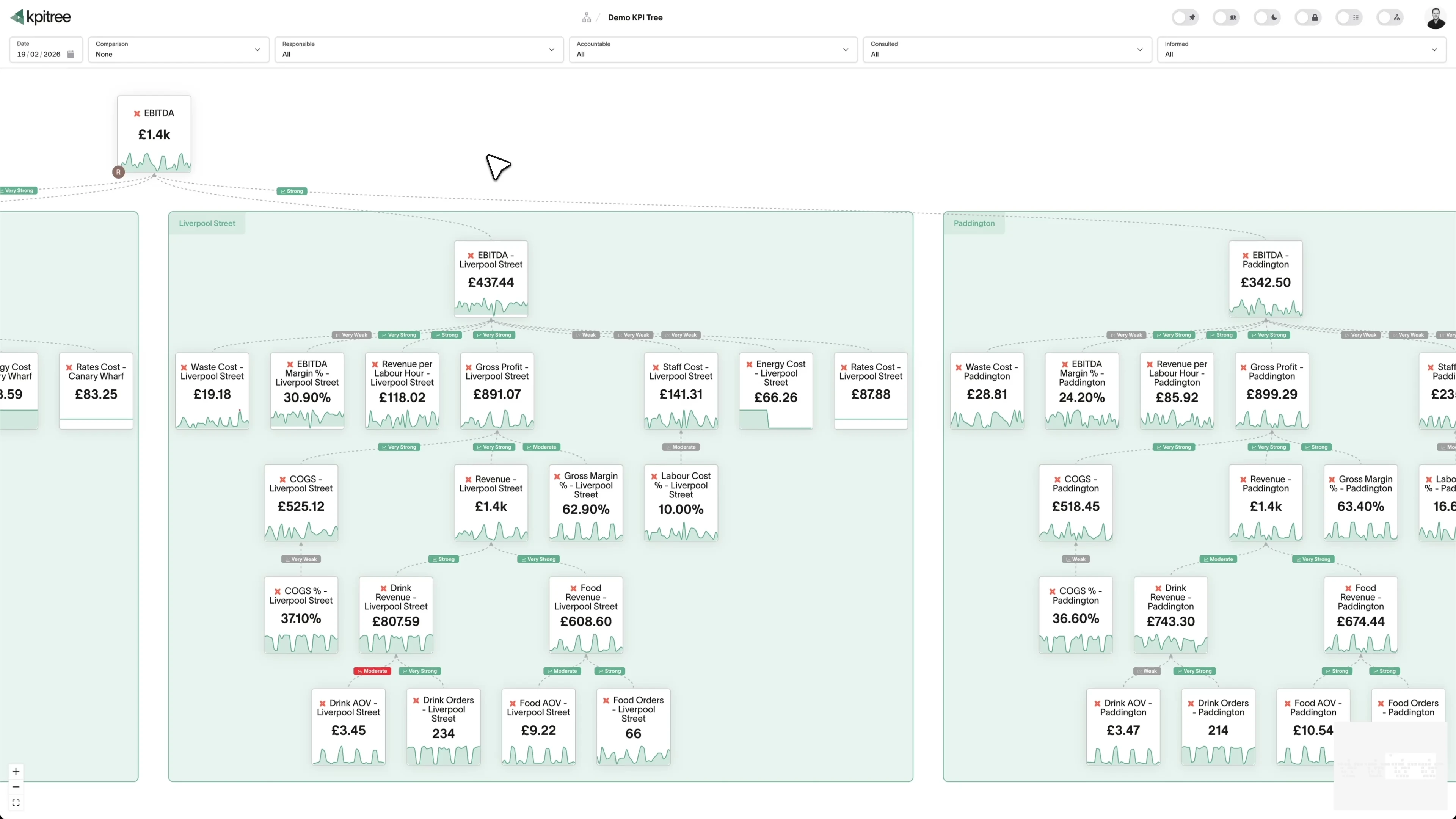
Causal trees from feature usage to revenue impact
Feature flag impact beyond A/B test results
Product metric ownership across engineering, product, and growth
Connect product behaviour to business outcomes in a single tree.
- Causal trees linking feature adoption, engagement, retention, and revenue
- Combine PostHog product data with Stripe/Chargebee revenue data in a unified tree
- Projected impact analysis when upstream product metrics change
- Period-over-period comparisons with statistical significance
Correlations that reveal which features actually drive retention.
- Statistical correlation between feature adoption and retention cohorts
- Causality testing to identify features that lead retention changes
- Partial correlations controlling for user segment and acquisition channel
- Statistical significance thresholds to separate signal from shipping velocity
Every product metric has an owner. Every regression gets a response.
- RACI ownership from event-level metrics to company-level retention
- Push notifications via Slack or email with statistical context
- Action tracking tied to specific product metric movements
- Impact verification closes the loop between ship and outcome
Product event data, analysed without querying your warehouse every time.
- One scheduled query per metric, regardless of team size
- All analytics computation runs off-warehouse
- Handles high-volume PostHog event tables without expensive full-table scans
- Works alongside your existing dbt semantic layer if you have one
How KPI Tree uses PostHog data differently
PostHog has excellent product analytics - events, funnels, experiments, replays. KPI Tree connects those product metrics to business outcomes with causation, ownership, and accountability.
Data warehouses
The numbers





Semantic layers
The definitions


Business apps
Launches, decisions, blockers




Org structure
Directory-synced




For humans
Answers, briefings and pushes
 @
@Read and write over MCP
Anthropic: 21% → ~95% with curated context



Canopy Agentic Workflows the metrics start them, humans gate them
Canopy Agents four out of the box, any model, your keys
Canopy
The business context layer
Structural context The causal tree, the org chart
Temporal context What was true when, plan against actual
Behavioural context What people did, what worked
Operational context RACI, workflows, approvals
Strategic context Objectives, key results, initiatives
Map & Measure
Metric Trees
Business Models
Prove & Act
Root Cause
Ownership
Verified Impact
Strategy
Grounded in proven causality
Verified proof
Meta spend → Revenue, +£32k vs forecast, q < 0.01
Personalised Action Plans 31 experiments running
hypothesis → a real person’s plan → measure the change
Causation the test cascade
ADF p 0.02 → Granger p 0.003 → q < 0.05, 87 of 1,204 survive
Correlation
22,791 pairs tested nightly, NPS – Churn r 0.71
Data warehouses
The numbers
Semantic layers
The definitions
Business apps
Launches, decisions, blockers
Org structure
Directory-synced
From product dashboards to business impact trees
Feature flag impact across the full metric tree
Cross-team accountability for product-led growth
Metrics you can track. Ready to add to your metric trees.
A/B Test Performance
Product AnalyticsA/B test performance evaluates the outcomes of PostHog experiments by comparing engagement, conversion, and retention metrics across control and treatment variants. It determines whether feature changes produce statistically significant improvements and quantifies their impact on downstream business metrics.
View metricBounce Rate
Product AnalyticsBounce Rate = (Single-Page Sessions / Total Sessions) x 100
Bounce rate in PostHog measures the percentage of sessions where a user visits a single page or screen and leaves without triggering any additional events. It indicates how effectively your entry points engage users enough to explore further.
View metricChurn Rate
Product AnalyticsChurn Rate = (Users Lost During Period / Users at Start of Period) x 100
Churn rate measures the percentage of users who stop using your product within a defined period, based on PostHog event data. It quantifies user attrition by identifying users whose activity drops below a defined threshold, providing a behavioural measure of retention failure.
View metricCohort Retention Analysis
Product AnalyticsCohort retention analysis groups PostHog users by their signup or first-use date and tracks what percentage remain active over subsequent days, weeks, and months. It reveals retention curves per cohort, showing whether product changes improve or degrade long-term user retention.
View metricConversion Rate
Product AnalyticsConversion Rate = (Users Completing Action / Total Users in Cohort) x 100
Conversion rate in PostHog measures the percentage of users who complete a defined conversion action - such as signing up, activating a feature, upgrading to a paid plan, or completing a key workflow. It quantifies how effectively your product converts users at each stage of the journey.
View metricDaily Active Users
Product AnalyticsDaily active users counts the unique users who trigger at least one qualifying event in PostHog within a calendar day. It serves as the foundational measure of product engagement, indicating how many users find enough value in your product to return and use it daily.
View metricDrop-Off Analysis
Product AnalyticsDrop-off analysis identifies the specific steps within PostHog funnels where users disengage or fail to proceed. It quantifies attrition at each stage to pinpoint the features, screens, or interactions that cause users to abandon their journey before reaching the desired outcome.
View metricEvent Frequency Analysis
Product AnalyticsEvent frequency analysis examines how often users trigger specific PostHog events within defined time periods. It reveals usage intensity patterns - distinguishing between casual users who perform an action once and power users who perform it dozens of times - and identifies the frequency thresholds that predict retention.
View metricFeature Adoption Rate
Product AnalyticsFeature Adoption Rate = (Users Who Used Feature / Total Eligible Users) x 100
Feature adoption rate measures the percentage of eligible users who have used a specific feature within a defined period after its release or their first login. It quantifies how effectively your product introduces users to new and existing capabilities.
View metricFeature Flag Impact Analysis
Product AnalyticsFeature flag impact analysis evaluates how PostHog feature flags and gradual rollouts affect engagement, conversion, retention, and revenue metrics. It measures the business impact of enabling or disabling features for specific user segments, providing evidence for rollout decisions.
View metricFeature Stickiness
Product AnalyticsFeature Stickiness = (Feature DAU / Feature MAU) x 100
Feature stickiness measures the ratio of daily active users to monthly active users for a specific feature, expressed as a percentage. A higher ratio indicates that users who discover a feature return to use it regularly, suggesting it provides ongoing value rather than one-time utility.
View metricFunnel Conversion Analysis
Product AnalyticsFunnel conversion analysis tracks user progression through defined multi-step journeys in PostHog - from initial action through intermediate steps to final conversion. It measures the conversion rate at each step and identifies where the largest opportunities for improvement exist.
View metricGoal Completion Rate
Product AnalyticsGoal Completion Rate = (Users Completing Goal / Total Users in Cohort) x 100
Goal completion rate measures the percentage of PostHog users who achieve a predefined product objective - such as completing onboarding, creating their first project, inviting a team member, or reaching a usage milestone. It quantifies how effectively your product guides users toward its intended value.
View metricMonthly Active Users
Product AnalyticsMonthly active users counts the unique users who trigger at least one qualifying event in PostHog within a 30-day period. It provides a broad measure of your product's reach and the size of your engaged user base, serving as a primary growth indicator.
View metricPage/Screen Views
Product AnalyticsPage and screen views measure the total number of times specific pages or screens are viewed within your product, as tracked by PostHog. This metric reveals which areas of your product receive the most attention and how users navigate through your interface.
View metricSession Duration
Product AnalyticsAverage Session Duration = Total Session Time / Total Sessions
Session duration measures the average time users spend in your product during a single PostHog session, calculated as the time between the first and last event. It indicates engagement depth and whether users spend enough time to derive value from your product.
View metricSession Frequency
Product AnalyticsAverage Session Frequency = Total Sessions / Unique Users (per period)
Session frequency measures how often individual users return to your product within a defined period, based on PostHog session data. It distinguishes between users who visit daily, weekly, or sporadically, revealing the cadence of habitual product usage.
View metricSurvey Response Analysis
Product AnalyticsSurvey response analysis evaluates PostHog in-product survey results - including NPS, satisfaction scores, and open-ended feedback - alongside quantitative product usage data. It connects qualitative user sentiment to behavioural patterns to reveal why users behave the way they do.
View metricTime Between Events
Product AnalyticsTime between events measures the duration between two specific PostHog events in a user's session or journey - such as the time between signup and first project creation, or between feature discovery and first use. It reveals workflow efficiency and user momentum through your product.
View metricTime to First Value
Product AnalyticsTime to first value measures the duration between a user's first interaction with your product and the moment they complete a defined value-delivering action - their "aha moment" - as tracked in PostHog. It quantifies how quickly your product demonstrates its worth to new users.
View metricTrend Analysis
Product AnalyticsTrend analysis examines how PostHog metrics change over time - daily, weekly, monthly, and quarterly. It identifies growth trajectories, seasonal patterns, and anomalies in product usage, engagement, and conversion metrics to inform strategic decisions and surface issues early.
View metricUser Activation Rate
Product AnalyticsActivation Rate = (Users Completing Activation Actions / Total New Signups) x 100
User activation rate measures the percentage of new signups who complete a defined set of activation actions in PostHog within a specified timeframe. Activation actions typically represent the behaviours that correlate with long-term retention, such as completing onboarding, creating a first project, or inviting a colleague.
View metricUser Flow Analysis
Product AnalyticsUser flow analysis maps the paths users take through your product in PostHog, from entry point through feature interactions to exit or conversion. It identifies the most common navigation patterns, unexpected detours, and the paths that most frequently lead to activation, retention, or churn.
View metricUser Journey Analysis
Product AnalyticsUser journey analysis maps the complete multi-session experience of PostHog users over their lifecycle - from first visit through onboarding, feature discovery, habitual usage, and expansion or churn. It reveals the long-term patterns that distinguish users who succeed from those who leave.
View metricUser Retention Rate
Product AnalyticsRetention Rate = (Users Active in Period / Users Active in Previous Period) x 100
User retention rate measures the percentage of users who return to your product within a defined period after their first use, based on PostHog event data. It is the inverse of churn and the primary indicator of whether your product delivers sustained value over time.
View metricUser Segmentation Analysis
Product AnalyticsUser segmentation analysis divides PostHog users into distinct groups based on behaviour, attributes, or lifecycle stage and compares their engagement, conversion, and retention patterns. It reveals which user segments deliver the most value and which require different product strategies.
View metricWeekly Active Users
Product AnalyticsWeekly active users counts the unique users who trigger at least one qualifying event in PostHog within a 7-day period. It provides a mid-range engagement measure between daily and monthly activity, capturing users who engage regularly but not necessarily every day.
View metricRelated integrations. More sources that work with KPI Tree.


Common questions
Does this work with PostHog Cloud, self-hosted, and the warehouse export?
Yes to all three, and the connection method you pick depends on how you already run PostHog. PostHog Cloud customers get the fastest time-to-value via MCP: KPI Tree queries events, persons, groups, and cohorts through the PostHog API, and the first metric tree is usually live the same day. Self-hosted PostHog teams running the native ClickHouse backend point KPI Tree at that ClickHouse cluster so no additional ETL step is needed. Teams that have enabled the PostHog BigQuery, Snowflake, or Redshift export run warehouse-first, and KPI Tree reads the replicated event tables directly. If none of those setups exist yet, our professional services team will build the warehouse, configure the PostHog export, and ship a dbt semantic layer for product analytics metrics.
What PostHog metrics can I track?
Any metric you can derive from your PostHog warehouse tables - daily/weekly/monthly active users, feature adoption rates, funnel conversion rates, time to activation, session frequency, retention cohorts, event counts, and any custom event or property. If it is in your warehouse, you can build a metric from it.
Can I combine PostHog metrics with revenue and marketing data?
Yes - that is the core value. Build a metric tree where PostHog product behaviour feeds into the same tree as Stripe revenue, Google Analytics acquisition, and Customer.io lifecycle engagement. KPI Tree runs correlations across all of them to show how product metrics drive business outcomes.
Does KPI Tree replace PostHog?
No. PostHog is essential for event-level product analytics, funnel analysis, feature flag experiments, and session replay. KPI Tree adds the layer above: connecting product metrics to business outcomes with causal trees, RACI ownership, and cross-tool statistical analysis that PostHog was not designed to provide.
How long does setup take?
If you use MCP or already have PostHog data in a warehouse KPI Tree supports, setup takes under an hour. Connect via MCP or point KPI Tree at your warehouse, define metrics from your PostHog data, and start building trees. If you need a warehouse built from scratch, our Professional Services team handles that for you.
Does KPI Tree store my PostHog event data?
KPI Tree queries your warehouse and processes aggregated metric values in its own engine for analytics. Raw PostHog event data - individual user actions, session recordings, feature flag assignments - stays in your warehouse. All warehouse security remains fully enforced.
Can I track feature flag experiment results in KPI Tree?
You can define metrics that correspond to PostHog experiment variants and track their impact across your full metric tree. This goes beyond PostHog's built-in experiment results by showing how a winning variant affects downstream metrics - retention, revenue, support tickets - not just the experiment's target metric.
What if I do not have a data warehouse?
You have two options. Use MCP to pull PostHog data directly into KPI Tree - no warehouse needed, ideal for getting started quickly. Or engage our Professional Services team, who will build a production-grade data foundation (Snowflake/BigQuery, Fivetran, and dbt) tailored to your stack, giving you richer historical data and the ability to join PostHog product metrics with revenue and marketing data.
Related guides. Frameworks and metrics in depth.

How to build a metric tree
A step-by-step metric tree and KPI tree template from North Star to daily levers
Metric trees for product teams
Connect every feature, experiment, and initiative to the outcomes that matter
AARRR pirate metrics and metric trees
Connecting the popular growth framework to a causal model
DAU/MAU ratio: a metric tree decomposition
Measuring product stickiness by understanding what proportion of your monthly users engage every day
Your product analytics should drive business decisions, not just product ones.
Connect your warehouse to KPI Tree and turn PostHog event, funnel, and feature data into causal trees with ownership, statistical analysis, and accountability. See how product behaviour drives your business - and who is responsible for each metric.










