
 Intercom Integration
Turn Intercom conversations into a support performance system that drives retention.
Intercom captures every customer conversation, bot interaction, help centre visit, and satisfaction rating.Intercom captures every customer conversation, bot interaction, help centre visit, and satisfaction rating. But support metrics stuck inside Intercom cannot show their impact on churn, expansion, or product adoption. KPI Tree consumes Intercom data through Intercom's official MCP server at `mcp.intercom.com` (currently supported for US-hosted Intercom workspaces), through your warehouse where Intercom data already lands via Fivetran or Airbyte, or through a professional services engagement that builds the stack for you. Once connected, KPI Tree maps it to metrics like first response time, resolution rate, CSAT, and bot deflection, then structures those metrics into causal trees that connect support performance directly to retention and revenue. Support stops being a cost centre in a spreadsheet and becomes a growth lever with clear ownership.
From Intercom events to owned support trees
Connect your Intercom data
Three ways to get started, depending on your stack.

Pull metrics from Intercom directly through the Model Context Protocol.



Connect your existing warehouse where Intercom data already lands.


Our professional services team can build you turn-key AI foundations in a matter of weeks. Data warehouse on Snowflake/BigQuery, ELT with Fivetran, all modelled in dbt with a semantic layer.
Map Intercom metrics from your warehouse tables
Define metrics from your Intercom data using SQL or the metric builder: first response time, resolution time, CSAT score, conversation volume, bot deflection rate, help centre article views, and more. Each metric supports dimensions like team, tag, topic, and channel.
Build trees and assign ownership
Arrange Intercom metrics into causal trees - bot deflection drives conversation volume, which drives resolution time, which drives CSAT, which drives retention. Assign RACI owners to every metric so the right support lead is accountable when any metric moves.
Support metrics that prove their impact on the business
Causal trees from conversation to retention
Statistical analysis across support and product metrics
Alerts that reach the right person with the right context
Support metrics that connect upward to revenue.
- Conversation volume, response time, resolution time, and CSAT as tree nodes
- Causal relationships connect support metrics to retention and revenue
- Statistical correlations quantify the impact of support improvements
- Executive stakeholders see support impact without learning Intercom
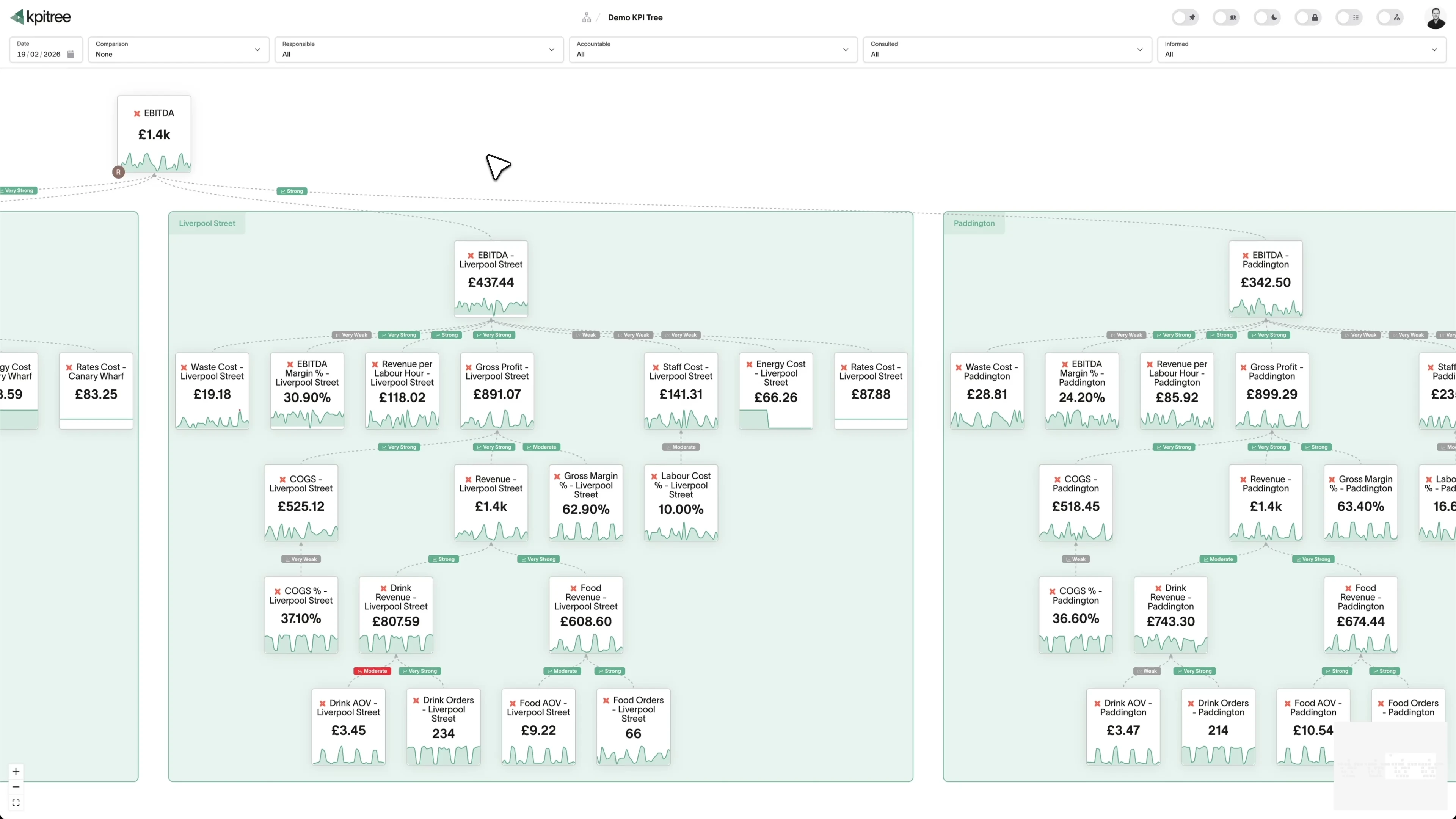
Bot deflection and self-service measured by business impact.
- Bot deflection rate, help centre views, and self-service resolution as metrics
- Causal trees link deflection to CSAT, re-contact rate, and agent workload
- Dimension breakdowns by topic, tag, and channel isolate where self-service works
- Automated alerts when deflection and satisfaction diverge
Team performance visible without building custom reports.
- Dimension breakdowns by team, agent, topic, tag, and channel
- RACI ownership at every level - team leads own team metrics, agents own theirs
- Correlation engine links team performance to topic and channel patterns
- Actions tracked against specific metrics with impact verified after the fact
Support capacity planning backed by statistical trends.
- Automated outlier detection identifies volume spikes and trend shifts
- Causal trees quantify the downstream impact of volume changes on CSAT
- Historical comparison periods show seasonal patterns automatically
- Staffing decisions backed by statistical trends, not gut feel
How KPI Tree uses Intercom data differently
Intercom's built-in reporting shows support activity. KPI Tree connects that activity to business outcomes through causal structure, statistical analysis, and cross-functional ownership.
Data warehouses
The numbers





Semantic layers
The definitions


Business apps
Launches, decisions, blockers



Org structure
Directory-synced




For humans
Answers, briefings and pushes
 @
@Read and write over MCP
Anthropic: 21% → ~95% with curated context



Canopy Agentic Workflows the metrics start them, humans gate them
Canopy Agents four out of the box, any model, your keys
Canopy
The business context layer
Structural context The causal tree, the org chart
Temporal context What was true when, plan against actual
Behavioural context What people did, what worked
Operational context RACI, workflows, approvals
Strategic context Objectives, key results, initiatives
Map & Measure
Metric Trees
Business Models
Prove & Act
Root Cause
Ownership
Verified Impact
Strategy
Grounded in proven causality
Verified proof
Meta spend → Revenue, +£32k vs forecast, q < 0.01
Personalised Action Plans 31 experiments running
hypothesis → a real person’s plan → measure the change
Causation the test cascade
ADF p 0.02 → Granger p 0.003 → q < 0.05, 87 of 1,204 survive
Correlation
22,791 pairs tested nightly, NPS – Churn r 0.71
Data warehouses
The numbers
Semantic layers
The definitions
Business apps
Launches, decisions, blockers
Org structure
Directory-synced
Causal trees, not activity reports
Statistical proof that support drives retention
Cross-functional accountability, not siloed dashboards
Metrics you can track. Ready to add to your metric trees.
Agent Performance Analysis
Customer SupportAgent Performance Analysis evaluates individual support agents across multiple dimensions including response time, resolution rate, customer satisfaction scores, and conversation volume handled. It provides a balanced scorecard that avoids over-indexing on speed at the expense of quality.
View metricAgent Utilisation Rate
Customer SupportAgent Utilisation Rate = Active Handling Time / Total Available Time × 100
Agent Utilisation Rate measures the percentage of an agent's available time spent actively handling conversations versus idle or performing administrative tasks. It helps balance workload to prevent both burnout from over-utilisation and waste from under-utilisation.
View metricArticle Effectiveness Score
Customer SupportArticle Effectiveness Score measures how successfully help centre articles resolve customer queries without requiring further human support. It considers article views, positive and negative reactions, and whether customers who view an article subsequently open a conversation. Effective articles deflect tickets and empower self-service.
View metricCompany Support Trends
Customer SupportCompany Support Trends analyses conversation volume, topic distribution, and satisfaction scores at the company or account level over time. It identifies accounts with escalating support needs that may signal churn risk, as well as accounts whose declining support needs may indicate successful adoption.
View metricConversation Abandonment Rate
Customer SupportAbandonment Rate = Abandoned Conversations / Total Conversations × 100
Conversation Abandonment Rate measures the percentage of support conversations where the customer stops responding before the issue is resolved. It indicates friction, frustration, or perceived futility in the support experience. High abandonment often correlates with long wait times or unhelpful initial responses.
View metricConversation Channel Analysis
Customer SupportConversation Channel Analysis breaks down support metrics by communication channel - in-app chat, email, social media, and phone - to compare volume, performance, and customer satisfaction across channels. It informs channel investment decisions and identifies where customers prefer to seek help.
View metricConversation Funnel Analysis
Customer SupportConversation Funnel Analysis maps the stages a support conversation passes through - from initiation through triage, assignment, response, and resolution - and measures conversion rates between each stage. It identifies where conversations stall, get lost, or are abandoned.
View metricConversation Resolution Rate
Customer SupportResolution Rate = Conversations Resolved (Not Re-opened) / Total Conversations × 100
Conversation Resolution Rate measures the percentage of support conversations that are closed and remain closed - without being re-opened by the customer within a defined window. It distinguishes genuine resolutions from premature closures that leave the customer's issue unaddressed.
View metricConversation Volume
Customer SupportConversation Volume = Count of New Conversations in Period
Conversation Volume measures the total number of new support conversations initiated within a given period. It is the foundational capacity metric for support operations, driving staffing decisions, budget planning, and automation investment. Sudden volume changes often correlate with product releases, incidents, or seasonal patterns.
View metricCustomer Effort Score
Customer SupportCES = Sum of Effort Ratings / Total Responses
Customer Effort Score (CES) measures how much effort a customer must expend to get their issue resolved through Intercom. It is typically captured via a post-conversation survey asking customers to rate the ease of their experience. Lower effort strongly correlates with higher retention and loyalty.
View metricCustomer Journey Support Analysis
Customer SupportCustomer Journey Support Analysis maps support conversation volume and topics to specific stages of the customer lifecycle - onboarding, activation, adoption, renewal, and expansion. It reveals which journey stages generate the most support friction and where product improvements could reduce support demand.
View metricCustomer Satisfaction Score
Customer SupportCSAT = Positive Ratings / Total Ratings × 100
Customer Satisfaction Score (CSAT) measures the percentage of customers who rate their support experience positively after an Intercom conversation. It is the most widely used indicator of support quality and directly reflects whether agents are meeting customer expectations.
View metricCustomer Segment Support Analysis
Customer SupportCustomer Segment Support Analysis evaluates support metrics - volume, resolution time, CSAT, and topic distribution - across customer segments defined by plan tier, company size, industry, or cohort. It reveals whether high-value segments receive appropriate service levels and where segment-specific issues exist.
View metricFirst Response Time
Customer SupportFirst Response Time = First Agent Reply Timestamp − Conversation Created Timestamp
First Response Time (FRT) measures the elapsed time from when a customer initiates a conversation to when they receive the first human reply from a support agent. It is one of the most impactful support metrics because speed of initial acknowledgement strongly influences customer perception of the entire interaction.
View metricHelp Centre Article Views
Customer SupportArticle Views = Count of Page Views per Article in Period
Help Centre Article Views measures the number of times each article in your Intercom help centre is viewed by customers. It reveals which topics customers most frequently seek help with and which articles are discoverable. Pairing view data with effectiveness scores identifies high-traffic articles that need improvement.
View metricMessage Sentiment Analysis
Customer SupportMessage Sentiment Analysis applies natural language processing to Intercom conversation messages to classify customer sentiment as positive, neutral, or negative. It tracks sentiment trends over time and across segments, providing an objective measure of customer emotion that complements survey-based metrics like CSAT.
View metricPeak Support Hours Analysis
Customer SupportPeak Support Hours Analysis identifies the times of day, days of the week, and seasonal periods when support conversation volume is highest. It provides the demand signal needed for optimal agent scheduling and helps set customer expectations about response times during different periods.
View metricProactive Support Effectiveness
Customer SupportProactive Support Effectiveness measures the impact of outbound messages, product tours, tooltips, and banners on reducing inbound support volume. It compares support conversation rates between customers who received proactive communications and those who did not, quantifying the deflection value of proactive support.
View metricRepeat Contact Rate
Customer SupportRepeat Contact Rate = Customers with Repeat Contacts / Total Customers Contacting Support × 100
Repeat Contact Rate measures the percentage of customers who contact support about the same or a closely related issue within a defined window after their initial conversation was closed. It reveals incomplete resolutions, workarounds masquerading as fixes, and systemic product issues that generate recurring support demand.
View metricAverage Resolution Time
Customer SupportResolution Time = Conversation Resolved Timestamp − Conversation Created Timestamp
Resolution Time measures the total elapsed time from when a customer opens a conversation in Intercom to when it is marked as resolved. It encompasses first response time, back-and-forth exchanges, internal investigation, and any waiting periods. It is a primary indicator of support efficiency and customer experience.
View metricSelf-Service Success Rate
Customer SupportSelf-Service Success Rate = Self-Service Resolutions / Total Support Interactions × 100
Self-Service Success Rate measures the percentage of customers who find a resolution through help centre articles, chatbot flows, or product tours without needing to speak to a human agent. It is the ultimate measure of whether self-service investment is paying off and is a key driver of support scalability.
View metricSupport Cost per Conversation
Customer SupportCost per Conversation = Total Support Costs / Total Conversations Handled
Support Cost per Conversation calculates the fully loaded cost of handling a single support conversation, including agent compensation, tooling costs, management overhead, and infrastructure. It provides the economic foundation for automation ROI calculations and staffing decisions.
View metricSupport Ticket Escalation Rate
Customer SupportEscalation Rate = Escalated Conversations / Total Conversations × 100
Support Ticket Escalation Rate measures the percentage of conversations that require escalation from first-line agents to senior specialists, managers, or other departments. High escalation rates indicate gaps in first-tier training, documentation, or tooling that prevent frontline resolution.
View metricTag Usage Analysis
Customer SupportTag Usage Analysis examines how conversation tags are applied across Intercom, measuring tag frequency, consistency, and coverage. It ensures that the tagging taxonomy remains relevant and that agents apply tags consistently, which is essential for reliable topic-level reporting and routing.
View metricTeam Workload Distribution
Customer SupportTeam Workload Distribution measures how conversations are distributed across teams and individual agents within Intercom. It highlights imbalances where some agents are overloaded while others are under-utilised, enabling fairer distribution and more sustainable working conditions.
View metricResolution Time
SupportResolution Time = Conversation Closed Timestamp - Conversation Created Timestamp
Resolution Time measures the total elapsed time between when an Intercom conversation is first opened and when it is marked as closed or resolved. In Intercom this draws on conversation timestamps and state changes, capturing the full journey across every reply, reassignment and snooze rather than just the first agent response. It reflects how long a customer actually waits for their issue to be settled, not how quickly the first reply went out.
View metricRelated integrations. More sources that work with KPI Tree.

Common questions
How does Intercom data get into KPI Tree?
Through Intercom's official MCP server at `mcp.intercom.com`, which exposes conversations, contacts, and tickets over OAuth. **Currently supported for US-hosted Intercom workspaces only**, so EU and AU data-residency customers should use the warehouse path and replicate Intercom to Snowflake, BigQuery, or another warehouse via Fivetran, Airbyte, or a custom job. Teams without a warehouse engage our professional services team, which stands up the pipeline and ships a dbt semantic layer for first response time, resolution time, CSAT, and bot deflection.
What Intercom metrics can I track?
Any metric derivable from your Intercom warehouse tables: first response time, resolution time, CSAT score, conversation volume, bot deflection rate, help centre article views, re-contact rate, tag distribution, and more. Metrics support dimensions like team, agent, topic, tag, and channel.
Can I track Intercom Fin bot performance?
Yes. Fin deflection rate, resolution rate, handoff rate, and customer satisfaction after bot interactions can all be defined as metrics. KPI Tree adds what Intercom's Fin reporting lacks: causal relationships showing whether bot improvements actually drive CSAT and reduce agent load.
How long does setup take?
The MCP connection takes minutes - no warehouse required. If your Intercom data is already in a warehouse, connecting KPI Tree takes under an hour. If you need AI foundations built from scratch, our professional services team handles the setup end to end. Most teams have a working support metric tree within a single session.
Does this replace Intercom's built-in reporting?
No. Intercom's reporting is excellent for day-to-day support operations - queue management, agent performance, conversation routing. KPI Tree solves a different problem: connecting support metrics to business outcomes with causal structure and cross-functional ownership.
Can I connect support metrics to revenue and retention metrics?
Yes - this is exactly what KPI Tree is designed for. Support metrics from Intercom sit in the same tree as retention, expansion, and revenue metrics from Stripe, Chargebee, or your CRM. The causal tree makes the connection explicit and statistical.
Is customer conversation content exposed to KPI Tree?
No. KPI Tree reads aggregate metrics from your data warehouse - not conversation transcripts. It sees metadata like timestamps, tags, resolution status, and satisfaction scores, not the content of customer conversations.
Can I break metrics down by support team or topic?
Yes. Metrics support dimensions like team, agent, topic, tag, channel, and priority. Dimension breakdowns auto-generate child metrics - "Resolution Time (Team: EMEA)", "CSAT (Topic: Billing)" - each with its own owner and alerts.
Related guides. Frameworks and metrics in depth.
Your Intercom data proves support drives growth. Make the case undeniable.
Connect your warehouse to KPI Tree and turn Intercom conversations into a support performance system with causal metric trees, RACI ownership, and statistical proof that support quality drives retention.