


 Pylon Integration
Turn Pylon's B2B support data into an account health system that drives net revenue retention.
Pylon gives B2B support teams a unified view of customer conversations across Slack, email, and in-app channels.Pylon gives B2B support teams a unified view of customer conversations across Slack, email, and in-app channels. But support metrics trapped inside Pylon cannot show their impact on account health, expansion, or churn risk. KPI Tree consumes Pylon data through Pylon's official remote MCP server at `mcp.usepylon.com` (enabled from Settings → AI Controls → MCP Server and authenticated via OAuth 2.1), through your warehouse where Pylon data already lands via Fivetran or a custom ELT, or through a professional services engagement that builds the stack for you. Once connected, KPI Tree maps Pylon data to metrics like account response time, conversation volume by tier, CSAT, and resolution rate, then structures those metrics into causal trees that tie B2B support performance directly to net revenue retention. Every account-level support metric gets an owner, statistical monitoring, and a clear line to business impact.
From Pylon events to B2B support performance trees
Connect your Pylon data
Three ways to get started, depending on your stack.

Pull metrics from Pylon directly through the Model Context Protocol.



Connect your existing warehouse where Pylon data already lands.


Our professional services team can build you turn-key AI foundations in a matter of weeks. Data warehouse on Snowflake/BigQuery, ELT with Fivetran, all modelled in dbt with a semantic layer.
Map Pylon metrics from your warehouse tables
Define metrics from your Pylon data using SQL or the metric builder: account response time, resolution rate, CSAT by account tier, conversation volume, SLA compliance, and more. Each metric supports dimensions like account, tier, channel, and assignee.
Build trees and assign ownership
Arrange Pylon metrics into causal trees - SLA compliance drives CSAT, CSAT drives account health score, account health drives net revenue retention. Assign RACI owners so the CSM and support lead for each account tier are accountable when metrics shift.
B2B support metrics that connect to account-level revenue
Account-level metric trees that span support and success
Statistical early warnings for at-risk accounts
SLA compliance tied to business impact
B2B support performance visible by account tier.
- Dimension breakdowns by account tier, account name, channel, and assignee
- Tier-specific targets and alerts for enterprise, mid-market, and SMB segments
- Causal trees show how tier-level support metrics drive segment retention
- Auto-generated child metrics for each dimension value with individual ownership
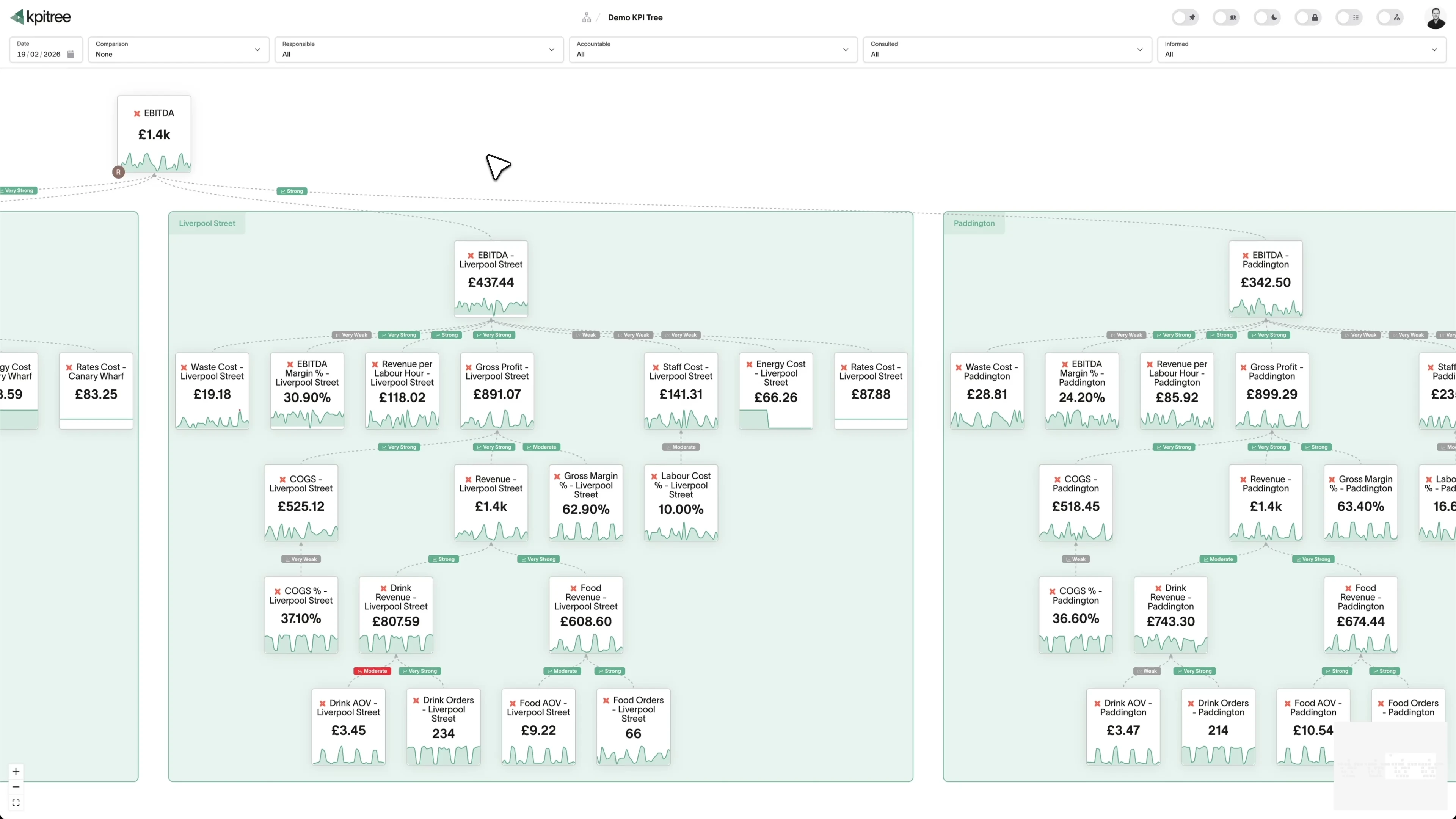
Multi-channel support performance in a single tree.
- Channel-level metrics: Slack, email, and in-app tracked separately and together
- Correlation analysis reveals which channels drive the best outcomes
- Causal trees show how channel mix affects overall support performance
- Ownership assigned per channel so each channel lead is accountable
Support and success teams aligned in one metric tree.
- Support metrics from Pylon alongside success metrics from your CRM in one tree
- RACI ownership spans support leads, CSMs, and account executives
- Statistical correlations between support quality and expansion revenue
- Shared accountability replaces finger-pointing between support and success
Actionable insights that close the loop on support issues.
- Metric alerts include causal context and correlated metric movements
- Actions tracked against specific metrics with owners and deadlines
- Impact verification compares metric trends before and after interventions
- MCP server and REST API expose support metrics to AI assistants and internal tools
How KPI Tree uses Pylon data differently
Pylon is excellent at unifying B2B conversations. KPI Tree connects those conversations to account-level business outcomes through causal structure and cross-functional ownership.
Data warehouses
The numbers





Semantic layers
The definitions


Business apps
Launches, decisions, blockers




Org structure
Directory-synced




For humans
Answers, briefings and pushes
 @
@Read and write over MCP
Anthropic: 21% → ~95% with curated context



Canopy Agentic Workflows the metrics start them, humans gate them
Canopy Agents four out of the box, any model, your keys
Canopy
The business context layer
Structural context The causal tree, the org chart
Temporal context What was true when, plan against actual
Behavioural context What people did, what worked
Operational context RACI, workflows, approvals
Strategic context Objectives, key results, initiatives
Map & Measure
Metric Trees
Business Models
Prove & Act
Root Cause
Ownership
Verified Impact
Strategy
Grounded in proven causality
Verified proof
Meta spend → Revenue, +£32k vs forecast, q < 0.01
Personalised Action Plans 31 experiments running
hypothesis → a real person’s plan → measure the change
Causation the test cascade
ADF p 0.02 → Granger p 0.003 → q < 0.05, 87 of 1,204 survive
Correlation
22,791 pairs tested nightly, NPS – Churn r 0.71
Data warehouses
The numbers
Semantic layers
The definitions
Business apps
Launches, decisions, blockers
Org structure
Directory-synced
Account-level causal trees, not conversation dashboards
Statistical link between support and revenue
Shared ownership across support and success
Metrics you can track. Ready to add to your metric trees.
Account Health Score
Customer SupportAccount Health Score is a composite metric that evaluates the support health of each customer account by weighting conversation volume trends, sentiment patterns, resolution times, and escalation frequency. It provides an early warning system for accounts whose support experience is deteriorating and may be at risk of churn.
View metricAgent Productivity Score
Customer SupportAgent Productivity Score is a balanced composite metric that evaluates support agent effectiveness across multiple dimensions including conversations handled, resolution time, first-response speed, customer satisfaction, and escalation rate. It avoids over-indexing on volume by equally weighting quality indicators.
View metricAgent Specialisation Analysis
Customer SupportAgent Specialisation Analysis examines how individual agents perform across different issue categories, channels, and customer segments. It identifies natural specialisations - agents who consistently resolve billing issues faster, or who achieve higher CSAT on technical queries - enabling smarter routing decisions.
View metricChannel Performance Analysis
Customer SupportChannel Performance Analysis compares key support metrics - response time, resolution time, CSAT, and volume - across the communication channels managed by Pylon, including Slack, email, in-app chat, and social media. It reveals which channels deliver the best customer experience and where investment should be directed.
View metricConversation Handoff Analysis
Customer SupportConversation Handoff Analysis measures the frequency, reasons, and impact of conversation transfers between agents, teams, or channels within Pylon. It quantifies the additional resolution time and satisfaction impact caused by each handoff, identifying opportunities to reduce unnecessary transfers.
View metricConversation Sentiment Analysis
Customer SupportConversation Sentiment Analysis applies natural language processing to Pylon conversation messages to classify customer sentiment as positive, neutral, or negative throughout the interaction. It tracks both the starting sentiment and the trajectory - whether the conversation improved or deteriorated - providing insight beyond end-of-conversation surveys.
View metricConversation Volume Trends
Customer SupportConversation Volume = Count of New Conversations in Period
Conversation Volume Trends tracks the number of new support conversations initiated across all Pylon channels over time. It reveals patterns, seasonal variations, and anomalies that inform staffing decisions and operational planning. Sudden spikes often correlate with product releases, incidents, or marketing campaigns.
View metricCross-Channel Journey Analysis
Customer SupportCross-Channel Journey Analysis maps the paths customers take across support channels - starting in Slack, moving to email, and ending in a video call, for example. It measures the frequency of channel-switching, the reasons behind it, and the impact on resolution time and satisfaction.
View metricCustom Field Utilisation
Customer SupportCustom Field Utilisation = Conversations with Field Populated / Total Conversations × 100
Custom Field Utilisation measures the percentage of conversations where custom fields - such as product area, issue severity, or account tier - are populated by agents or automation. High utilisation ensures reliable data for routing, reporting, and analytics. Low utilisation undermines the value of custom fields entirely.
View metricCustomer Contact Frequency
Customer SupportContact Frequency = Total Conversations per Customer / Time Period
Customer Contact Frequency measures how often individual customers or accounts initiate support conversations over a given period. It identifies high-frequency contacts who may be experiencing chronic issues, as well as customers whose contact frequency is changing - a leading indicator of satisfaction shifts.
View metricCustomer Effort Score
Customer SupportCES = Sum of Effort Ratings / Total Responses
Customer Effort Score (CES) measures how much effort a customer must expend to get their issue resolved through Pylon's support channels. It is captured via post-conversation surveys and strongly predicts customer loyalty - lower effort correlates with higher retention.
View metricCustomer Satisfaction Score
Customer SupportCSAT = Positive Ratings / Total Ratings × 100
Customer Satisfaction Score (CSAT) measures the percentage of customers who rate their support experience positively after a Pylon conversation. It is the most widely used indicator of support quality and directly reflects whether agents are meeting customer expectations across all channels.
View metricEscalation Rate
Customer SupportEscalation Rate = Escalated Conversations / Total Conversations × 100
Escalation Rate measures the percentage of support conversations in Pylon that are escalated from first-line agents to senior specialists, managers, or engineering teams. High escalation rates indicate gaps in first-tier training, documentation, or tooling that prevent frontline resolution.
View metricFirst Response Time
Customer SupportFirst Response Time = First Agent Reply Timestamp − Conversation Created Timestamp
First Response Time (FRT) measures the elapsed time from when a customer initiates a conversation to when they receive the first human reply from a support agent across any Pylon channel. Speed of initial acknowledgement strongly influences customer perception of the entire support interaction.
View metricIssue Category Distribution
Customer SupportIssue Category Distribution breaks down support conversations by topic or category - billing, technical, onboarding, feature requests - to reveal which areas generate the most volume. It informs product improvement priorities, training focus areas, and automation investment decisions.
View metricIssue Recurrence Rate
Customer SupportRecurrence Rate = Recurring Issue Conversations / Total Conversations × 100
Issue Recurrence Rate measures how frequently the same issue categories reappear across different customers or accounts over time. Unlike repeat contact rate which measures per-customer repeats, recurrence rate identifies systemic problems affecting multiple customers that warrant permanent product or process fixes.
View metricKnowledge Gap Identification
Customer SupportKnowledge Gap Identification surfaces topics where support agents consistently struggle - evidenced by high escalation rates, long resolution times, or low satisfaction scores for specific issue categories. It pinpoints where documentation, training, or tooling is insufficient to enable first-tier resolution.
View metricMessage Response Time by Priority
Customer SupportResponse Time = Agent Reply Timestamp − Customer Message Timestamp (per priority)
Message Response Time by Priority measures agent response times segmented by conversation priority level - critical, high, medium, and low. It ensures that the most urgent issues receive the fastest attention and that SLA commitments by priority tier are being met.
View metricPeak Hours Analysis
Customer SupportPeak Hours Analysis identifies the times of day, days of the week, and seasonal periods when support conversation volume is highest across all Pylon channels. It provides the demand signal needed for optimal agent scheduling and helps set customer expectations about response times.
View metricRepeat Contact Rate
Customer SupportRepeat Contact Rate = Customers with Repeat Contacts / Total Customers Contacting Support × 100
Repeat Contact Rate measures the percentage of customers who reach out about the same or a closely related issue within a defined window after their initial conversation was resolved. It reveals incomplete resolutions, temporary workarounds, and systemic product issues that generate recurring support demand.
View metricAverage Resolution Time
Customer SupportResolution Time = Conversation Resolved Timestamp − Conversation Created Timestamp
Resolution Time measures the total elapsed time from when a customer opens a conversation across any Pylon channel to when it is marked as resolved. It encompasses first response time, investigation, back-and-forth exchanges, and any internal waiting periods. It is a primary indicator of support efficiency.
View metricSupport Cost per Contact
Customer SupportCost per Contact = Total Support Costs / Total Conversations Handled
Support Cost per Contact calculates the fully loaded cost of handling a single support interaction across all Pylon channels, including agent compensation, tooling costs, management overhead, and infrastructure. It provides the economic foundation for automation ROI calculations and channel strategy decisions.
View metricTag Usage Patterns
Customer SupportTag Usage Patterns examines how conversation tags are applied across Pylon, measuring tag frequency, consistency, coverage, and co-occurrence. Consistent tagging is essential for reliable topic-level reporting, routing automation, and trend analysis. Inconsistent tagging undermines every downstream metric that depends on categorisation.
View metricTeam Workload Distribution
Customer SupportTeam Workload Distribution measures how support conversations are distributed across teams and individual agents within Pylon. It highlights imbalances where some agents are overloaded while others are under-utilised, enabling fairer distribution and more sustainable working conditions.
View metricResolution Time
SupportResolution Time = Issue Resolved Timestamp - Issue Created Timestamp
Resolution Time measures the elapsed time between when an issue is first opened in Pylon and when it is marked as resolved or closed. Because Pylon unifies shared Slack, Microsoft Teams, email, and in-app support into a single issue record, this metric captures the full lifecycle of a B2B support request regardless of which channel it arrived through. It reflects how quickly your team moves a customer from a reported problem to a confirmed solution.
View metricRelated integrations. More sources that work with KPI Tree.
Common questions
How does Pylon data get into KPI Tree?
Through Pylon's official remote MCP server at `mcp.usepylon.com`, which your Pylon workspace admin enables from Settings → AI Controls → MCP Server and authenticates via OAuth 2.1 with dynamic client registration. Once enabled, KPI Tree connects as an MCP client and exposes accounts, contacts, and issues as tree nodes. Teams that prefer a warehouse-first path can replicate Pylon to Snowflake, BigQuery, or another warehouse via Fivetran, Airbyte, or a custom job, and KPI Tree reads those tables in place. Teams without a warehouse engage our professional services team, which builds the pipeline and ships dbt models for account response time, resolution rate, CSAT, and SLA compliance.
What Pylon metrics can I track?
Any metric derivable from your Pylon warehouse tables: first response time, resolution time, CSAT score, conversation volume, SLA compliance, channel distribution, account-level support frequency, and more. Metrics support dimensions like account, tier, channel, assignee, and priority.
Can I track metrics at the account level?
Yes. Account-level metrics are central to the Pylon integration. You can dimension any metric by account name or account tier and auto-generate child metrics for each. Each account-level metric gets its own owner and alerts.
How long does setup take?
The MCP connection takes minutes - no warehouse required. If your Pylon data is already in a warehouse, connecting KPI Tree takes under an hour. If you need AI foundations built from scratch, our professional services team handles the setup end to end. Most teams have a working support metric tree within a single session.
Does this work with Pylon's Slack channel support?
Yes. Whether you connect via MCP or your data warehouse, you can dimension metrics by channel if the Pylon data includes cross-channel conversations. This lets you compare response times, CSAT, and resolution rates across Slack, email, and in-app - all within the same metric tree.
Can I connect Pylon support metrics to CRM data?
Yes. KPI Tree is designed to span multiple data sources. Pylon support metrics sit alongside CRM metrics (from HubSpot, Salesforce, or Attio) in a single causal tree. The statistical engine correlates support performance with account health, expansion pipeline, and churn risk.
Is customer conversation content exposed to KPI Tree?
No. KPI Tree reads aggregate metrics from your data warehouse - not conversation transcripts. It sees metadata like timestamps, account identifiers, resolution status, and satisfaction scores, not the content of customer messages.
How is this different from Pylon's built-in analytics?
Pylon's analytics focus on support operations - queue management, response times, conversation routing. KPI Tree adds causal structure that connects those operational metrics to business outcomes like retention and expansion, with RACI ownership spanning support and success teams.
Related guides. Frameworks and metrics in depth.
Your B2B support data is an untapped retention signal. Start using it.
Connect your warehouse to KPI Tree and turn Pylon conversations into an account health system with causal metric trees, shared ownership across support and success, and statistical proof that support quality drives revenue.










