
 Salesforce Integration
Turn your Salesforce data into a causal model of how your organisation generates revenue.
Salesforce holds your pipeline, forecasts, accounts, and activity data.Salesforce holds your pipeline, forecasts, accounts, and activity data. But Salesforce reports answer "what happened," not "why" or "who should act." KPI Tree connects to your Salesforce data through your existing warehouse or a fully managed data foundation and builds causal metric trees that trace revenue back to its drivers: pipeline generation, stage conversion, deal velocity, and rep activity. Every metric gets an owner. Every anomaly gets an action plan. Your revenue organisation stops reacting to numbers and starts understanding the system that produces them.
From Salesforce data to a revenue accountability system
Connect your Salesforce data
Two ways to get started, depending on your stack.



Connect your existing warehouse where Salesforce data already lands.

Our professional services team can build you turn-key AI foundations in a matter of weeks. Data warehouse on Snowflake/BigQuery, ELT with Fivetran, all modelled in dbt with a semantic layer.
Define metrics from your Salesforce data model
Build metrics from opportunities, accounts, contacts, activities, campaigns, and custom objects: pipeline created, stage conversion rates, average deal size, sales cycle length, forecast accuracy, and any custom metric your revenue operations team needs.
Build revenue trees and assign ownership
Map how pipeline generation drives stage progression drives forecast drives revenue. Assign RACI ownership to every metric - from the SDR team's meeting rate to the CRO's ARR target. KPI Tree adds statistical monitoring, correlation analysis, and automated action plans.
Revenue intelligence that goes beyond reports and dashboards
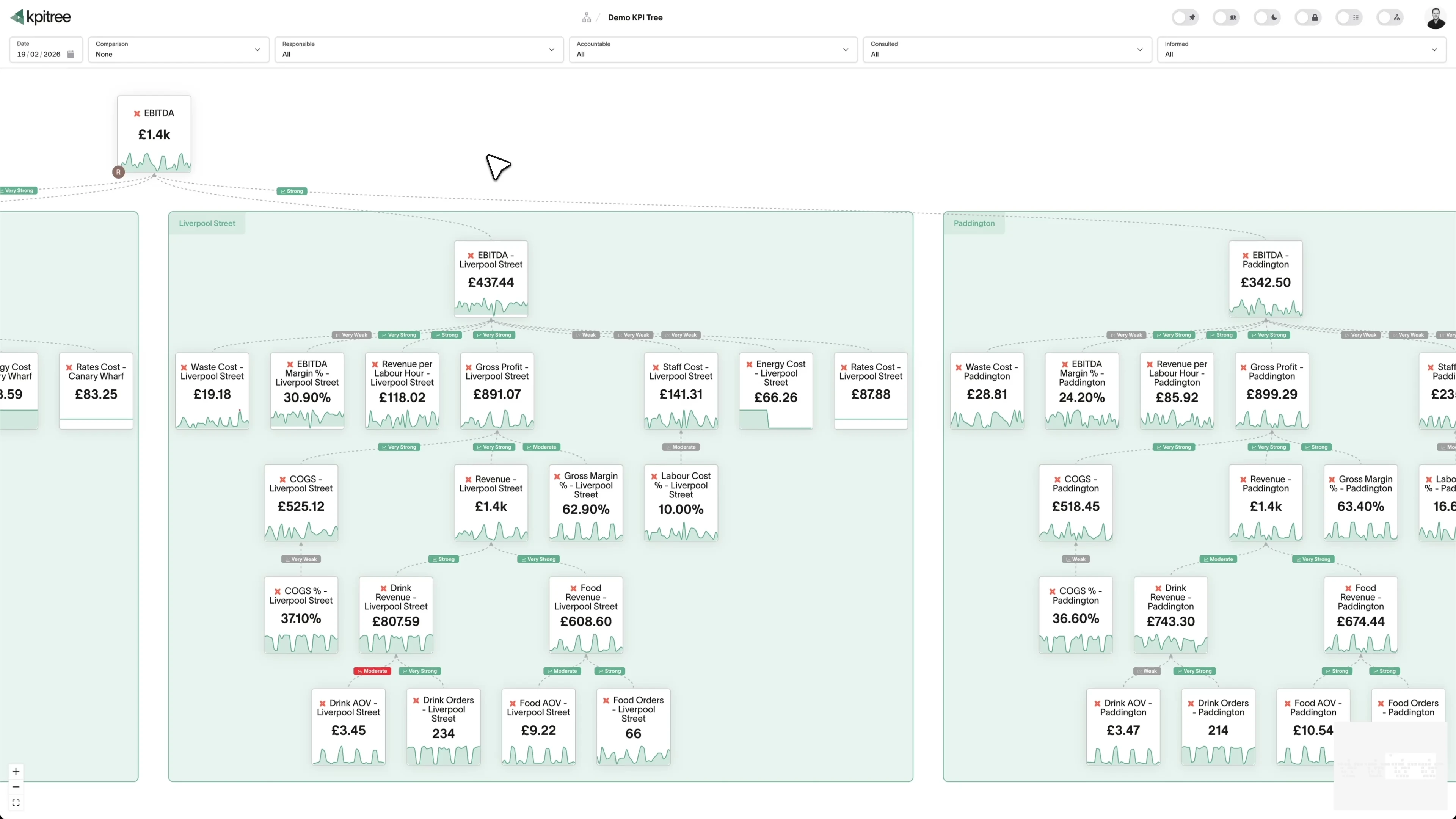
Causal revenue trees from pipeline to ARR
Root cause analysis for forecast misses
Early warning system for revenue risk
A revenue model your whole organisation can read.
- Visual metric tree from pipeline generation through to closed revenue
- Role-based views: CRO sees the full tree, reps see their owned metrics
- Automatic decomposition traces any revenue change to its root cause
- Consistent methodology eliminates conflicting reports across teams
Forecast accuracy backed by statistical evidence, not gut feel.
- Correlation analysis between leading indicators and forecast accuracy
- Regression models quantify how pipeline changes translate to revenue impact
- Anomaly detection flags when conversion patterns deviate from historical norms
- Compare forecast assumptions against statistical reality each period
RACI ownership that goes deeper than opportunity assignment.
- RACI ownership on systemic metrics: conversion rates, velocity, coverage
- Personalised action plans delivered when owned metrics deviate from targets
- Manager dashboards aggregate team performance with drill-down to individuals
- Clear escalation paths when leading indicators signal revenue risk
Salesforce data connected to every other revenue signal.
- Unified metric trees spanning Salesforce, marketing, product, and finance data
- Cross-functional correlations reveal which non-sales signals predict revenue
- Single ownership model across every team and every data source
- Eliminate the "attribution wars" between marketing and sales with shared metrics


How KPI Tree uses Salesforce data differently
Salesforce is the system of record for deals. KPI Tree adds causal structure, statistical analysis, and metric ownership - transforming CRM data from a reporting tool into a revenue operating system.
Data warehouses
The numbers




Semantic layers
The definitions


Business apps
Launches, decisions, blockers




Org structure
Directory-synced




For humans
Answers, briefings and pushes
 @
@Read and write over MCP
Anthropic: 21% → ~95% with curated context



Canopy Agentic Workflows the metrics start them, humans gate them
Canopy Agents four out of the box, any model, your keys
Canopy
The business context layer
Structural context The causal tree, the org chart
Temporal context What was true when, plan against actual
Behavioural context What people did, what worked
Operational context RACI, workflows, approvals
Strategic context Objectives, key results, initiatives
Map & Measure
Metric Trees
Business Models
Prove & Act
Root Cause
Ownership
Verified Impact
Strategy
Grounded in proven causality
Verified proof
Meta spend → Revenue, +£32k vs forecast, q < 0.01
Personalised Action Plans 31 experiments running
hypothesis → a real person’s plan → measure the change
Causation the test cascade
ADF p 0.02 → Granger p 0.003 → q < 0.05, 87 of 1,204 survive
Correlation
22,791 pairs tested nightly, NPS – Churn r 0.71
Data warehouses
The numbers
Semantic layers
The definitions
Business apps
Launches, decisions, blockers
Org structure
Directory-synced
From pipeline reports to causal revenue models
Systemic accountability, not deal-level tracking
Off-warehouse analytics that scale with your org
Metrics you can track. Ready to add to your metric trees.
Account Health Score
CRMAccount health score is a composite metric that evaluates the overall strength of a customer relationship using Salesforce data. It combines activity recency, opportunity pipeline status, support ticket trends, product adoption signals, and engagement frequency to produce a single score indicating whether an account is thriving, stable, or at risk.
View metricActivity Volume per Rep
CRMActivity Volume per Rep = Total Logged Activities / Number of Active Reps
Activity volume per rep measures the total number of logged activities (calls, emails, meetings, tasks) per sales representative in Salesforce over a defined period. It quantifies the effort each rep invests in customer-facing and pipeline-building activities and serves as a baseline for evaluating activity efficiency.
View metricMarketing ROI
CRMCampaign ROI = (Campaign-Attributed Revenue - Campaign Cost) / Campaign Cost x 100
Campaign ROI measures the return on investment for marketing campaigns tracked in Salesforce by comparing campaign costs against the pipeline and revenue generated by campaign members. It evaluates whether each campaign produced sufficient returns to justify its investment and informs future budget allocation.
View metricAverage Resolution Time
CRMCase Resolution Time = Average(Case Close Date - Case Created Date)
Case resolution time measures the average elapsed time from case creation to case closure in Salesforce Service Cloud. It evaluates support team efficiency and customer experience by tracking how quickly issues are addressed, segmented by case priority, type, product, and support agent.
View metricContact Conversion Rate
CRMContact Conversion Rate = (Contacts with Opportunities / Total Qualified Contacts) x 100
Contact conversion rate measures the percentage of contacts in Salesforce that become associated with an opportunity. It evaluates the effectiveness of lead qualification, nurturing, and sales development at converting the contact database into active pipeline.
View metricCustomer Acquisition Cost
CRMCustomer Acquisition Cost = Total Sales & Marketing Spend / Number of New Customers Won
Customer acquisition cost (CAC) measures the total sales and marketing investment required to win a new customer. Using Salesforce opportunity data, campaign costs, and activity records, CAC quantifies acquisition efficiency and determines the breakeven point for each new customer relationship.
View metricCustomer Lifetime Value
CRMCustomer Lifetime Value = Average Revenue per Customer per Year x Gross Margin % x Average Customer Lifespan
Customer lifetime value (CLV) estimates the total net revenue a customer will generate over their entire relationship with your business. Using Salesforce opportunity history, renewal data, expansion revenue, and churn patterns, CLV quantifies the long-term return on each customer acquisition and retention investment.
View metricDashboard Adoption Rate
CRMDashboard Adoption Rate = (Users Viewing Dashboards in Period / Total Active Salesforce Users) x 100
Dashboard adoption rate measures the percentage of Salesforce users who actively view and interact with dashboards and reports on a regular basis. It evaluates whether the analytics investments made in Salesforce are actually being consumed by the intended audience and driving data-informed decision-making.
View metricDeal Stage Progression
CRMDeal stage progression measures the rate and pattern of opportunity movement through pipeline stages in Salesforce. It tracks forward progression, stage skipping, regression (deals moving backwards), and stagnation (deals stuck in a stage), providing a comprehensive view of how effectively the sales process advances deals toward close.
View metricForecast Accuracy
CRMForecast Accuracy = (1 - |Forecasted Revenue - Actual Revenue| / Actual Revenue) x 100
Forecast accuracy measures the percentage deviation between revenue forecasts derived from Salesforce pipeline data and actual closed revenue for a given period. It evaluates the reliability of opportunity stage probabilities, close date predictions, and deal value estimates across the sales organisation.
View metricLead Conversion Rate
CRMLead Conversion Rate = (Converted Leads / Total Leads) x 100
Lead conversion rate measures the percentage of leads in Salesforce that are successfully converted to contacts with associated accounts and opportunities. It is the primary metric for evaluating the effectiveness of lead qualification, scoring, and handoff processes between marketing and sales.
View metricLead Response Time
CRMLead Response Time = Timestamp of First Rep Activity - Timestamp of Lead Creation
Lead response time measures the elapsed time between a new lead being created in Salesforce and the first meaningful outreach by an assigned sales rep. It quantifies how quickly the organisation acts on new leads, which research consistently shows is one of the strongest predictors of conversion probability.
View metricLead Scoring Effectiveness
CRMLead scoring effectiveness evaluates the predictive accuracy of lead scores in Salesforce by comparing assigned scores to actual conversion outcomes. It measures whether higher-scored leads genuinely convert at higher rates and generate larger deals, identifying scoring criteria that add predictive value versus those that introduce noise.
View metricOpportunity Aging
CRMOpportunity aging analyses the age distribution of open opportunities in Salesforce by measuring days since creation or days in current stage. It identifies opportunities that have exceeded normal timelines, categorises pipeline into age buckets, and quantifies the proportion of pipeline at risk of being stale or unlikely to close.
View metricWin Rate
CRMOpportunity Win Rate = (Closed-Won Opportunities / Total Closed Opportunities) x 100
Opportunity win rate measures the percentage of closed opportunities in Salesforce that result in a won outcome. It is the definitive measure of sales effectiveness, capturing the combined impact of qualification, competitive positioning, pricing, negotiation, and execution across the entire pipeline.
View metricPipeline Coverage Ratio
CRMPipeline Coverage Ratio = Total Open Pipeline Value / Revenue Target or Quota
Pipeline coverage ratio measures the total value of open pipeline in Salesforce divided by the revenue target or quota for a given period. It indicates whether sufficient pipeline exists to absorb normal loss and slippage rates while still achieving the revenue goal.
View metricSales Pipeline Velocity
CRMPipeline Velocity = (Number of Opportunities x Average Deal Value x Win Rate) / Sales Cycle Length
Pipeline velocity quantifies the rate at which opportunities in Salesforce convert into revenue. It combines the number of qualified opportunities, average deal value, win rate, and sales cycle length into a single metric representing the revenue-generating throughput of the sales organisation per unit of time.
View metricQuota Attainment
CRMQuota Attainment = (Closed-Won Revenue / Assigned Quota) x 100
Quota attainment measures the percentage of assigned revenue quota that a rep, team, or territory has achieved through closed-won opportunities in Salesforce. It is the ultimate accountability metric for sales, directly connecting individual and team performance to the revenue commitments that drive business planning.
View metricReport Usage Analysis
CRMReport usage analysis examines how Salesforce reports and dashboards are consumed across the organisation. It tracks which reports are viewed most frequently, which users access them, which reports are never viewed, and how report consumption correlates with sales performance and data quality.
View metricRevenue by Product Line
CRMRevenue by product line breaks down closed-won revenue in Salesforce by the products and product families included in opportunities. It tracks which products generate the most revenue, how product mix is shifting over time, and which product combinations appear most frequently in winning deals.
View metricSales Cycle Length
CRMSales Cycle Length = Average(Close Date - Opportunity Created Date)
Sales cycle length measures the average number of days from opportunity creation in Salesforce to a closed-won outcome. It captures the full duration of the active sales process and is a critical input for pipeline velocity, coverage calculations, and revenue forecasting.
View metricSales Rep Performance Analysis
CRMSales rep performance analysis compares individual reps across the full spectrum of Salesforce metrics: activity volume, pipeline generation, stage conversion rates, deal sizes, cycle lengths, win rates, and quota attainment. It identifies top performers, reveals the specific behaviours that drive success, and pinpoints coaching opportunities for each individual.
View metricTerritory Performance Analysis
CRMTerritory performance analysis compares pipeline generation, conversion rates, deal sizes, cycle lengths, and revenue outcomes across sales territories defined in Salesforce. It identifies high-performing and underperforming territories to inform territory design, resource allocation, and go-to-market strategy.
View metricUser Adoption Rate
CRMUser Adoption Rate = (Active Users in Period / Total Licensed Users) x 100
User adoption rate measures the percentage of licensed Salesforce users who actively log in and perform meaningful actions (creating records, updating opportunities, logging activities, running reports) within a defined period. It evaluates whether the Salesforce investment is being utilised by the intended user base.
View metricWin/Loss Analysis
CRMWin/loss analysis systematically examines closed opportunities in Salesforce to identify patterns that differentiate won and lost deals. It analyses loss reasons, competitive presence, deal characteristics, sales process adherence, and buyer behaviour to surface actionable insights for improving future win rates.
View metricContract Value Analysis
CRMContract value analysis examines the distribution and trends of contract values across Salesforce opportunities and contracts. It segments total contract value (TCV) and annual contract value (ACV) by customer segment, product mix, contract term length, and sales rep to identify pricing patterns, discount behaviours, and deal structuring trends that influence long-term revenue.
View metricCustomer Churn Prediction
CRMCustomer churn prediction uses Salesforce activity, support case, engagement, and renewal data to calculate a probability score indicating how likely each customer is to churn. It combines declining engagement frequency, increasing support escalations, contract approaching renewal without expansion signals, and reduced product usage into a composite risk score.
View metricCustomer Renewal Rate
CRMCustomer Renewal Rate = (Renewed Contracts / Contracts Up for Renewal) x 100
Customer renewal rate measures the percentage of customers whose contracts are successfully renewed at the end of their term, tracked through Salesforce renewal opportunities or contract objects. It is the primary indicator of customer retention and a critical input for revenue forecasting and customer lifetime value calculations.
View metricDeal Stage Conversion Analysis
CRMStage Conversion Rate = (Opportunities Entering Next Stage / Opportunities Entering Current Stage) x 100
Deal stage conversion analysis measures the conversion rate between each consecutive pair of opportunity stages in Salesforce. It identifies which stage transitions have the highest drop-off rates, how conversion rates vary by deal segment, and where in the pipeline the greatest proportion of potential revenue is lost.
View metricDeal Velocity
CRMDeal Velocity = Total Days from Opportunity Creation to Close / Number of Stages Progressed
Deal velocity measures the speed at which individual opportunities in Salesforce progress through pipeline stages, expressed as the average number of days spent in each stage and the total elapsed time from creation to close. Unlike pipeline velocity which measures aggregate throughput, deal velocity focuses on the pace of individual deal progression.
View metricEmail Engagement Analysis
CRMEmail engagement analysis measures open rates, click-through rates, reply rates, and response times for sales emails tracked in Salesforce. It evaluates the effectiveness of outreach templates, sequences, and individual rep communication by connecting email engagement signals to downstream pipeline and revenue outcomes.
View metricLead Source Attribution
CRMLead source attribution traces Salesforce pipeline and closed revenue back to the original lead source, campaign, or channel that generated the initial contact. It applies first-touch, last-touch, and multi-touch attribution models to quantify each source's contribution to revenue generation across the full funnel.
View metricMarketing Qualified Lead Rate
CRMMQL Rate = (Leads Reaching MQL Status / Total New Leads) x 100
Marketing qualified lead (MQL) rate measures the percentage of leads in Salesforce that meet predefined qualification criteria based on engagement, fit, and behaviour signals. It evaluates the effectiveness of marketing programmes at generating leads that meet the threshold for sales follow-up and reflects the alignment between marketing targeting and ideal customer profile.
View metricPipeline Value
CRMPipeline value measures the total monetary value of all open opportunities in Salesforce at a given point in time. It provides a snapshot of the revenue potential currently in the sales pipeline, segmented by stage, expected close date, owner, territory, and product to give a comprehensive view of future revenue potential.
View metricSales Velocity Analysis
CRMSales Velocity = (Opportunity Count x Average Deal Value x Win Rate) / Sales Cycle Length
Sales velocity analysis breaks down the pipeline velocity formula into its four constituent components - opportunity count, average deal value, win rate, and sales cycle length - and analyses each independently to identify which lever has the greatest potential impact on revenue throughput. It goes beyond calculating a single velocity number to provide actionable decomposition.
View metricUpsell Cross-sell Analysis
CRMUpsell cross-sell analysis measures the volume, value, and conversion rate of expansion opportunities within existing Salesforce accounts. It tracks upsell opportunities (larger quantities or higher tiers of existing products) and cross-sell opportunities (new products sold to existing customers) to quantify the expansion revenue engine and its contribution to total revenue growth.
View metricAccount Growth Rate
SalesAccount Growth Rate = (Accounts at End of Period - Accounts at Start of Period) / Accounts at Start of Period x 100
Account Growth Rate measures how quickly the number of Account records in Salesforce increases across a defined period. It is calculated from the CreatedDate on Account objects, comparing accounts added during the period against the base of accounts that existed at the start. In a Salesforce context this reflects how fast your customer and prospect base is expanding, drawn directly from Account creation and ownership data rather than estimates.
View metricActivity Based Analysis
SalesActivity Based Analysis = Won Opportunities Linked to Activities / Total Activities Logged in Period x 100
Activity Based Analysis measures the relationship between logged sales activities in Salesforce, such as calls, emails, tasks and meetings, and the outcomes they drive across opportunities and accounts. In Salesforce these activities live on the Task and Event objects tied to leads, contacts, opportunities and accounts, which lets you connect effort to pipeline movement and closed revenue. It shifts reporting from raw activity counts towards understanding which activity patterns correlate with conversion and won deals.
View metricAverage Deal Size
SalesAverage Deal Size = Total Closed-Won Opportunity Amount in Period / Number of Closed-Won Opportunities in Period
Average Deal Size measures the mean revenue value of opportunities that reach a closed-won stage in Salesforce over a defined period. It is calculated from the Amount field on Opportunity records, filtered to the won stage, so it reflects the typical contract value your team actually closes rather than the value of open pipeline. Tracking it by record type, lead source or owner shows which deals and segments carry the most weight.
View metricCampaign Attribution Analysis
MarketingCampaign Attributed Revenue = Sum of (Won Opportunity Amount x Campaign Credit Weight) for opportunities linked to the campaign
Campaign Attribution Analysis measures how much pipeline and closed revenue each Salesforce campaign generates, using Campaign Member records and the Opportunity Contact Roles linked to them. It connects the campaigns a contact engaged with to the opportunities those contacts later touched, so credit can be assigned to the touchpoints that influenced a deal. The analysis can run on a first-touch, last-touch, or multi-touch model depending on how you weight each campaign in the buyer journey.
View metricCampaign ROI
MarketingCampaign ROI = (Attributed Closed Won Revenue - Campaign Actual Cost) / Campaign Actual Cost x 100
Campaign ROI measures the revenue a Salesforce campaign generates against the cost recorded for it. Using the Campaign object alongside Campaign Influence and the Opportunities linked to campaign members, it compares Actual Cost against the value of Closed Won opportunities the campaign touched. It tells you which campaigns return more than they consume rather than which simply produced activity.
View metricCase Resolution Time
SupportCase Resolution Time = Sum of (Case ClosedDate - Case CreatedDate) / Number of Closed Cases
Case Resolution Time measures the elapsed time between when a Salesforce case is created and when its Status moves to Closed. Computed from the CreatedDate and ClosedDate fields on the Case object, it shows how quickly Service Cloud agents move a customer issue from open to resolved. It is usually reported as a mean or median across cases, and can be segmented by case Origin, Priority, queue or owner.
View metricChurn Risk Analysis
RevenueChurn Risk Analysis = Weighted Sum of Risk Signals (declining activity, open cases, stalled renewals, falling account health) / Maximum Possible Risk Score x 100
Churn Risk Analysis scores how likely each Salesforce account is to cancel or fail to renew, based on signals already held in your CRM. It combines account engagement, open support cases, declining activity volume and stalled renewal opportunities into a single risk view per customer. In a Salesforce context, it turns standard objects such as Account, Opportunity, Case and Activity into an early warning system rather than a static record.
View metricContact Engagement Score
SalesContact Engagement Score = (Weighted Activity Count over Period) x Recency Factor, where Weighted Activity Count = (Emails x w1) + (Calls x w2) + (Meetings x w3) + (Tasks x w4) and Recency Factor decays as days since last activity increase
Contact Engagement Score measures how actively a Salesforce contact interacts with your team, derived from logged activities such as emails, calls, meetings, and tasks recorded against the Contact and its related records. It combines the volume and recency of those interactions into a single weighted figure, so a contact with frequent recent touchpoints scores higher than one whose last activity was months ago. Because it reads directly from Salesforce activity history, the score reflects real relationship momentum rather than a static field someone updated by hand.
View metricCustomer Segmentation Analysis
SalesSegment Value Share = Revenue from Segment Accounts / Total Revenue Across All Accounts x 100
Customer Segmentation Analysis groups your Salesforce Accounts into meaningful cohorts, for example by industry, region, employee count, plan tier or annual revenue, and then compares performance across those cohorts. Using Account, Opportunity and Contact records, it measures how metrics such as revenue, win rate, deal size and retention differ from one segment to the next. It turns a flat list of Accounts into a structured view of where value concentrates.
View metricLead Source Analysis
SalesSource Conversion Rate = Converted Leads from Source / Total Leads from Source x 100; Source Pipeline Value = Sum of Opportunity Amount by LeadSource
Lead Source Analysis breaks down Salesforce leads and converted opportunities by the value held in the LeadSource field, so the team can see how each channel performs across volume, conversion, and revenue. In Salesforce, every Lead and Opportunity carries a source, which lets you compare inbound, outbound, events, referrals, and paid channels on a like for like basis. The analysis turns that single field into a ranking of which sources actually generate qualified pipeline and won deals.
View metricMonthly Recurring Revenue
RevenueMonthly Recurring Revenue = Sum of Active Recurring Contract Values Normalised to a Monthly Amount
Monthly Recurring Revenue is the normalised, predictable revenue your business earns each month from active subscriptions. In Salesforce, it is derived from closed-won Opportunities with recurring revenue line items, or from a subscription or contract object, by converting every active contract value to a monthly figure. It excludes one-off charges such as setup fees or professional services.
View metricOpportunity Stage Analysis
SalesStage Conversion Rate = Opportunities Advancing to Next Stage / Opportunities Entering Stage x 100
Opportunity Stage Analysis breaks down the open and closed opportunities in your Salesforce pipeline by StageName, showing the count, value, and conversion rate at each step from prospecting to closed won. Drawing on the Opportunity object and its OpportunityHistory records, it measures how deals progress, how long they sit in each stage, and the proportion that advance versus the proportion that slip or are lost. It turns a static stage list into a view of pipeline movement over time.
View metricPipeline Velocity
SalesPipeline Velocity = (Number of Open Opportunities x Win Rate x Average Deal Size) / Average Sales Cycle Length in Days
Pipeline Velocity measures how quickly revenue moves through your Salesforce sales pipeline, expressed as the value of deals closing per unit of time. It combines the number of open opportunities, the average win rate, the average deal size, and the length of your sales cycle drawn from Salesforce Opportunity and Stage history records. A higher figure means your team is converting more value in less time.
View metricProduct Performance Analysis
SalesProduct Performance Index = (Closed Won Revenue per Product / Total Closed Won Revenue) x Product Win Rate, where Product Win Rate = Won Opportunities containing the Product / All Closed Opportunities containing the Product
Product Performance Analysis measures how individual products or product families perform across the sales motion captured in Salesforce. It draws on Opportunity Line Items, Products and Price Book entries to compare each product on revenue contribution, win rate, average deal size and pipeline coverage. It turns the product catalogue inside Salesforce into a ranked view of what is actually selling and where it stagnates.
View metricQuote To Close Rate
SalesQuote To Close Rate = Closed-Won Opportunities with a Quote / Total Opportunities with a Quote x 100
Quote To Close Rate measures the share of Salesforce opportunities that reach the quote stage and then convert to closed-won. It is calculated from Quote records linked to Opportunity records, using the opportunity stage and close outcome to determine which quoted deals actually closed. The metric isolates the final stretch of the pipeline, after a price has been presented but before the deal is signed.
View metricSales Funnel Analysis
SalesStage Conversion Rate = Opportunities Advancing to Next Stage / Opportunities Entering Stage x 100
Sales Funnel Analysis measures how opportunities progress through each stage of your Salesforce pipeline, from the first qualified opportunity to closed won. It quantifies the conversion rate between adjacent stages in the Opportunity object, the volume of deals resting at each stage, and the time those deals spend before advancing. In Salesforce terms, it reads the StageName field and its history to show exactly where the funnel narrows.
View metricSales Pipeline Value
SalesSales Pipeline Value = Sum of Amount for all Open Opportunities (StageName not in Closed Won or Closed Lost)
Sales Pipeline Value is the combined amount of all open Salesforce opportunities that have not yet been closed won or closed lost. It is drawn from the Amount field on each Opportunity record, filtered to active sales stages, and gives a single figure for the revenue currently working its way through the funnel. Reading it alongside stage and close date shows not only how much is in play but how reachable it is.
View metricSales Rep Quota Attainment
SalesSales Rep Quota Attainment = Closed Won Amount per Rep in Period / Assigned Quota per Rep in Period x 100
Sales Rep Quota Attainment measures how much of an assigned quota each Salesforce rep has closed within a period, expressed as a percentage. In Salesforce, it is calculated from Closed Won opportunity amounts joined to the quota stored on the Forecasting Quota object or a custom quota field, grouped by Opportunity Owner. It tells you, rep by rep, who is ahead of plan and who is behind.
View metricRelated integrations. More sources that work with KPI Tree.


Common questions
What Salesforce objects does the connector need access to?
KPI Tree reads whatever tables your Fivetran, Airbyte, or Salesforce Data Cloud replication has already materialised in your warehouse. At minimum you want Account, Contact, Opportunity, OpportunityHistory, OpportunityLineItem, and Activity objects to build meaningful revenue trees. Add Lead, Campaign, CampaignMember, User, and Forecast objects if you want full pipeline-to-close attribution and rep-level performance analysis. Custom objects and custom fields are supported automatically on Enterprise and Unlimited editions through the same warehouse replication. Professional services customers get the full object graph modelled in dbt as part of the engagement. Salesforce ships a Hosted MCP Server in beta for enrolled orgs; we are tracking it and will add it as an MCP-path alternative once Salesforce moves it to GA.
What Salesforce objects and metrics can I track?
Any metric derivable from your Salesforce data: opportunities (pipeline, stage conversion, velocity, win rates), accounts (expansion, churn risk), contacts (engagement), activities (calls, emails, meetings), campaigns (influence, ROI), and any custom objects or fields your team has built.
We have a complex Salesforce data model with custom objects. Does that work?
Yes. KPI Tree is schema-agnostic: it builds metrics from whatever tables and columns are available in your warehouse, so custom objects, custom fields, record types, and calculated fields all work as long as they are synced to your warehouse (Fivetran, Airbyte, and the Salesforce Data Cloud all preserve them by default).
How long does setup take?
If your Salesforce data is already in a warehouse, most teams are operational in under an hour because KPI Tree auto-discovers tables and suggests metrics. The professional services route takes longer (typically a few weeks) but delivers a complete, production-ready data foundation plus the dbt models for pipeline generation, stage conversion, deal velocity, and forecast accuracy.
Does KPI Tree replace Salesforce reports and dashboards?
No. Salesforce reports are essential for day-to-day deal management, pipeline reviews, and forecasting workflows. KPI Tree adds the causal analysis, statistical rigour, and cross-tool metric ownership layer that Salesforce's reporting isn't designed to provide.
Can I combine Salesforce data with other tools?
Yes - this is a core strength. Build metric trees that combine Salesforce pipeline data with HubSpot marketing metrics, Apollo outbound activity, Stripe billing data, or any other tool syncing to your warehouse. One unified revenue tree.
Is our Salesforce data secure?
KPI Tree connects to your warehouse, not to Salesforce directly. Warehouse access uses least-privilege read-only credentials encrypted at rest with HSM-backed KMS. No Salesforce credentials are stored or required. Your existing data governance policies remain fully enforced.
We have thousands of Salesforce users. How does KPI Tree scale?
KPI Tree syncs metric values once per schedule from your warehouse. All analytics - correlations, anomaly detection, comparisons - run off-warehouse. Whether you have 10 or 10,000 Salesforce users viewing KPI Tree, the warehouse query volume stays the same.
Related guides. Frameworks and metrics in depth.

How to build a metric tree
A step-by-step metric tree and KPI tree template from North Star to daily levers
Average sales cycle length: a metric tree decomposition
Understand how long deals take to close and where time is lost in the pipeline
Activity per rep: a metric tree decomposition
Measure the volume and quality of sales activities to understand what drives pipeline generation
Conversion rate: a metric tree decomposition
Break conversion rate into its component parts so you can see exactly where prospects drop off and how to fix it
Annual recurring revenue: a metric tree decomposition
The annualised value of your recurring subscription revenue and how to break it into actionable drivers
Salesforce tells you what happened. KPI Tree tells you why - and who should act.
Connect Salesforce data to KPI Tree through your warehouse. Build causal revenue trees with statistical analysis, RACI ownership, and automated action plans that turn CRM data into a system your entire organisation can act on.