

 BigQuery Integration
Connect BigQuery to KPI Tree and build the accountability layer your warehouse was never designed to hold.
You have the warehouse. You have the data. What you do not have is a system that maps how metrics drive each other, names who owns each one, routes the work when a number moves, and proves what actually worked.You have the warehouse. You have the data. What you do not have is a system that maps how metrics drive each other, names who owns each one, routes the work when a number moves, and proves what actually worked. KPI Tree connects to BigQuery with a project ID and a choice of two auth methods, runs one query per metric on a schedule you set, and computes every comparison, rollup, correlation and significance test off-warehouse in its own engine. Each query returns the bytes it processed and a deep link straight to the BigQuery console, so you always know exactly what ran and what it cost.
Connected in under an hour
Choose your authentication method
KPI Tree supports two ways to authenticate against BigQuery. With the managed service account, KPI Tree authenticates as its own GCP service account through workload identity and you simply grant that account access to your datasets, so there is no JSON key to download, store or rotate. Alternatively, create your own GCP service account, download its JSON key, and paste it into KPI Tree, where it is encrypted at rest. Either way the permission surface is identical, and the next step covers all of it.
Grant three predefined IAM roles
Grant BigQuery Data Viewer for read-only access to only the datasets you name, BigQuery Job User so KPI Tree can run queries, and BigQuery Read Session User so results stream back efficiently through the Storage Read API as Apache Arrow. No custom roles, no project-level admin, no data export or write grants. Your security team can read the whole surface in one screen.
Provide your project ID and connect
Enter your GCP project ID. KPI Tree validates the connection in real time, confirming it can authenticate, resolve your datasets, and run a query, before anything is saved. From there, write SQL against your tables and views to define each metric, map how they drive each other, assign RACI ownership, and start closing the loop between the number and the action.
Your BigQuery investment, with an accountability layer on top
One query per metric, everything else off-warehouse
Bytes processed and a console deep link on every query
Two auth methods, zero stored passwords
Two authentication methods. Pick the one your security team prefers.
- Managed service account authenticates via workload identity, no JSON key to hold
- Custom service account: paste your own JSON key, encrypted at rest
- Both methods use only BigQuery Data Viewer, Job User, and Read Session User
- No project-level admin, and nothing that can export or write data
Warehouse connection
ConnectedRead-only access. Credentials never leave the encrypted store.
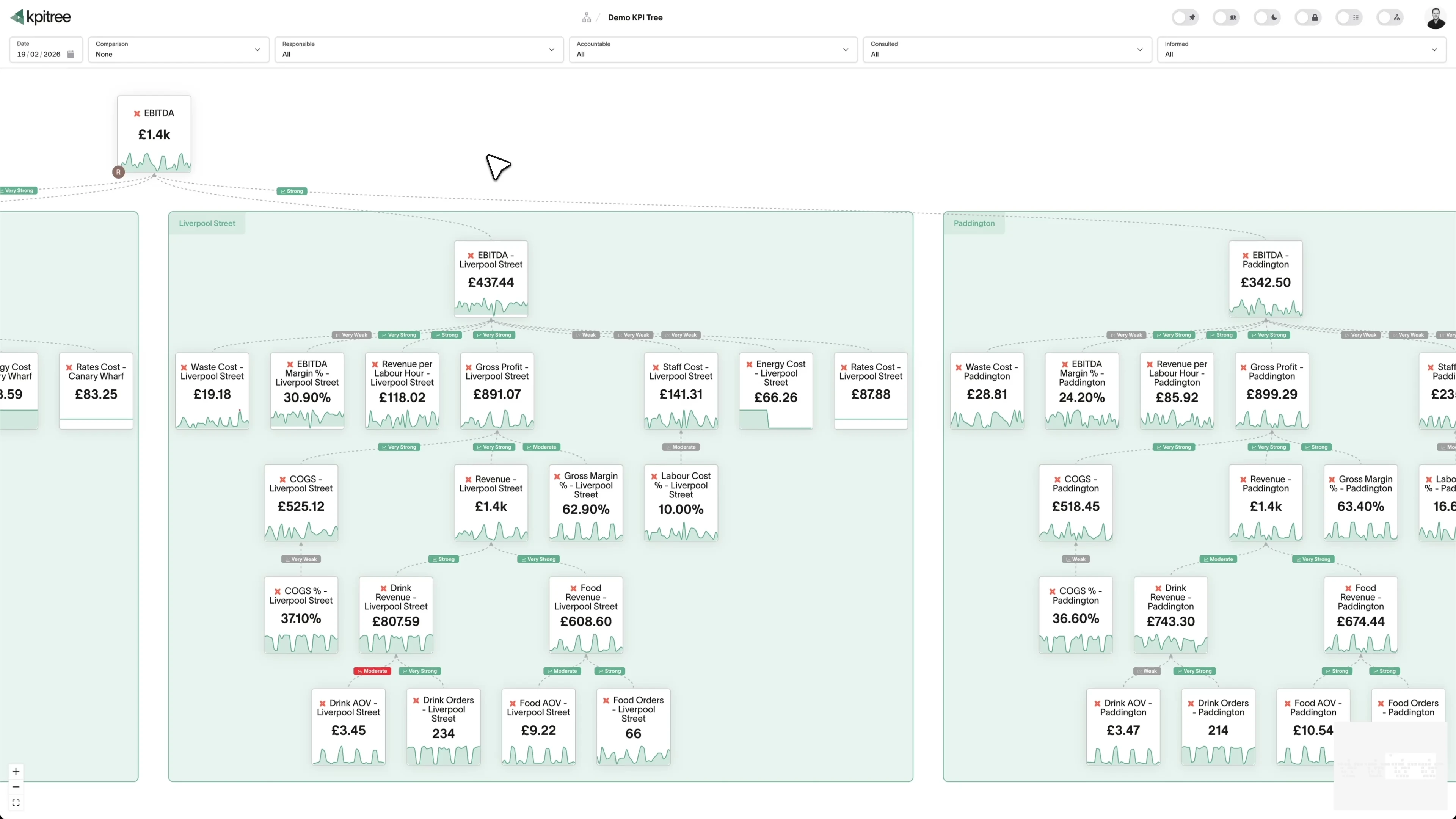
A causal metric tree that shows how the business actually moves.
- Map how every metric drives the ones above it, from inputs to revenue
- Statistically significant driver edges with confidence levels, recomputed nightly
- Automated root cause traces an anomaly to the driver that moved it
- Business model values (budgets, forecasts, targets) run through the same pipeline
One query per metric. The warehouse bill stays flat as the team grows.
- One scheduled query per metric, streamed back as Arrow via the Storage Read API
- Comparisons, rollups, correlations and outlier tests all run off-warehouse
- Cached results and in-browser interaction mean drilling never re-queries BigQuery
- BigQuery query cache set on every job, so unchanged syncs bill zero bytes
Ownership, routing, and proof the action worked.
- Full RACI per metric, tied to team, department and manager
- Anomaly-triggered push to the Accountable owner with org-chart escalation
- Tasks and subscriptions attach action to the metric it targets
- Verified impact confirms whether the action actually moved the number
What KPI Tree adds on top of BigQuery
Keep BigQuery, keep whatever governed definitions you have in dbt or Looker. KPI Tree reads them as a source and adds the layer above: your semantic layer tells the warehouse how a metric is calculated, and KPI Tree adds how metrics drive each other, who owns them, and what is being done about it. The same tree can carry metrics from BigQuery and another warehouse side by side, which a warehouse-native graph cannot.
Data warehouses
The numbers






Semantic layers
The definitions



Business apps
Launches, decisions, blockers




Org structure
Directory-synced




For humans
Answers, briefings and pushes
 @
@Read and write over MCP
Anthropic: 21% → ~95% with curated context



Canopy Agentic Workflows the metrics start them, humans gate them
Canopy Agents four out of the box, any model, your keys
Canopy
The business context layer
Structural context The causal tree, the org chart
Temporal context What was true when, plan against actual
Behavioural context What people did, what worked
Operational context RACI, workflows, approvals
Strategic context Objectives, key results, initiatives
Map & Measure
Metric Trees
Business Models
Prove & Act
Root Cause
Ownership
Verified Impact
Strategy
Grounded in proven causality
Verified proof
Meta spend → Revenue, +£32k vs forecast, q < 0.01
Personalised Action Plans 31 experiments running
hypothesis → a real person’s plan → measure the change
Causation the test cascade
ADF p 0.02 → Granger p 0.003 → q < 0.05, 87 of 1,204 survive
Correlation
22,791 pairs tested nightly, NPS – Churn r 0.71
Data warehouses
The numbers
Semantic layers
The definitions
Business apps
Launches, decisions, blockers
Org structure
Directory-synced
A causal metric tree, not a structural map
RACI ownership, then the alert goes to a person
Closed-loop verified impact
Related integrations. More sources that work with KPI Tree.
Common questions
What connection details does KPI Tree need?
Your GCP project ID, plus one of two auth methods, either dataset access granted to KPI Tree's managed service account or a JSON key for a service account you create yourself. The wizard validates the connection live before it saves anything.
What IAM roles does KPI Tree need?
Three predefined roles and nothing more. BigQuery Data Viewer for read-only access to the datasets you name, BigQuery Job User to run queries, and BigQuery Read Session User so results stream back efficiently through the Storage Read API. Nothing in the grant allows writes, exports, custom roles or project-level administration.
What is the difference between the two auth methods?
With the managed option, KPI Tree brings the identity: it connects as its own GCP service account through workload identity, you grant that account access to your datasets, and you never handle key material. With a custom service account, you bring the identity: create it in your own project, download its JSON key and paste it into KPI Tree, where it is stored encrypted at rest. The roles and permission surface are identical either way, so the choice is purely about who holds the credential.
How does KPI Tree affect my BigQuery bill?
KPI Tree runs one scheduled query per metric and computes every comparison, rollup and correlation off-warehouse, so cost tracks the number of metrics and their sync cadence, not the number of people looking at them. It also sets BigQuery's query cache on every job, so an unchanged scheduled query is served from cache and billed at zero bytes. Traditional per-user BI patterns push a fresh query for each viewer and interaction, KPI Tree does not.
Can I see what queries KPI Tree runs and what they cost?
Yes. Every query records the bytes it processed and returns a deep link to that exact job in the BigQuery console, scoped to the job's location and id, where you can inspect the SQL and execution details. Cost is visible per metric inside KPI Tree without opening a billing export.
How does KPI Tree decide how a metric rolls up across days?
It reads your query. KPI Tree parses each metric's BigQuery SQL to infer whether the metric is a flow that sums across days or a stock that carries its latest value, and applies the matching rollup automatically. It supports sum, count, distinct count, average, min, max, first value and last value, so a running balance and a daily signup count each roll up correctly without you configuring anything by hand.
Does KPI Tree work with dbt on BigQuery?
Yes, through a separate dbt Cloud or dbt Core connection rather than a button on the BigQuery connector. Your dbt models materialise to BigQuery, and KPI Tree reads the governed definitions from dbt, importing each metric with its dimensions and time grain and detecting its aggregation from the model. Those semantic-layer metrics can query BigQuery directly for their data while the definitions stay in dbt. See the dedicated dbt Cloud and dbt Core pages for the full flow.
Does KPI Tree copy data out of BigQuery?
No. KPI Tree queries your warehouse and processes aggregated metric results in its own engine. Raw row-level data is not persisted outside your environment, and every query runs in its dataset's own BigQuery location. All BigQuery governance, including IAM roles, VPC Service Controls, Cloud Audit Logs and organisation policies, stays fully enforced.
Related guides. Frameworks and metrics in depth.

How to build a metric tree
A step-by-step metric tree and KPI tree template from North Star to daily levers
Metric decomposition
Break any business metric into the components that drive it
Semantic layer vs business context layer
A semantic layer settles what a metric is. It cannot settle how metrics drive each other, who owns them, or what happens when one moves.
Connect BigQuery in under an hour.
One project ID, three predefined IAM roles, and your choice of auth method. Off-warehouse analytics, a flat warehouse bill, and full cost visibility from the first sync.










