
 Apollo Integration
Turn outbound activity data into a metric tree that shows what actually generates pipeline.
Apollo captures every sequence step, email open, call outcome, and meeting booked.Apollo captures every sequence step, email open, call outcome, and meeting booked. But the data sits in dashboards that show activity counts without explaining which sequences, reps, or personas actually drive revenue. KPI Tree connects to your Apollo data via your existing warehouse or a fully managed data foundation, maps the causal relationships between outbound activity and pipeline, and assigns ownership so every rep and manager knows exactly what to optimise.
From Apollo data to accountable outbound metrics
Connect your Apollo data
Two ways to get started, depending on your stack.



Connect your existing warehouse where Apollo data already lands.


Our professional services team can build you turn-key AI foundations in a matter of weeks. Data warehouse on Snowflake/BigQuery, ELT with Fivetran, all modelled in dbt with a semantic layer.
Map outbound metrics from Apollo tables
Define metrics from your Apollo data - sequence reply rates, emails delivered, calls connected, meetings booked, pipeline generated. Use SQL, your dbt semantic layer, or let KPI Tree suggest metrics from the tables it finds.
Build trees and assign ownership
Arrange metrics into causal trees: how does email volume drive replies, replies drive meetings, meetings drive pipeline? Assign each metric to the rep or manager who owns it. KPI Tree handles the statistical analysis, anomaly detection, and personalised action plans.
Outbound intelligence that goes beyond activity dashboards
Causal metric trees for your outbound funnel
Statistical correlation across sequence performance
Anomaly detection for outbound health
See which sequences actually drive pipeline - not just activity.
- Map sequence metrics to pipeline and revenue outcomes in a single tree
- Compare sequence performance across personas, verticals, and reps
- Identify the specific outbound motions with the highest pipeline conversion
- Track leading indicators that predict pipeline generation weeks ahead
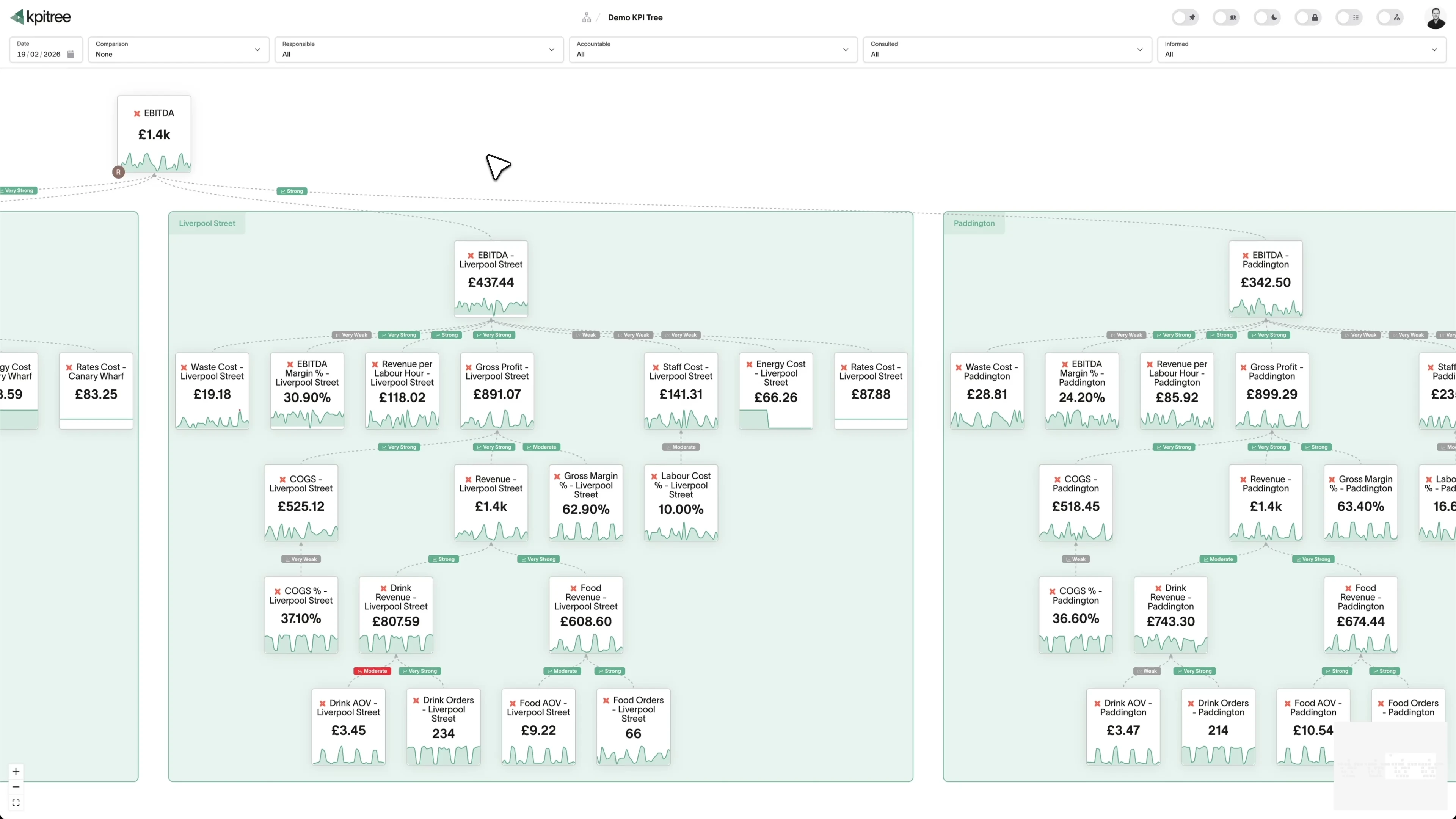
Every rep owns their metrics. Every manager sees the full picture.
- Assign RACI ownership to every outbound metric - from emails sent to deals created
- Personalised views show each rep only the metrics they influence
- Managers see team-level trees with drill-down to individual performance
- Action plans generated automatically when metrics deviate from targets
Correlations that reveal what your activity dashboards hide.
- Automatic correlation analysis across all outbound metrics
- Surface hidden relationships between send patterns and outcomes
- Compare periods to isolate what changed and quantify the impact
- Root cause analysis that traces metric movements back to specific activities
Outbound and inbound in one tree - see the full picture.
- Combine outbound metrics from Apollo with inbound metrics from your CRM
- Single tree view across all pipeline sources with consistent ownership
- Cross-channel correlation reveals how outbound warms up inbound
- Unified reporting without building custom dashboards or spreadsheets




How KPI Tree uses Apollo data differently
Apollo's native analytics show activity metrics in isolation. KPI Tree connects those metrics to outcomes, assigns ownership, and uses statistical analysis to surface what actually matters.
Data warehouses
The numbers





Semantic layers
The definitions


Business apps
Launches, decisions, blockers




Org structure
Directory-synced




For humans
Answers, briefings and pushes
 @
@Read and write over MCP
Anthropic: 21% → ~95% with curated context



Canopy Agentic Workflows the metrics start them, humans gate them
Canopy Agents four out of the box, any model, your keys
Canopy
The business context layer
Structural context The causal tree, the org chart
Temporal context What was true when, plan against actual
Behavioural context What people did, what worked
Operational context RACI, workflows, approvals
Strategic context Objectives, key results, initiatives
Map & Measure
Metric Trees
Business Models
Prove & Act
Root Cause
Ownership
Verified Impact
Strategy
Grounded in proven causality
Verified proof
Meta spend → Revenue, +£32k vs forecast, q < 0.01
Personalised Action Plans 31 experiments running
hypothesis → a real person’s plan → measure the change
Causation the test cascade
ADF p 0.02 → Granger p 0.003 → q < 0.05, 87 of 1,204 survive
Correlation
22,791 pairs tested nightly, NPS – Churn r 0.71
Data warehouses
The numbers
Semantic layers
The definitions
Business apps
Launches, decisions, blockers
Org structure
Directory-synced
From activity volume to causal impact
Individual accountability at every level
Root cause analysis, not just reporting
Metrics you can track. Ready to add to your metric trees.
Account-Based Sales Analysis
Sales EngagementAccount-based sales analysis evaluates engagement activity and pipeline progression at the account level rather than the individual contact level. It aggregates sequence touches, replies, meetings, and deal stages across all contacts within a target account to determine overall account health and buying readiness.
View metricAccount Penetration Rate
Sales EngagementAccount Penetration Rate = (Contacts Engaged / Total Identified Contacts in Account) x 100
Account penetration rate measures the percentage of identified decision-makers and influencers within a target account that have been contacted and engaged through outbound sequences. It quantifies multi-threading effectiveness by comparing contacted stakeholders against the total addressable buying committee.
View metricAverage Deal Size
Sales EngagementAverage Deal Size = Total Revenue from Apollo-Sourced Deals / Number of Closed-Won Deals
Average deal size is the mean monetary value of closed-won opportunities that originated from or were influenced by Apollo outbound activity. It provides a benchmark for the revenue quality of pipeline generated through sequences, calls, and email campaigns.
View metricContact Engagement Score
Sales EngagementContact engagement score is a composite metric that quantifies how actively a contact is interacting with your outbound efforts. It weights email opens, link clicks, replies, call connections, and meetings booked from Apollo sequences to produce a single score indicating buying intent and responsiveness.
View metricContact Lifecycle Analysis
Sales EngagementContact lifecycle analysis tracks how contacts move through defined stages of outbound engagement: from initial list addition, through sequence enrolment, first touch, engagement, meeting booked, and opportunity creation. It identifies bottlenecks, drop-off points, and the average time contacts spend in each stage.
View metricContact Response Time
Sales EngagementContact Response Time = Timestamp of Rep Reply - Timestamp of Contact Reply
Contact response time measures the elapsed time between a contact replying to an outbound sequence email and the rep sending a follow-up response. It quantifies how quickly the sales team capitalises on engagement signals generated through Apollo outreach.
View metricContact Segmentation Analysis
Sales EngagementContact segmentation analysis evaluates outbound engagement and conversion metrics broken down by contact attributes such as job title, seniority, industry, company size, and geographic region. It identifies which segments respond best to outbound efforts and which yield the highest quality pipeline.
View metricEmail Bounce Rate
Sales EngagementEmail Bounce Rate = (Bounced Emails / Total Emails Sent) x 100
Email bounce rate measures the percentage of outbound emails sent through Apollo sequences that fail to reach the recipient's inbox due to invalid addresses, full mailboxes, or domain-level blocks. It is a critical indicator of list quality and sender reputation health.
View metricEmail Open Rate
Sales EngagementEmail Open Rate = (Emails Opened / Emails Delivered) x 100
Email open rate is the percentage of delivered outbound emails from Apollo sequences that recipients open. While affected by email client privacy features like Apple Mail Privacy Protection, it remains a useful directional indicator of subject line effectiveness and sender reputation when tracked consistently over time.
View metricEmail Response Rate
Sales EngagementEmail Response Rate = (Emails Replied / Emails Delivered) x 100
Email response rate measures the percentage of delivered outbound emails that receive a reply from the recipient. Unlike open rate, response rate is a definitive engagement signal that indicates genuine interest or objection, making it one of the most reliable leading indicators of pipeline generation from Apollo sequences.
View metricEmail Template Performance Analysis
Sales EngagementEmail template performance analysis evaluates the effectiveness of individual email templates used across Apollo sequences by comparing open rates, reply rates, positive reply rates, and downstream meeting conversion. It identifies top-performing templates and surfaces underperformers that should be revised or retired.
View metricEmail Timing Optimisation Analysis
Sales EngagementEmail timing optimisation analysis examines the relationship between email send time (hour of day, day of week) and engagement outcomes across Apollo sequences. It identifies optimal sending windows for different personas, time zones, and industries to maximise open and reply rates.
View metricLead Source Attribution Analysis
Sales EngagementLead source attribution analysis traces pipeline and closed revenue back to the original source of the contact or account in Apollo. It evaluates the ROI of different list-building strategies, data providers, enrichment sources, and prospecting methods by measuring which sources produce contacts that convert into qualified pipeline.
View metricLead-to-Opportunity Conversion Rate
Sales EngagementLead-to-Opportunity Conversion Rate = (Opportunities Created from Apollo Leads / Total Apollo Leads Engaged) x 100
Lead-to-opportunity conversion rate measures the percentage of contacts engaged through Apollo sequences that progress to become qualified sales opportunities in the CRM. It is the most direct measure of whether outbound activity is translating into genuine pipeline.
View metricList Quality Score
Sales EngagementList quality score is a composite metric that evaluates prospect lists in Apollo based on email validity rates, bounce rates, engagement rates, and downstream conversion outcomes. It quantifies whether a list contains contacts who can be reached and who match the ideal customer profile.
View metricMonthly Recurring Meetings
Sales EngagementMonthly recurring meetings measures the total number of qualified meetings booked each month through Apollo outbound sequences and follow-up activities. It serves as the primary output metric for outbound sales development, bridging activity metrics and pipeline generation.
View metricOpportunity Stage Analysis
Sales EngagementOpportunity stage analysis examines how opportunities sourced from Apollo outbound activity progress through CRM pipeline stages. It measures conversion rates between stages, time spent in each stage, and identifies where Apollo-sourced deals stall or drop out compared to other pipeline sources.
View metricWin Rate
Sales EngagementOpportunity Win Rate = (Closed-Won Opportunities / Total Closed Opportunities) x 100
Opportunity win rate measures the percentage of Apollo-sourced opportunities that result in a closed-won deal. It is the ultimate effectiveness metric for the outbound motion, quantifying whether the contacts Apollo sequences engage actually convert into paying customers.
View metricPipeline Coverage Ratio
Sales EngagementPipeline Coverage Ratio = Total Apollo-Sourced Pipeline Value / Revenue Target
Pipeline coverage ratio measures the total value of open pipeline sourced from Apollo outbound activity divided by the revenue target for a given period. It indicates whether the outbound motion is generating sufficient pipeline to meet its share of the revenue goal, accounting for historical win rates.
View metricSales Pipeline Velocity
Sales EngagementPipeline Velocity = (Number of Opportunities x Average Deal Size x Win Rate) / Sales Cycle Length
Pipeline velocity quantifies the rate at which Apollo-sourced pipeline converts into revenue. It combines the number of opportunities, average deal size, win rate, and sales cycle length into a single metric that represents the revenue-generating capacity of the outbound motion per unit of time.
View metricSales Cycle Length
Sales EngagementSales Cycle Length = Average(Close Date - First Apollo Touch Date)
Sales cycle length measures the average number of days from the first Apollo outbound touch to a closed-won deal. It captures the full duration of the outbound sales process, from initial sequence email to signed contract, and reveals how efficiently outbound-sourced deals move through the pipeline.
View metricSales Rep Performance Analysis
Sales EngagementSales rep performance analysis compares individual rep metrics across the full outbound funnel: emails sent, deliverability, open rates, reply rates, meetings booked, opportunities created, and deals won. It identifies top performers, highlights coaching opportunities, and surfaces systematic differences in how reps execute their outbound motion.
View metricSequence Completion Rate
Sales EngagementSequence Completion Rate = (Contacts Completing All Steps / Total Contacts Enrolled) x 100
Sequence completion rate measures the percentage of contacts enrolled in an Apollo sequence who reach the final step without being removed due to bounces, unsubscribes, manual removal, or replies that trigger exit criteria. It indicates whether sequences are appropriately sized and whether contacts remain reachable throughout the outreach cadence.
View metricSequence Performance Analysis
Sales EngagementSequence performance analysis evaluates and compares Apollo sequences across their full set of engagement and outcome metrics: delivery rates, open rates, reply rates, positive reply rates, meetings booked, and pipeline generated. It identifies which sequences produce the best results and which should be revised or retired.
View metricTask Completion Rate
Sales EngagementTask Completion Rate = (Tasks Completed On Time / Total Tasks Assigned) x 100
Task completion rate measures the percentage of manual tasks generated by Apollo sequences (phone calls, LinkedIn connection requests, manual emails, research tasks) that reps complete within the expected timeframe. It reflects rep discipline and process adherence for the non-automated components of outbound sequences.
View metricOpportunity Win Rate
SalesOpportunity Win Rate = Opportunities Won / (Opportunities Won + Opportunities Lost) x 100
Opportunity Win Rate measures the proportion of sales opportunities in Apollo that reach a closed-won outcome out of all opportunities that reach a final, closed stage. In Apollo, this is calculated from deal records and their stage transitions, counting deals marked won against the total of won plus lost deals over a defined period. It reflects how effectively the team converts qualified pipeline into revenue rather than how much pipeline is created.
View metricPipeline Velocity
SalesPipeline Velocity = (Number of Open Deals x Win Rate x Average Deal Size) / Average Sales Cycle Length in Days
Pipeline Velocity measures how much revenue moves through your Apollo pipeline over a given period, combining the number of open opportunities, the average deal size, the win rate and the average sales cycle length. Using Apollo deal stages, sequence engagement and task activity, it shows how fast qualified contacts convert into closed revenue. A higher value means deals are progressing faster and producing more revenue per unit of time.
View metricRelated integrations. More sources that work with KPI Tree.

Common questions
What Apollo prospecting signals does KPI Tree pick up?
All of them. Every object Apollo exposes to its API is fair game: sequences, sequence steps, contacts, accounts, email sends, opens, replies, clicks, calls, dials, connects, meetings booked, opportunities created, and any custom fields you have added to leads or accounts. Teams that already sync Apollo to Snowflake, BigQuery, or Databricks via Fivetran or a custom ELT job point KPI Tree at the warehouse and it reads those tables in place. Teams that want Apollo-led analytics built properly for them can engage our professional services team, which delivers the warehouse, ELT, and dbt semantic layer as a fixed-scope engagement. Apollo has an early-access MCP server rolling out through the Claude connector directory that we are tracking, but the production connection method today is warehouse-first.
What Apollo metrics can I track in KPI Tree?
Any metric you can derive from Apollo data in your warehouse: emails sent, delivered, opened, replied; calls made, connected, meetings booked; sequences started, completed, converted; pipeline generated, deals created, and any custom metrics you define.
Do I need a data warehouse to use KPI Tree with Apollo?
Yes, today. KPI Tree reads Apollo data from your warehouse where it has already been replicated via Fivetran, Airbyte, or a custom sync against the Apollo API. If you do not yet have a warehouse or an Apollo ELT job, our professional services team builds the full stack end-to-end: Snowflake or BigQuery, Fivetran or another ELT, and dbt with a semantic layer so Apollo becomes a first-class analytics source.
How long does setup take?
If your Apollo data is already in a warehouse, you can have metrics defined and trees built in under an hour. If you do not yet have a warehouse, the professional services engagement typically takes a few weeks to deliver a production-ready data foundation covering sequences, contacts, accounts, and outbound activity.
Can I combine Apollo data with data from other tools?
Yes - that's the point. KPI Tree is designed to build metric trees across multiple data sources. Combine Apollo outbound metrics with HubSpot inbound metrics, Salesforce pipeline data, or Stripe revenue data in a single tree with unified ownership.
Does KPI Tree replace Apollo's built-in analytics?
No. Apollo's analytics are great for real-time activity monitoring and sequence management. KPI Tree adds a layer on top: causal relationships between metrics, statistical analysis, ownership, and cross-tool visibility that Apollo's native dashboards don't provide.
Is my data secure?
KPI Tree connects to your warehouse with least-privilege read-only access. No Apollo credentials are shared with KPI Tree. All warehouse credentials are encrypted at rest with HSM-backed KMS. Your existing warehouse security model stays fully intact.
Can I track metrics at the individual rep level?
Yes. Define metrics segmented by rep, team, or any dimension available in your Apollo data. Assign ownership so each rep sees their own metrics, targets, and action plans - while managers see the aggregated team view.
Related guides. Frameworks and metrics in depth.

How to build a metric tree
A step-by-step metric tree and KPI tree template from North Star to daily levers
Metric trees for sales teams
Connect every rep activity to a revenue outcome
Metric ownership: who should own which metric and why it matters
The most underrated lever in business performance
Your outbound data deserves more than activity dashboards.
Connect Apollo data to KPI Tree through your warehouse. Build causal metric trees, assign ownership to every rep, and let statistical analysis reveal what actually drives pipeline.