
 Ramp Integration
Turn Ramp spend data into a causal model of where money goes, why costs move, and who is accountable.
Ramp captures every corporate card transaction, reimbursement, bill payment, and budget allocation.Ramp captures every corporate card transaction, reimbursement, bill payment, and budget allocation. KPI Tree connects to Ramp through the data warehouse where your Ramp exports already land, whether you pipe them in through Fivetran, Airbyte, or the Ramp Developer API. If you do not yet run a warehouse, our professional services team will build one for you around Ramp as the canonical spend system. Once connected, KPI Tree builds what no expense platform offers: causal metric trees that decompose total spend into departments, categories, and vendors, assign ownership at every level, and alert the right person when costs deviate from plan. Burn rate, CAC, spend per employee, vendor concentration, budget utilisation, each becomes a node in a tree with an owner, statistical monitoring, and a direct line to action. Expense data stops being a compliance exercise and starts driving financial accountability.
From expense data to owned spend trees
Connect your Ramp data
Two ways to get started, depending on your stack.



Connect your existing warehouse where Ramp data already lands.


Our professional services team can build you turn-key AI foundations in a matter of weeks. Data warehouse on Snowflake/BigQuery, ELT with Fivetran, all modelled in dbt with a semantic layer.
Define spend and efficiency metrics
Create metrics from your Ramp data - total spend, departmental spend, vendor spend, budget utilisation rate, spend per employee, expense-to-revenue ratio, reimbursement cycle time, card utilisation rate, and more. Write SQL against your existing tables or sync definitions from your dbt semantic layer.
Build spend trees and assign ownership
Arrange metrics into parent-child trees that model how they drive each other. Total spend decomposes into departments. Departmental spend decomposes into categories and vendors. Each node gets a RACI owner, statistical monitoring, and alerts. When SaaS spend spikes, the department head and procurement lead know immediately - with context on which vendors drove the increase.
Spend intelligence that goes beyond expense management
Spend decomposition trees by department, category, and vendor
Efficiency ratios connected to revenue metrics
Budget deviation alerts with causal context
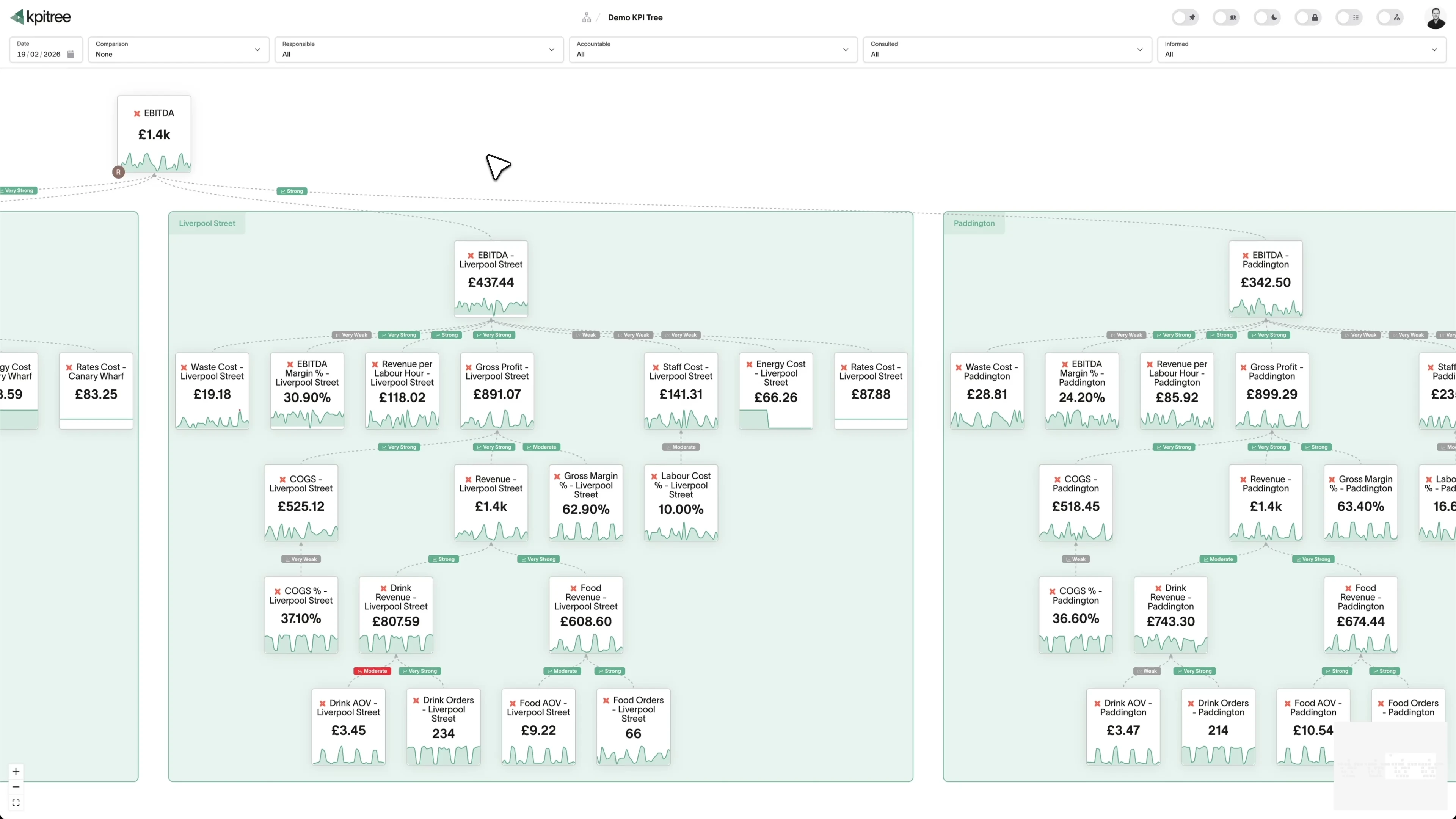
Spend decomposition that reveals where every pound goes.
- Total spend decomposed into departments, categories, and vendors
- Each level is an owned metric with statistical baseline and alerts
- Period-over-period comparison isolates which components drove changes
- RACI ownership connects spend metrics to department heads and procurement
Efficiency metrics that connect cost to revenue outcomes.
- Expense-to-revenue ratio, CAC, and revenue per employee as owned metrics
- Spend changes linked causally to revenue and efficiency outcomes
- Correlation analysis surfaces which cost categories drive the best returns
- Period comparisons show efficiency trends as the business scales
Vendor spend analysis with ownership and trend detection.
- Top vendors tracked as individual metric nodes with ownership
- Growth rate per vendor with statistical outlier detection
- Vendor concentration index as a risk metric with alerts
- Trend detection surfaces cost drift before contract renewal deadlines
Combine Ramp with revenue, headcount, and operational data.
- Ramp spend metrics alongside revenue, headcount, and pipeline data
- End-to-end efficiency modelling from spend to revenue outcome
- Cross-tool correlation reveals which costs generate the best returns
- Every metric carries ownership regardless of its data source




What KPI Tree adds that Ramp's analytics cannot
Ramp's analytics are built for expense management and policy compliance. KPI Tree is built for understanding how spend drives business outcomes and holding teams accountable.
Data warehouses
The numbers





Semantic layers
The definitions


Business apps
Launches, decisions, blockers




Org structure
Directory-synced




For humans
Answers, briefings and pushes
 @
@Read and write over MCP
Anthropic: 21% → ~95% with curated context



Canopy Agentic Workflows the metrics start them, humans gate them
Canopy Agents four out of the box, any model, your keys
Canopy
The business context layer
Structural context The causal tree, the org chart
Temporal context What was true when, plan against actual
Behavioural context What people did, what worked
Operational context RACI, workflows, approvals
Strategic context Objectives, key results, initiatives
Map & Measure
Metric Trees
Business Models
Prove & Act
Root Cause
Ownership
Verified Impact
Strategy
Grounded in proven causality
Verified proof
Meta spend → Revenue, +£32k vs forecast, q < 0.01
Personalised Action Plans 31 experiments running
hypothesis → a real person’s plan → measure the change
Causation the test cascade
ADF p 0.02 → Granger p 0.003 → q < 0.05, 87 of 1,204 survive
Correlation
22,791 pairs tested nightly, NPS – Churn r 0.71
Data warehouses
The numbers
Semantic layers
The definitions
Business apps
Launches, decisions, blockers
Org structure
Directory-synced
Causal spend trees, not expense reports
Cross-functional ownership of cost efficiency
Spend connected to revenue outcomes
Metrics you can track. Ready to add to your metric trees.
Average Transaction Value
Expense ManagementAverage Transaction Value = Total Spend / Number of Transactions
Average transaction value measures the mean monetary amount per expense transaction processed through Ramp. It provides a baseline for identifying unusual spending patterns and understanding typical purchase behaviour.
View metricBudget Adherence Rate
Expense ManagementBudget Adherence Rate = (Categories Within Budget / Total Budget Categories) × 100
Budget adherence rate measures the percentage of budget categories where actual spending remains within the allocated amount. It quantifies organisational discipline in following financial plans.
View metricBudget Utilisation Rate
Expense ManagementBudget Utilisation Rate = (Actual Spend / Budget Allocation) × 100
Budget utilisation rate measures the percentage of allocated budget that has been spent within the current period. It shows spending velocity and helps predict whether budgets will be over or under-utilised.
View metricCard Activation Rate
Expense ManagementCard Activation Rate = (Cards with Transactions / Total Cards Issued) × 100
Card activation rate is the percentage of issued Ramp cards, both physical and virtual, that have been used for at least one transaction. It measures programme adoption and employee onboarding effectiveness.
View metricCategory Spend Analysis
Expense ManagementCategory spend analysis breaks down total expenditure by spend category such as software, travel, office supplies, and professional services. It reveals concentration, trends, and potential savings opportunities within each category.
View metricCompliance Violation Rate
Expense ManagementCompliance Violation Rate = (Violating Transactions / Total Transactions) × 100
Compliance violation rate is the percentage of transactions that breach company spending policies, including merchant restrictions, spending limits, or category prohibitions. It measures policy enforcement effectiveness.
View metricDepartment Spend Analysis
Expense ManagementDepartment spend analysis segments total expenditure by organisational department or team. It provides visibility into how each department uses its budget and enables comparison against plans and historical patterns.
View metricDuplicate Payment Detection
Expense ManagementDuplicate payment detection measures the number and value of potentially duplicated transactions identified across expense submissions and vendor payments. It quantifies recoverable waste in the payments process.
View metricEmployee Reimbursement Time
Expense ManagementReimbursement Time = Average (Payment Date - Submission Date)
Employee reimbursement time measures the average number of days between expense submission and reimbursement payment. It reflects the efficiency of the expense review, approval, and payment process.
View metricExpense Approval Cycle Time
Expense ManagementApproval Cycle Time = Average (Approval Date - Submission Date)
Expense approval cycle time measures the average duration from expense submission to final approval. It captures the speed and efficiency of the review and approval workflow.
View metricExpense Per Employee
Expense ManagementExpense Per Employee = Total Spend / Total Employees
Expense per employee divides total company spend by headcount to provide a normalised measure of spending intensity. It enables benchmarking across periods and against industry standards.
View metricMaverick Spend Rate
Expense ManagementMaverick Spend Rate = (Off-Contract Spend / Total Spend) × 100
Maverick spend rate is the percentage of total expenditure that occurs outside approved contracts, preferred vendors, or procurement channels. It represents spend that bypasses negotiated terms and volume discounts.
View metricMerchant Concentration Analysis
Expense ManagementMerchant concentration analysis measures the distribution of spend across vendors, identifying top merchants by volume and the degree of concentration. It reveals vendor dependency and negotiation opportunities.
View metricBurn Rate
Expense ManagementMonthly Burn Rate = Total Monthly Expenditure
Monthly burn rate is the total net cash expenditure per month, encompassing all operating expenses processed through Ramp. It is a critical metric for startups and growth-stage companies managing runway.
View metricOut-of-Policy Spend Rate
Expense ManagementOut-of-Policy Spend Rate = (Out-of-Policy Spend / Total Spend) × 100
Out-of-policy spend rate measures the percentage of total spend that falls outside company expense policies, including excessive amounts, unapproved categories, or non-compliant merchants.
View metricPayment Cycle Time
Expense ManagementPayment Cycle Time = Average (Payment Date - Invoice Date)
Payment cycle time measures the average duration from invoice receipt to vendor payment. It reflects accounts payable efficiency and impacts vendor relationships, early payment discounts, and working capital.
View metricReceipt Compliance Rate
Expense ManagementReceipt Compliance Rate = (Transactions with Receipts / Total Transactions) × 100
Receipt compliance rate is the percentage of transactions that have a matching receipt or supporting documentation attached. It measures adherence to documentation requirements essential for audit readiness and tax compliance.
View metricRecurring Spend Analysis
Expense ManagementRecurring spend analysis identifies and tracks expenses that repeat on a regular basis, including software subscriptions, service contracts, and regular vendor payments. It separates predictable from variable expenditure.
View metricSavings Identification Rate
Expense ManagementSavings Identification Rate = (Identified Savings / Total Spend) × 100
Savings identification rate measures the value of cost savings opportunities identified as a percentage of total spend. It captures how effectively the organisation discovers and acts on opportunities to reduce costs.
View metricSpend by Vendor Analysis
Expense ManagementSpend by vendor analysis ranks and examines expenditure at the individual vendor level. It shows total spend, transaction frequency, and trend for each vendor, enabling strategic vendor management.
View metricSpend Forecast Accuracy
Expense ManagementForecast Accuracy = (1 - |Actual Spend - Forecasted Spend| / Forecasted Spend) × 100
Spend forecast accuracy measures the deviation between predicted and actual expenditure, expressed as a percentage. It evaluates the reliability of financial planning and budgeting processes.
View metricSubscription Waste Detection
Expense ManagementSubscription waste detection identifies recurring software and service subscriptions that are unused, underused, or duplicated across the organisation. It quantifies the recoverable value of optimising the subscription portfolio.
View metricT&E Spend Ratio
Expense ManagementT&E Spend Ratio = (Travel & Entertainment Spend / Total Spend) × 100
T&E spend ratio measures travel and entertainment expenses as a percentage of total company spend. It provides a benchmark for controlling discretionary spending and comparing against industry norms.
View metricTotal Spend Under Management
Expense ManagementSpend Under Management = (Spend Through Ramp / Total Company Spend) × 100
Total spend under management measures the percentage of company expenditure that flows through Ramp and is subject to its controls, visibility, and reporting. It indicates programme coverage and control maturity.
View metricVirtual Card Adoption Rate
Expense ManagementVirtual Card Adoption Rate = (Virtual Card Transactions / Total Transactions) × 100
Virtual card adoption rate measures the percentage of transactions or spend volume processed through virtual cards rather than physical cards or reimbursements. Virtual cards offer tighter controls with vendor and amount restrictions.
View metricAccounting Integration Accuracy
Expense ManagementAccounting Integration Accuracy = (Correctly Synced Transactions / Total Synced Transactions) × 100
Accounting integration accuracy is the percentage of Ramp transactions that sync correctly to the general ledger without requiring manual adjustment. It reflects the reliability of automated category mappings, GL codes, and entity assignments between Ramp and the accounting system.
View metricBill Payment Cycle Time
Expense ManagementBill Payment Cycle Time = Average (Payment Execution Date − Bill Receipt Date)
Bill payment cycle time measures the average number of days from bill receipt to payment execution within Ramp Bill Pay. It captures the end-to-end efficiency of the accounts payable workflow, including approval routing and scheduling.
View metricCard Spend Distribution
Expense ManagementCard spend distribution breaks down total card expenditure by card type, covering physical, virtual, and department-level cards, and by spending band. It reveals how concentration or fragmentation of spend across card instruments affects control and visibility.
View metricExpense Fraud Detection Rate
Expense ManagementExpense Fraud Detection Rate = (Confirmed Fraudulent Transactions / Total Flagged Transactions) × 100
Expense fraud detection rate is the percentage of flagged transactions confirmed as fraudulent or policy-abusive relative to total transactions reviewed. It measures the effectiveness of both automated controls and manual review processes in identifying genuine threats.
View metricReconciliation Time
Expense ManagementReconciliation Time = Period-End Reconciliation Completion Date − Period Close Start Date
Reconciliation time is the total number of hours or days required to match Ramp transactions against general-ledger entries and bank statements at period end. It reflects the efficiency of automated matching rules and the volume of exceptions requiring manual resolution.
View metricSpend Anomaly Detection
Expense ManagementSpend anomaly detection measures the volume and value of transactions flagged as statistical outliers against historical spending patterns. It captures deviations in amount, frequency, merchant, or timing that warrant investigation.
View metricVendor Consolidation Savings
Expense ManagementVendor Consolidation Savings = Pre-Consolidation Category Spend − Post-Consolidation Category Spend
Vendor consolidation savings tracks the monetary value saved by reducing the number of suppliers serving the same spend category and shifting volume to preferred vendors with negotiated pricing. It quantifies the financial benefit of strategic vendor rationalisation.
View metricBudget Variance Analysis
FinanceBudget Variance = Actual Spend - Budgeted Amount; Budget Variance % = (Actual Spend - Budgeted Amount) / Budgeted Amount x 100
Budget Variance Analysis measures the difference between the budget you set in Ramp and the actual spend Ramp records against it across card transactions, reimbursements and bill payments. It is expressed both as an absolute amount and as a percentage of the budget, broken down by department, project or spend category. Because Ramp ties every transaction to a budget at the point of authorisation, the variance reflects committed spend rather than spend reconstructed after the fact.
View metricCard Fraud Detection Rate
FinanceCard Fraud Detection Rate = Fraudulent Transactions Caught Before Settlement / Total Fraudulent Transactions x 100
Card Fraud Detection Rate measures the share of fraudulent or unauthorised Ramp card transactions that are caught and blocked or flagged before they settle, rather than discovered after the fact. It draws on Ramp transaction data, including declined charges, locked cards, and disputes raised against virtual and physical cards. A high rate means Ramp controls and your finance review process are intercepting bad charges early.
View metricCard Utilisation Rate
FinanceCard Utilisation Rate = Total Card Spend in Period / Total Issued Card Limits in Period x 100
Card Utilisation Rate measures the share of the total spending limit issued across your Ramp cards that is actually spent within a period. Using Ramp transaction and card limit data, it shows whether the limits you have assigned to people, teams and vendors match real spending behaviour. A low rate points to limits set far above need, while a rate near the cap signals teams that may be constrained.
View metricCash Flow Impact Analysis
FinanceCash Flow Impact = (Settled Card Transactions + Bill Payments Made) - (Refunds + Statement Credits + Cashback Earned)
Cash Flow Impact Analysis measures the net cash that leaves the business through Ramp in a given period, combining settled card transactions and bill payments against any statement credits, refunds, and cashback returned. In Ramp, this draws on transaction settlement dates rather than authorisation dates, so the figure reflects when money actually moves rather than when a purchase was made. It separates committed spend from realised outflows so finance can see the true timing of cash leaving the business.
View metricCost Centre Efficiency Analysis
FinanceCost Centre Efficiency = Output or Value Delivered by Cost Centre / Total Ramp Spend Allocated to that Cost Centre
Cost Centre Efficiency Analysis measures how much value each cost centre returns for the spend it consumes, using the department, team, and category labels Ramp applies to every card transaction and bill payment. In Ramp, every transaction carries a cost centre and an accounting category, so you can compare actual spend per cost centre against the output, revenue, or budget tied to that same group. A higher ratio means a cost centre converts its spend into more useful output, while a falling ratio signals waste or misallocation.
View metricDepartment Spending Trends
FinanceDepartment Spending Trend = (Department Spend in Current Period - Department Spend in Prior Period) / Department Spend in Prior Period x 100
Department Spending Trends measures how total spend tagged to each department in Ramp changes across consecutive periods. It draws on Ramp card transactions, reimbursements, and bill payments that carry a department or cost-centre attribute, then compares period-over-period totals to surface the direction and pace of change. The metric tells you not just what each team spent, but whether that spend is rising, falling, or holding steady.
View metricDuplicate Transaction Detection Rate
FinanceDuplicate Transaction Detection Rate = Duplicate Transactions Flagged Before Approval / Total Duplicate Transactions x 100
Duplicate Transaction Detection Rate measures the share of duplicate transactions in your Ramp data that are flagged before they are approved or reimbursed. Using Ramp card swipe records, bill payments, and reimbursement claims, a duplicate is a second transaction that matches an earlier one on vendor, amount, and date window. The rate captures how much of that duplication the team catches versus lets through to settlement.
View metricEmployee Spending Behaviour Analysis
FinanceOut-of-Policy Spend Rate per Employee = Out-of-Policy Transaction Value / Total Card Spend per Employee x 100
Employee Spending Behaviour Analysis examines how individual employees and teams spend across their Ramp cards, breaking transactions down by merchant category, frequency, average value and policy compliance. In the context of Ramp data, it draws on every card transaction, receipt and policy flag to show patterns such as repeat merchants, out-of-policy purchases and concentration of spend among a small group of cardholders. It turns raw transaction logs into a behavioural view that finance teams can act on.
View metricExpense Categorisation Accuracy
FinanceExpense Categorisation Accuracy = Correctly Categorised Transactions / Total Categorised Transactions x 100
Expense Categorisation Accuracy measures the share of Ramp transactions assigned to the correct accounting category, general ledger code or department without later correction. In Ramp, each card swipe and bill is auto-coded by rules or suggestions, so this metric tracks how often that coding survives review unchanged. A high value means finance teams spend less time recoding spend and can trust category-level reporting straight from the data.
View metricLocation Based Spend Analysis
FinanceLocation Based Spend Analysis = Sum of Ramp Transaction Amounts grouped by Location / Total Ramp Spend x 100
Location Based Spend Analysis breaks down Ramp transactions by the geographic location attached to each charge, whether that is the merchant city or country, the spending entity, or the cardholder office. In Ramp, every card swipe and bill payment carries merchant and entity metadata, so you can aggregate total spend per location and compare regions side by side. It turns a flat transaction feed into a map of where company money is actually being committed.
View metricMonthly Spend Velocity
FinanceMonthly Spend Velocity = (Current Month Spend - Prior Month Spend) / Prior Month Spend x 100
Monthly Spend Velocity measures the rate of change in total company spend recorded in Ramp from one month to the next, expressed as a percentage. It draws on all card transactions, reimbursements, and bill payments captured in Ramp so finance can see whether outgoings are accelerating or slowing. A positive velocity means spend is growing month over month, while a negative figure means it is contracting.
View metricPolicy Violation Rate
FinancePolicy Violation Rate = Flagged Transactions in Period / Total Transactions in Period x 100
Policy Violation Rate measures the proportion of Ramp card and reimbursement transactions that breach a configured spend policy, such as exceeding a category limit, missing a required receipt, or falling outside an approved merchant. Ramp flags each violation against the policy rules attached to a card programme, so the metric reflects real enforcement gaps rather than estimates. It is usually tracked over a month and segmented by team, category, or individual cardholder.
View metricReimbursement Processing Time
FinanceReimbursement Processing Time = Average of (Reimbursement Paid Date - Reimbursement Submitted Date) across all paid claims in the period
Reimbursement Processing Time measures the elapsed time between an employee submitting a reimbursement claim in Ramp and that claim being paid out. It captures the full lifecycle through Ramp, including manager approval, finance review and the payment run. A shorter time means employees are repaid faster and the finance team is clearing claims without bottlenecks.
View metricSeasonal Spending Patterns
FinanceSeasonal Index for Period = Average Spend in Period across Years / Average Spend across All Periods x 100
Seasonal Spending Patterns measure how total spend captured in Ramp, across corporate cards and bill payments, varies in a repeating way across periods of the year. By aggregating Ramp transactions by month, quarter or season and comparing the same period across multiple years, you can isolate the recurring component of spend from one-off changes. It turns Ramp transaction history into a view of when your business reliably spends more or less.
View metricSpend Category Analysis
FinanceCategory Spend Share = Spend in Category / Total Spend x 100
Spend Category Analysis measures how total Ramp spend is distributed across expense categories such as software, travel, meals, advertising and office supplies. Ramp automatically categorises every card transaction and bill payment, so this metric reads directly from that categorised transaction data over a chosen period. It surfaces both the absolute spend per category and each category share of the total.
View metricSpend Programme Effectiveness
FinanceSpend Programme Effectiveness = In-Policy Spend / Total Spend x 100
Spend Programme Effectiveness measures how well your Ramp spend programme keeps actual spending inside the budgets, card limits, and policies you have set. Using Ramp transaction, budget, and approval data, it captures the share of spend that lands within policy against the total spend flowing through your cards and bill payments. A high score means the controls you configured in Ramp are doing their job without constant manual intervention.
View metricTransaction Volume Growth Rate
FinanceTransaction Volume Growth Rate = (Transactions This Period - Transactions Last Period) / Transactions Last Period x 100
Transaction Volume Growth Rate measures the period over period change in the number of transactions flowing through Ramp, including card swipes and bill payments. It is calculated from the count of settled transactions in each period rather than their value, so it reflects activity and frequency rather than spend size. Tracking it against Ramp data tells you whether your finance operations are scaling smoothly or whether transaction throughput is rising faster than the team can process and reconcile.
View metricVendor Concentration Risk
FinanceVendor Concentration Risk = Spend on Top N Vendors / Total Spend x 100
Vendor Concentration Risk measures how much of your total spend in Ramp flows through a small number of vendors. Using Ramp transaction and bill payment records, it expresses the share of spend captured by your largest suppliers, so you can see whether your outflows depend on a narrow set of relationships. A high reading means a single vendor going down, raising prices, or changing terms would have an outsized effect on the business.
View metricVendor Diversification Index
FinanceVendor Diversification Index = 1 - Sum of (Vendor Spend / Total Spend)^2
Vendor Diversification Index measures how evenly your spend is distributed across the vendors you pay through Ramp, rather than concentrated in a handful of suppliers. Using Ramp transaction and bill payment data tagged by merchant or vendor, it scores spend concentration so a high index reflects a broad, balanced supplier base and a low index flags dependency on a few vendors. It turns raw vendor-level spend into a single signal of supplier risk.
View metricVendor Payment Terms Analysis
FinanceWeighted Average Payment Terms = Sum of (Bill Amount x Net Terms in Days) / Total Bill Amount; Early Discount Capture Rate = Discounts Captured / Discounts Available x 100
Vendor Payment Terms Analysis examines the payment terms recorded against each vendor and bill in Ramp, comparing the terms you have negotiated (such as net 30, net 60, or early payment discounts) with how those bills are actually paid. It reveals whether the finance team is using the full credit period, capturing early payment discounts, or paying ahead of schedule without benefit. In Ramp, the source data sits in the Bill Pay records, vendor profiles, and invoice due dates.
View metricVendor Performance Scoring
FinanceVendor Performance Score = (Cost Efficiency Weight x Cost Score) + (Reliability Weight x Reliability Score) + (Payment Behaviour Weight x Payment Score)
Vendor Performance Scoring is a composite rating that grades each supplier in Ramp using the transaction, bill, and payment records tied to that vendor. It blends signals such as total spend, payment cycle time, dispute and decline frequency, and budget adherence into a single comparable score. In the context of Ramp, the score is built entirely from the vendor records Ramp already captures across card spend and bill pay, so it reflects how a supplier actually behaves on your account rather than a self-reported rating.
View metricRelated integrations. More sources that work with KPI Tree.


Common questions
How does Ramp data reach KPI Tree?
Through the warehouse. Most finance teams already replicate Ramp to Snowflake, BigQuery, or another warehouse via Fivetran, Airbyte, or a lightweight custom job against the Ramp Developer API, and KPI Tree reads those tables in place so budgets, card transactions, vendors, and reimbursements flow into metric trees without any duplication. If you do not yet have that pipeline, our professional services team can build the warehouse, configure the ELT, and ship a dbt semantic layer for Ramp as a fixed-scope engagement. We are tracking the experimental Ramp MCP reference server in the ramp-public GitHub organisation but do not currently treat it as a production connection path, so if you need a live MCP integration today, warehouse-first is the route we recommend.
What Ramp metrics can I track?
Any metric computable from Ramp data in your warehouse: total spend, departmental spend, category spend, vendor spend, budget utilisation rate, spend per employee, expense-to-revenue ratio, reimbursement cycle time, card utilisation rate, vendor concentration index, and more. If it can be expressed as SQL against your Ramp tables, it can be a KPI Tree metric.
Can I track budget versus actual spend?
Yes. Define budget targets as metrics and track actuals against them. KPI Tree's period comparison and statistical monitoring will alert the metric owner when actual spend deviates from budget by more than the expected variance - at the department, category, or vendor level.
How long does setup take?
If your Ramp data is already in a warehouse, connecting KPI Tree takes under an hour, and teams with a dbt semantic layer can sync Ramp-derived metrics in one click. If you do not yet have a warehouse or an ELT pipeline, our professional services engagement typically takes a few weeks end-to-end and delivers a production data foundation plus the dbt models for spend, budgets, vendors, and card transactions.
Does KPI Tree replace Ramp?
No. Ramp handles corporate card management, expense policies, bill payments, and accounting integrations. KPI Tree serves a different purpose: modelling how spend metrics causally relate to each other and to business outcomes, assigning ownership, and creating accountability. Most teams use both.
Can I connect spend data to revenue metrics?
Yes. That is one of the core advantages. A single metric tree can include Ramp spend data alongside Stripe revenue, Chargebee subscription metrics, and Salesforce pipeline data. KPI Tree's correlation engine analyses relationships across all sources - showing whether increased spend in specific categories correlates with revenue growth.
Is my financial data secure?
KPI Tree connects to your warehouse, not directly to Ramp. Your warehouse security model - RSA key-pair authentication, service accounts, network policies - remains fully enforced. KPI Tree queries aggregated metric data, not individual transaction details or card numbers.
Do I need a dbt semantic layer?
No. You can define metrics directly with SQL against your Ramp warehouse tables. If you use dbt to model your financial data, KPI Tree can sync those metric definitions automatically via the dbt Cloud or dbt Core integration.
Related guides. Frameworks and metrics in depth.

How to build a metric tree
A step-by-step metric tree and KPI tree template from North Star to daily levers
Metric trees for finance teams
From DuPont analysis to modern decomposition
Burn rate: a metric tree decomposition
Breaking down how fast your startup spends cash so you can extend runway and reach profitability
Revenue per employee as a metric tree
Decomposing workforce productivity into actionable drivers
Your expense data should drive efficiency, not just track it.
Connect your warehouse to KPI Tree and turn Ramp spend data into causal metric trees with ownership, statistical analysis, and accountability that connects cost management to business outcomes.