
 Jira Integration
Turn Jira sprint data into metric trees that connect engineering output to business impact.
Jira tracks every issue, sprint, and epic across your engineering organisation. But sprint reports show what was delivered, not whether it mattered.Jira tracks every issue, sprint, and epic across your engineering organisation. But sprint reports show what was delivered, not whether it mattered. KPI Tree connects to Jira in three ways - pull data directly via MCP with no warehouse needed, connect your existing data warehouse where Jira data already lands, or let our professional services team build the AI foundations for you. Sprint velocity, cycle time, and bug escape rate are modelled to show how they causally drive product quality, customer satisfaction, and revenue. Assign metric-level ownership that persists across sprints. Surface statistical correlations between engineering process metrics and business outcomes. Stop treating velocity as a vanity metric and start using it as a lever.
From Jira data to engineering accountability in three steps
Connect your Jira data
Three ways to get started, depending on your stack.

Pull metrics from Jira directly through the Model Context Protocol.



Connect your existing warehouse where Jira data already lands.


Our professional services team can build you turn-key AI foundations in a matter of weeks. Data warehouse on Snowflake/BigQuery, ELT with Fivetran, all modelled in dbt with a semantic layer.
Map metrics from your Jira data
Define metrics from Jira tables - sprint velocity, average cycle time, bug escape rate, story point completion, epic burn-down, lead time, deployment frequency. Use SQL directly or sync from your dbt semantic layer if you already model Jira data there.
Build trees and assign ownership
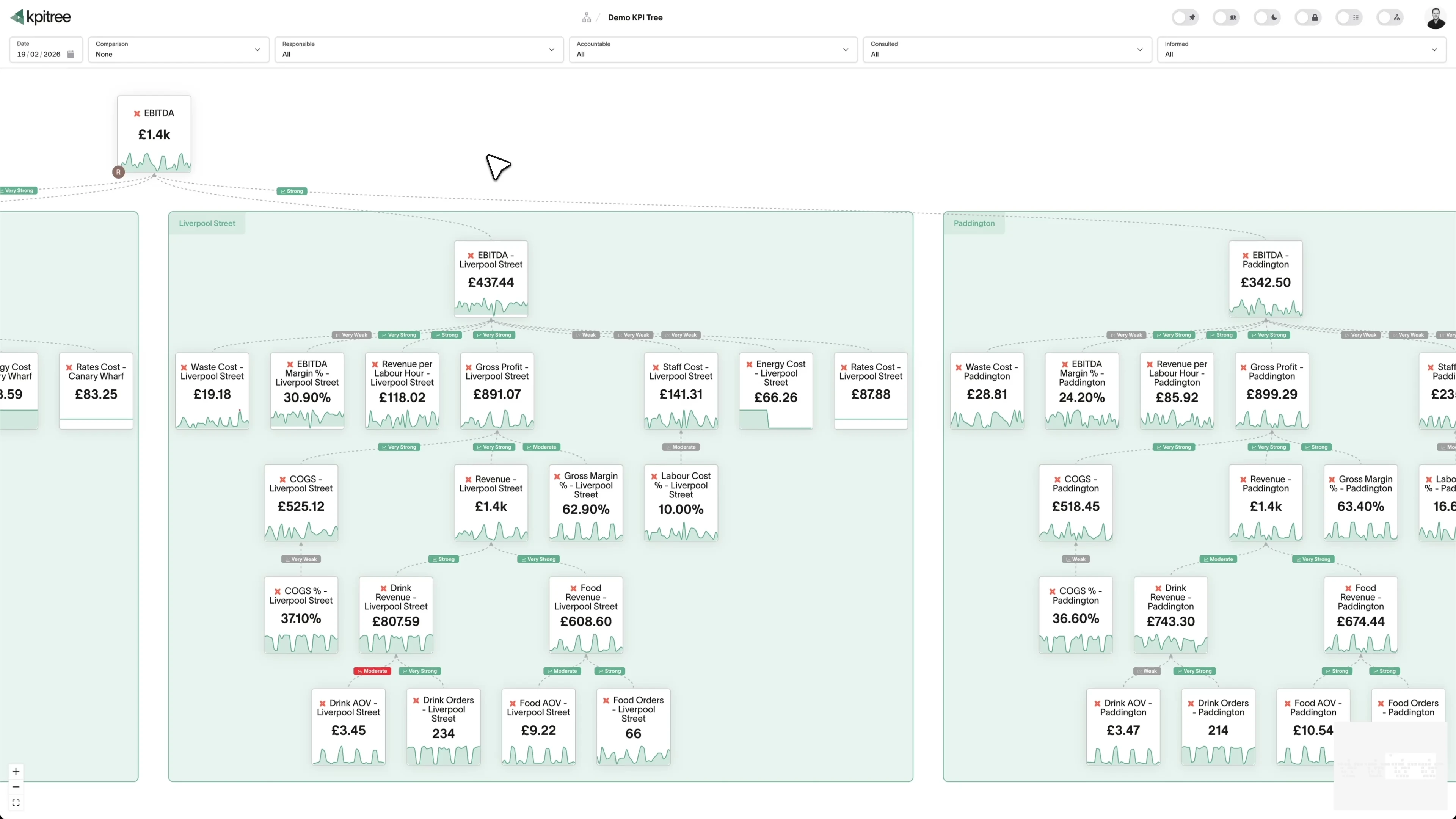
Arrange Jira engineering metrics into causal trees alongside product, revenue, and customer metrics. Assign RACI owners to each node. When velocity drops or cycle time spikes, the tree shows the cascading business impact and the person accountable for recovery.
Engineering metrics that connect to the rest of the business
Causal trees from code to customer
Cycle time and lead time as strategic levers
Sprint anomaly detection with business context
Sprint velocity tied to outcomes, not just story points.
- Track velocity, story points completed, and sprint commitment accuracy
- Model velocity as a leading indicator of feature delivery and adoption
- Quantify the downstream business impact of velocity changes
- RACI ownership at the metric level persists across sprints
Bug escape rate as a quality signal, not a blame tool.
- Track bug escape rate, severity distribution, and mean time to resolution
- Model causal impact on support tickets, CSAT, and churn
- Statistical tests quantify the relationship between quality and retention
- Alert quality owners when escape rate exceeds statistical thresholds
Epic delivery mapped to the business case that justified it.
- Link epic completion metrics to the business KPIs they target
- Track delivery progress alongside target metric movement
- Post-launch impact verification with statistical change detection
- Build an evidence base for future investment prioritisation
Engineering metrics alongside every other team in one tree.
- Combine Jira metrics with Salesforce, PostHog, Stripe, and support data
- Model cross-functional causal relationships in a single tree
- Statistical analysis validates assumed cause-and-effect across systems
- Every metric has an owner regardless of which tool generated the data




How KPI Tree uses Jira data differently
Jira reporting tools optimise sprint execution. KPI Tree connects sprint execution to the business outcomes that engineering exists to drive.
Data warehouses
The numbers





Semantic layers
The definitions


Business apps
Launches, decisions, blockers




Org structure
Directory-synced




For humans
Answers, briefings and pushes
 @
@Read and write over MCP
Anthropic: 21% → ~95% with curated context



Canopy Agentic Workflows the metrics start them, humans gate them
Canopy Agents four out of the box, any model, your keys
Canopy
The business context layer
Structural context The causal tree, the org chart
Temporal context What was true when, plan against actual
Behavioural context What people did, what worked
Operational context RACI, workflows, approvals
Strategic context Objectives, key results, initiatives
Map & Measure
Metric Trees
Business Models
Prove & Act
Root Cause
Ownership
Verified Impact
Strategy
Grounded in proven causality
Verified proof
Meta spend → Revenue, +£32k vs forecast, q < 0.01
Personalised Action Plans 31 experiments running
hypothesis → a real person’s plan → measure the change
Causation the test cascade
ADF p 0.02 → Granger p 0.003 → q < 0.05, 87 of 1,204 survive
Correlation
22,791 pairs tested nightly, NPS – Churn r 0.71
Data warehouses
The numbers
Semantic layers
The definitions
Business apps
Launches, decisions, blockers
Org structure
Directory-synced
Business impact, not just sprint performance
Metric-level ownership that outlasts sprints
Correlations that validate engineering investments
Metrics you can track. Ready to add to your metric trees.
Backlog Health Analysis
Issue TrackingBacklog Health Analysis evaluates the overall quality and manageability of a Jira backlog. It considers factors such as issue age distribution, prioritisation consistency, estimation coverage, and the ratio of groomed to ungroomed items.
View metricBlocked Time Percentage
Issue TrackingBlocked Time Percentage = (Time in Blocked State / Total Cycle Time) × 100
Blocked Time Percentage calculates the proportion of an issue's total cycle time spent in a blocked or impeded state in Jira. It quantifies how much delivery time is consumed by waiting rather than active work.
View metricCode Review Cycle Time
Issue TrackingCode Review Cycle Time = Review Completion Date − Review Start Date
Code Review Cycle Time measures the elapsed time between when a Jira issue enters a code review state and when it exits, either approved or requiring changes. It captures the efficiency of the review process as reflected in Jira workflow transitions.
View metricComponent Quality Trends
Issue TrackingComponent Quality Trends analyses the volume and severity of defects and issues filed against specific Jira components over time. It identifies components with improving or deteriorating quality trajectories, guiding targeted investment in testing and refactoring.
View metricCross-Team Dependency Analysis
Issue TrackingCross-Team Dependency Analysis maps the network of issue links, blockers, and handoffs between different Jira projects and teams. It quantifies how often teams depend on each other and measures the impact of those dependencies on delivery timelines.
View metricCycle Time
Issue TrackingCycle Time = Done Date − In Progress Date
Cycle Time measures the elapsed time from when work actively begins on a Jira issue (typically moving to "In Progress") to when it is marked done. It captures the actual working duration, excluding backlog waiting time, and is a key indicator of process efficiency.
View metricDefect Density
Issue TrackingDefect Density = Total Defects / Units of Work Delivered
Defect Density measures the number of defects found per unit of delivered work, such as per story point, per feature, or per release in Jira. It provides a normalised quality indicator that accounts for the volume of work delivered.
View metricEpic Progress Tracking
Issue TrackingEpic Progress = (Completed Story Points / Total Epic Story Points) × 100
Epic Progress Tracking monitors the advancement of Jira epics by measuring the proportion of child issues completed, story points delivered, and time elapsed against planned timelines. It provides feature-level visibility into delivery progress.
View metricEscalation Pattern Analysis
Issue TrackingEscalation Pattern Analysis examines how issues are escalated in Jira, including priority changes, reassignments to senior staff, and cross-team handoffs. It identifies recurring escalation triggers and measures the impact of escalations on delivery timelines.
View metricFlow Efficiency
Issue TrackingFlow Efficiency = (Active Work Time / Total Cycle Time) × 100
Flow Efficiency measures the ratio of active work time to total cycle time for Jira issues. It reveals what percentage of an issue's lifecycle is spent in value-adding states versus waiting states such as review queues, approvals, or blocked status.
View metricIssue Age Distribution
Issue TrackingIssue Age Distribution analyses the age profile of open issues in Jira, categorising them into age brackets to reveal how much of the backlog is fresh versus stale. It tracks the number and proportion of issues in each age bracket over time.
View metricIssue Resolution Rate
Issue TrackingIssue Resolution Rate = Issues Resolved / Time Period
Issue Resolution Rate measures the number or percentage of Jira issues resolved within a given time period. It serves as a fundamental throughput metric that reflects the team's ability to close out work items across all issue types.
View metricLead Time
Issue TrackingLead Time = Resolution Date − Creation Date
Lead Time measures the total elapsed time from when a Jira issue is created to when it is resolved. Unlike cycle time, lead time includes the time an issue spends waiting in the backlog before work begins, providing a customer-centric view of delivery speed.
View metricPriority Distribution Analysis
Issue TrackingPriority Distribution Analysis examines how issues are distributed across priority levels in Jira. It tracks the proportion of issues at each priority level over time and identifies trends such as priority inflation, where an increasing percentage of issues are marked as high or critical.
View metricRelease Burnup Analysis
Issue TrackingRelease Burnup Analysis tracks the cumulative amount of work completed for a Jira release version over time, plotted against the total release scope. Unlike burndown charts, burnup charts also visualise scope changes, making them ideal for releases where requirements evolve.
View metricSprint Burndown Analysis
Issue TrackingSprint Burndown Analysis tracks the remaining work in a Jira sprint over time, comparing actual progress against the ideal burndown trajectory. It reveals whether the team is on track to complete their sprint commitment and surfaces mid-sprint risks.
View metricSprint Commitment Accuracy
Issue TrackingCommitment Accuracy = (Completed Committed Points / Total Committed Points) × 100
Sprint Commitment Accuracy measures the percentage of committed sprint scope that a team actually delivers by the end of the sprint in Jira. It compares what was planned at sprint start against what was completed at sprint end, excluding work added mid-sprint.
View metricSprint Goal Achievement Rate
Issue TrackingSprint Goal Achievement Rate = (Sprints with Goal Achieved / Total Sprints) × 100
Sprint Goal Achievement Rate measures the percentage of sprints in which the stated sprint goal is achieved in Jira. Unlike commitment accuracy which focuses on scope completion, this metric evaluates whether the overarching sprint objective was met.
View metricSprint Velocity
Issue TrackingSprint Velocity = Total Story Points Completed per Sprint
Sprint Velocity measures the total story points or issue count completed by a team in each Jira sprint. It provides a rolling baseline of team capacity that is used for forecasting future delivery and calibrating sprint commitments.
View metricStory Point Estimation Accuracy
Issue TrackingStory Point Estimation Accuracy compares the story points assigned to Jira issues at estimation time against the actual effort required, measured through cycle time or time tracking. It identifies systematic over- or under-estimation patterns across issue types and teams.
View metricTeam Capacity Utilisation
Issue TrackingCapacity Utilisation = (Allocated Story Points / Available Capacity) × 100
Team Capacity Utilisation measures the proportion of available team capacity that is actively allocated to Jira issues. It compares assigned workload against available capacity, accounting for team member availability, leave, and non-project commitments.
View metricTeam Collaboration Index
Issue TrackingTeam Collaboration Index quantifies the quality and frequency of collaboration across Jira teams. It combines signals such as cross-team issue assignments, comment interactions on shared issues, linked issues between projects, and collaborative resolution of blockers.
View metricTechnical Debt Ratio
Issue TrackingTechnical Debt Ratio = (Technical Debt Story Points / Total Story Points) × 100
Technical Debt Ratio measures the proportion of engineering effort in Jira that is allocated to addressing technical debt, including refactoring, upgrading dependencies, and fixing architectural issues, relative to total development effort.
View metricUser Productivity Analysis
Issue TrackingUser Productivity Analysis examines individual contributor patterns in Jira, including throughput, cycle time, issue type distribution, and work consistency. It identifies productivity trends and factors that influence individual effectiveness, supporting coaching and team optimisation.
View metricVersion Release Success Rate
Issue TrackingRelease Success Rate = (Successful Releases / Total Releases) × 100
Version Release Success Rate measures the percentage of Jira version releases that are delivered on time, within scope, and without critical post-release defects. It provides a holistic view of release quality and predictability.
View metricWorklog Accuracy
Issue TrackingWorklog Accuracy compares the time logged against Jira issues with the actual time spent, derived from calendar data, workflow state durations, or team surveys. It measures the reliability of worklog data for planning, billing, and process analysis purposes.
View metricRelated integrations. More sources that work with KPI Tree.
Common questions
Does this work with Jira Cloud, Data Center, and Server?
Yes to all three. Jira Cloud is the quickest path because MCP talks to the Atlassian Cloud REST API directly, so cycle time, throughput, issue resolution rate, and sprint burndown can be flowing into a metric tree within the hour. Jira Data Center and Server customers almost always already replicate issues, sprints, and worklogs to a warehouse via Fivetran, Airbyte, or a JDBC-based export, and KPI Tree queries those tables in place so your self-hosted security perimeter does not move. If you do not yet have that pipeline, our professional services team can build it end-to-end: Snowflake or BigQuery, the ELT job, a dbt semantic layer for Jira, and the metric tree templates. The connection method does not change which metrics are available, only how they arrive.
What Jira metrics can I track?
Any metric derivable from your Jira warehouse tables: sprint velocity, story point completion, average cycle time, lead time, bug escape rate, epic burn-down, deployment frequency, sprint commitment accuracy, issue age distribution, and more. If it is queryable in SQL, it can be a KPI Tree metric.
Does it work with Jira Cloud and Jira Data Center?
Yes. MCP connects to Jira Cloud directly. For Jira Data Center, connect via your data warehouse where the data is already being synced, or our professional services team can set up the pipeline for you.
How long does setup take?
With MCP, you can start pulling Jira data in minutes - no warehouse required. With an existing data warehouse, connecting KPI Tree takes under an hour. Teams with a dbt semantic layer modelling Jira data can sync metrics in one click. Professional services engagements typically take a few weeks to deliver a full data foundation.
Can I combine Jira metrics with data from other tools?
Yes - this is where KPI Tree adds the most value. Build metric trees that connect Jira engineering metrics with GitHub deployment data, PostHog product analytics, Salesforce revenue data, and Intercom support metrics. Model causal relationships across systems in a single tree.
Is my Jira data secure?
Yes, regardless of connection method. MCP connections use secure, scoped API access. Data warehouse connections use encrypted authentication (RSA key-pair for Snowflake, service accounts for BigQuery), and your existing warehouse security policies remain fully enforced. Data is processed in KPI Tree's engine and never stored in raw form.
Can I track DORA metrics using Jira data?
Partially. Jira data contributes to lead time for changes and change failure rate when combined with deployment data from GitHub or your CI/CD pipeline. KPI Tree lets you model all four DORA metrics in a single tree, pulling from Jira for issue tracking and GitHub for deployment events.
Does KPI Tree replace Jira dashboards or plugins like Jira Align?
No. Jira dashboards and Jira Align are designed for sprint-level and portfolio-level project management. KPI Tree adds a different layer: causal metric trees that connect engineering process metrics to business outcomes, with statistical analysis and RACI ownership. Teams typically use both.
Related guides. Frameworks and metrics in depth.
Connect Jira to KPI Tree via MCP, warehouse, or professional services.
Pull Jira data directly via MCP, connect your existing warehouse, or let our team build the foundations. Turn sprint data into causal metric trees linking engineering velocity to product adoption, customer satisfaction, and revenue.