
 Azure SQL Integration
Connect Azure SQL Database to KPI Tree. Two authentication methods, no ODBC driver to install.
KPI Tree connects directly to Azure SQL Database using SQL authentication or a Microsoft Entra ID service principal.KPI Tree connects directly to Azure SQL Database using SQL authentication or a Microsoft Entra ID service principal. There is no ODBC driver to install or version-manage, because KPI Tree uses Microsoft's official mssql-python driver over its own DDBC transport. Every connection is encrypted with TLS and validated against a real server certificate. Define metrics in T-SQL, map how they drive each other with confidence levels, assign RACI ownership, and build the accountability layer that sits above your database.
Connected in under an hour
Create a read-only user and allow the connection
In your database, create a login and a contained user with SELECT on the tables and views you want to measure (db_datareader is the simplest grant). The user has to exist in the database itself, not only in master. If your Azure SQL firewall is locked down, add KPI Tree's outbound IP under Security then Networking in the Azure portal, or expose the server over Private Link. Nothing else in your Azure configuration needs to change.
Choose an authentication method and connect
SQL authentication uses a standard username and password. A Microsoft Entra ID service principal uses a client ID, client secret and tenant ID for passwordless access managed in Entra. Enter your server hostname, port (1433 by default) and database name. KPI Tree runs a live SELECT 1 to confirm it can authenticate and reach the database before the connection is saved.
Define metrics and start building
Write T-SQL against your tables and views. Each query aggregates raw rows down to a daily value, and KPI Tree infers the cross-day rollup (sum, count, average, first or last) from the T-SQL itself. From there, arrange metrics into a causal tree, assign RACI ownership, and start closing the loop between a number moving and someone acting on it.
Built for the Azure data stack
Microsoft Entra ID service principal auth
No ODBC driver required
Off-database analytics
Two authentication methods, matched to your security model.
- SQL authentication with a username and password
- Entra ID service principal with client ID, client secret and tenant ID
- TLS-encrypted connections validated against a valid server certificate
- No ODBC driver, and passwords are never logged
Warehouse connection
ConnectedRead-only access · credentials never leave the encrypted store
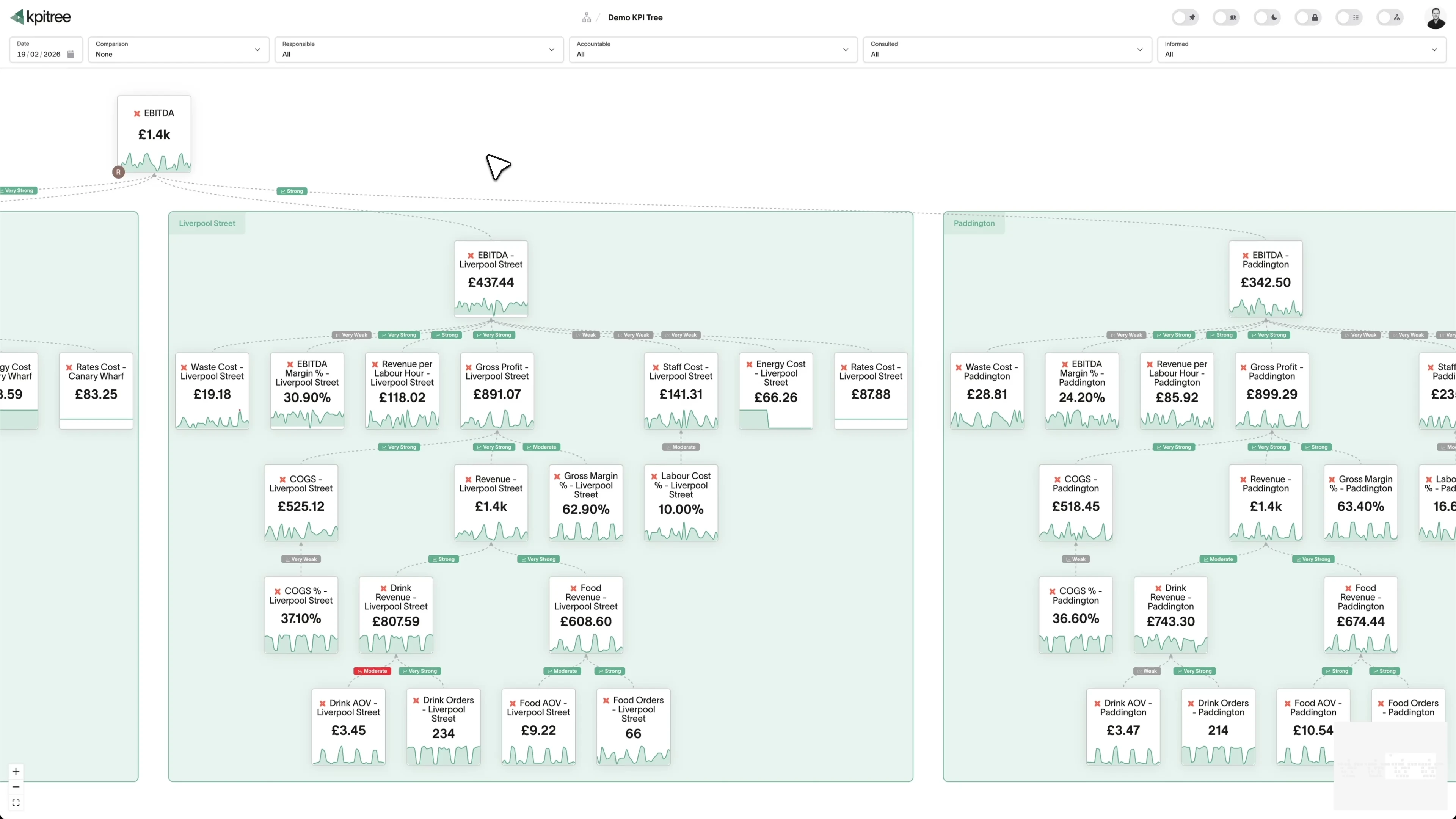
A causal tree built from your Azure SQL data.
- Metrics arranged into a causal tree from operational inputs up to revenue
- Statistical driver signals with confidence levels on every relationship
- Automated root cause traces an anomaly down through the tree
- Budgets, forecasts and targets run through the same pipeline as actuals
One query per metric. No extra queries for comparisons or aggregations.
- No extra database queries for comparisons, rollups or correlations
- DTU and vCore consumption stays predictable as usage grows
- A configurable sync schedule for every metric
- All downstream analytics run in KPI Tree's own engine
Ownership, alerts, and proof that the action worked.
- RACI ownership per metric, tied to team, department and manager
- Anomaly alerts pushed to the Accountable owner with org-chart escalation
- Delivered across Slack and email
- Verified impact confirms whether the action moved the metric
What KPI Tree adds on top of Azure SQL
Above the database, not inside it. Your database stores and serves the data. KPI Tree reads it as a source and adds the layer your database and BI tools were never designed to provide: causation with confidence, ownership, and proof.
Data warehouses
The numbers







Semantic layers
The definitions



Business apps
Launches, decisions, blockers




Org structure
Directory-synced




For humans
Answers, briefings and pushes
 @
@Read and write over MCP
Anthropic: 21% → ~95% with curated context



Canopy Agentic Workflows the metrics start them, humans gate them
Canopy Agents four out of the box, any model, your keys
Canopy
The business context layer
Structural context The causal tree, the org chart
Temporal context What was true when, plan against actual
Behavioural context What people did, what worked
Operational context RACI, workflows, approvals
Strategic context Objectives, key results, initiatives
Map & Measure
Metric Trees
Business Models
Prove & Act
Root Cause
Ownership
Verified Impact
Strategy
Grounded in proven causality
Verified proof
Meta spend → Revenue, +£32k vs forecast, q < 0.01
Personalised Action Plans 31 experiments running
hypothesis → a real person’s plan → measure the change
Causation the test cascade
ADF p 0.02 → Granger p 0.003 → q < 0.05, 87 of 1,204 survive
Correlation
22,791 pairs tested nightly, NPS – Churn r 0.71
Data warehouses
The numbers
Semantic layers
The definitions
Business apps
Launches, decisions, blockers
Org structure
Directory-synced
Causation with confidence, not just queries
Ownership that routes to a person
Verified impact closes the loop
Related integrations. More sources that work with KPI Tree.
Common questions
What authentication methods are supported?
SQL authentication with a username and password, or a Microsoft Entra ID service principal with a client ID, client secret and tenant ID. Both encrypt the connection with TLS and require a valid server certificate. For a service principal, remember to create a contained user for it in the database itself, not only in master.
Do I need to install an ODBC driver?
No. KPI Tree connects through Microsoft's official mssql-python driver over DDBC (Direct Database Connectivity). There is no ODBC driver to install, no driver version to pin, and no compatibility layer to maintain.
How does KPI Tree reach a database behind the Azure firewall?
KPI Tree connects from a fixed outbound IP. If your Azure SQL firewall is restricted, add that IP under Security then Networking in the Azure portal, or expose the server privately over Private Link. If the IP is not allowed you get a clear firewall error rather than a silent timeout, so the fix is obvious.
What permissions does the database user need?
Read-only access to the tables and views you want to measure. Adding the user to the db_datareader role is the simplest way to grant this. No write access and no admin rights are needed. The user has to exist in the target database as a contained user, not only as a login on the logical server.
What connection details do I need?
Server hostname, port (1433 by default), database name, and your chosen credentials: username and password for SQL authentication, or client ID, client secret and tenant ID for an Entra service principal.
How does KPI Tree affect my database costs?
It runs one query per metric on the schedule you set, and every comparison, rollup, correlation and anomaly check runs off-database in KPI Tree's own engine. Your DTU or vCore consumption reflects those lightweight syncs, not the number of people using KPI Tree, and a serverless database is free to auto-pause between them.
How does KPI Tree know how to aggregate a metric across days?
It reads the cross-day rollup from your T-SQL. KPI Tree parses the query with the T-SQL dialect and infers whether the metric should sum, count, average, or take the first or last value across a period, so a running balance and a daily count are each rolled up the right way without extra configuration.
Does KPI Tree work with Azure Synapse or SQL Managed Instance?
The integration is designed and tested against Azure SQL Database. SQL Managed Instance and Synapse dedicated SQL pools speak the same wire protocol, so metrics reachable through the same connection details may work, but Azure SQL Database is the supported and validated target.
Does KPI Tree work with dbt?
If your models are governed in dbt, connect through our dedicated dbt Cloud or dbt Core integration, which reads your metric definitions from the dbt semantic layer. The Azure SQL connector itself queries your tables and views directly and does not run a dbt sync.
Does KPI Tree copy data out of Azure SQL?
KPI Tree queries your database and processes the aggregated daily result in its own engine. Raw row-level data is not persisted outside your environment, cached results are encrypted at rest, and your existing Azure firewall, Entra policies and access controls stay fully enforced.
Related guides. Frameworks and metrics in depth.

How to build a metric tree
A step-by-step metric tree and KPI tree template from North Star to daily levers
Metric decomposition
Break any business metric into the components that drive it
Semantic layer vs business context layer
A semantic layer settles what a metric is. It cannot settle how metrics drive each other, who owns them, or what happens when one moves.
Connect Azure SQL in under an hour.
SQL or Microsoft Entra ID authentication, no ODBC driver, TLS-encrypted connections. Your Azure data stays where it is, and KPI Tree adds the layer above it.