


 Google Sheets Integration
Start on the spreadsheet you already have. Add the accountability it never could.
Your team already tracks the numbers in Google Sheets. Revenue by week, pipeline by stage, NPS by quarter, headcount by department. The data is there, the structure and ownership are not.Your team already tracks the numbers in Google Sheets. Revenue by week, pipeline by stage, NPS by quarter, headcount by department. The data is there, the structure and ownership are not. KPI Tree reads your spreadsheet as a first-class source and adds the layer above it: how each metric drives the ones above it with confidence levels, who is accountable for each as a RACI primitive, the action in flight against it, and whether the last action actually moved the number. Provide a spreadsheet ID, optionally pick a sheet tab, map your date and metric columns, and KPI Tree syncs on a schedule. No engineering, no SQL, no warehouse to stand up first. When you do outgrow spreadsheets, the tree, ownership and action plans you built stay attached to each metric, and you re-point the metric at a warehouse rather than starting again.
Connected in minutes, not a data project
Authenticate with Google
Two methods are available. Provide a service account JSON key for explicit control over which identity reads your data, or use default credentials via workload identity when KPI Tree runs in a Google Cloud environment. Either way KPI Tree requests read-only access to your spreadsheets (the read-only Sheets scope). You grant access by sharing the specific spreadsheet with the service account email, so nothing outside the sheets you deliberately share is ever reachable.
Point at your spreadsheet and tab
Paste the spreadsheet ID (the long string in the Sheets URL). Optionally name a sheet tab to read a specific tab instead of the first one. KPI Tree validates the connection live before saving, confirming the sheet exists, that the service account has access, and that the named tab is present.
Map columns to metrics and assign ownership
Tell KPI Tree which column is the date and which columns are metrics. Pick the aggregation for each metric (sum, average, count, first or last value, among others). From there each metric gets a RACI owner, causal edges to the metrics it drives, and statistical monitoring. Your spreadsheet stays the source of truth. KPI Tree reads it on a schedule and runs every downstream calculation in its own engine.
Structure and accountability for the metrics you already track
No engineering. Connected in minutes.
Read as a first-class source, on its own engine
Read-only access with two authentication paths
You do not need a warehouse to have metric accountability.
- Connect with a spreadsheet ID and an optional sheet tab name
- Weekly revenue, activation rate, NPS, pipeline coverage: if it is in a sheet, it works
- Causal drivers, RACI ownership and action plans from the first sync
- Re-point a metric at a warehouse later and keep the tree you built on it
Revenue · Liverpool St
15%£43,452


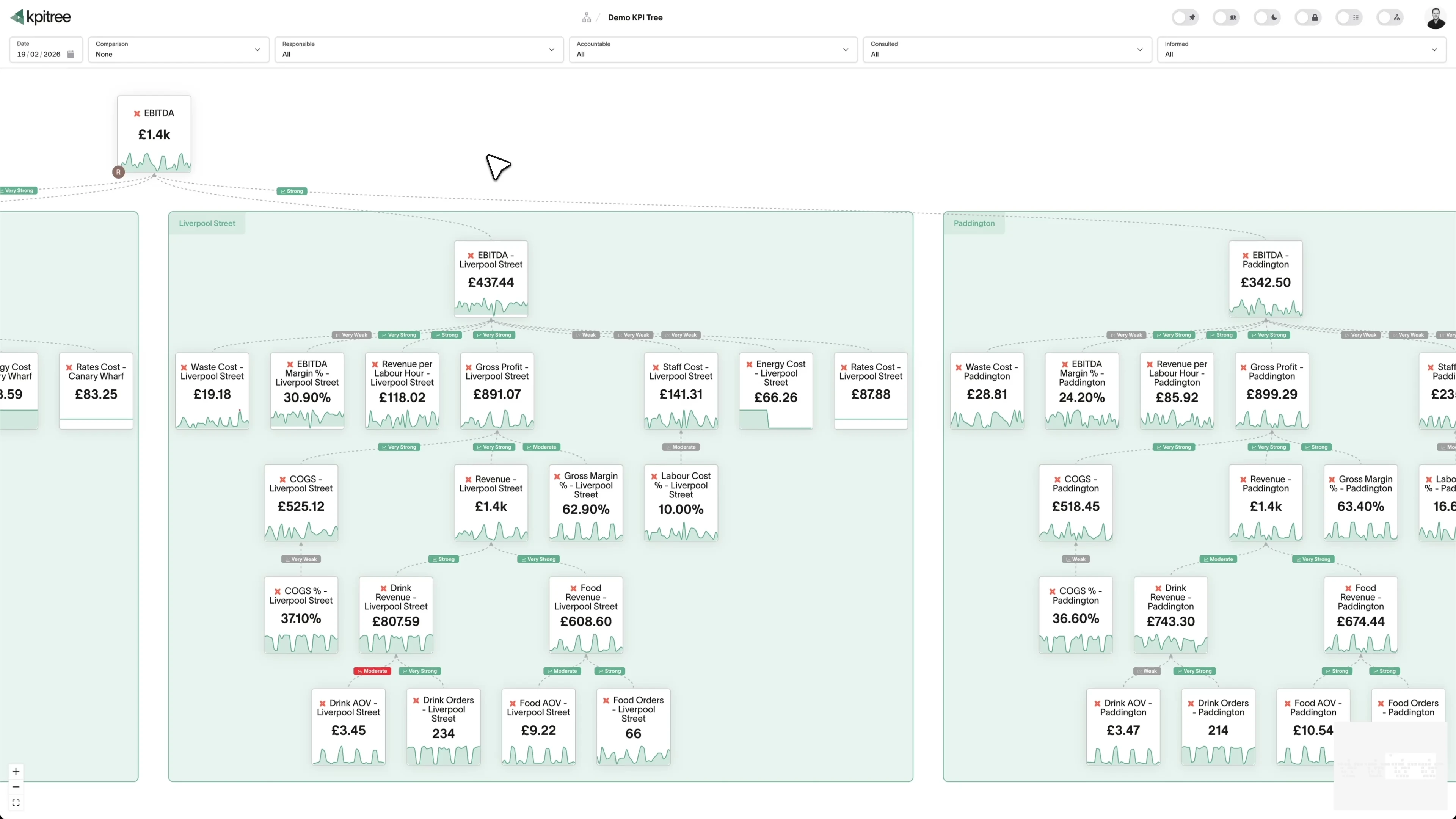
Map what drives what, and who owns each number.
- A causal metric tree built from the columns in your spreadsheet
- Statistical driver signals with confidence levels, not manual arrows
- RACI ownership tied to real people, teams and managers
- Automatic root cause tracing when a metric moves out of pattern
Your spreadsheet stays the source of truth.
- Reads on a schedule you choose: hourly, daily or weekly
- Update the sheet any way you like and the next sync picks it up
- Header detection on by default, with options for headerless or mixed-type columns
- Every metric links back to the exact spreadsheet and tab it reads
Graduate to a warehouse without rebuilding your tree.
- Re-point a metric from Sheets to a warehouse and keep the tree, ownership and actions
- Swap the source and rewrite the query; the structure around the metric stays
- BigQuery, Snowflake, PostgreSQL and every supported source available as a target
- Mix sources on one tree: some metrics on Sheets, others on the warehouse
North star
Your ultimate goal
Lag indicators
Past performance
Lead indicators
Predictive metrics
 Revenue
£1.2M
15% Active Customers
2,847
8.5%
 Trial Signups
312
5.2%
 Demo Requests
184
3.7%How KPI Tree uses Google Sheets differently
Most tools either ignore spreadsheets or treat them as a temporary workaround to be migrated away. KPI Tree treats Google Sheets as a legitimate source and adds the same layer above it that it adds above a warehouse: causal drivers, ownership, routed action and verified impact.
Data warehouses
The numbers





Semantic layers
The definitions



Business apps
Launches, decisions, blockers




Org structure
Directory-synced


For humans
Answers, briefings and pushes
 @
@Read and write over MCP
Anthropic: 21% → ~95% with curated context



Canopy Agentic Workflows the metrics start them, humans gate them
Canopy Agents four out of the box, any model, your keys
Canopy
The business context layer
Structural context The causal tree, the org chart
Temporal context What was true when, plan against actual
Behavioural context What people did, what worked
Operational context RACI, workflows, approvals
Strategic context Objectives, key results, initiatives
Map & Measure
Metric Trees
Business Models
Prove & Act
Root Cause
Ownership
Verified Impact
Strategy
Grounded in proven causality
Verified proof
Meta spend → Revenue, +£32k vs forecast, q < 0.01
Personalised Action Plans 31 experiments running
hypothesis → a real person’s plan → measure the change
Causation the test cascade
ADF p 0.02 → Granger p 0.003 → q < 0.05, 87 of 1,204 survive
Correlation
22,791 pairs tested nightly, NPS – Churn r 0.71
Data warehouses
The numbers
Semantic layers
The definitions
Business apps
Launches, decisions, blockers
Org structure
Directory-synced
Spreadsheets as a first-class source
The layer above your data, wherever it lives
A graduation path that keeps your structure
Related integrations. More sources that work with KPI Tree.
Common questions
What connection details does KPI Tree need?
A spreadsheet ID (the long string in the Google Sheets URL) and, optionally, a sheet tab name if you want a specific tab instead of the first one. Headers are detected by default and can be turned off for sheets that begin with data on row one. If a column mixes numbers and text, there is an option to read every column as text so the sheet still imports cleanly.
How does KPI Tree authenticate with Google Sheets?
Two ways. You can provide a service account JSON key, which gives you explicit control over the identity that reads your spreadsheets, or, when KPI Tree runs inside Google Cloud, it can use workload identity with no keys to manage. Both use the read-only Sheets scope. You grant access by sharing the spreadsheet with the service account email, and you revoke it by removing that share. Keys are encrypted at rest and never logged.
Do I need a data warehouse to use KPI Tree?
No. KPI Tree connects directly to Google Sheets and reads it as a first-class source. If your metrics live in a spreadsheet today, you can have a metric tree with causal drivers, RACI ownership and action plans in minutes. A warehouse is optional and can come later, at which point you re-point the metric at the new source and keep the structure you built.
Does connecting Sheets slow down or add load to my spreadsheet?
No. On the schedule you set, KPI Tree makes a single read of the sheet into its own analytics engine, and every calculation after that happens inside the engine rather than against the live spreadsheet. However often your team opens a metric, compares periods or digs into an outlier in KPI Tree, the sheet sees no extra traffic.
Can I write SQL against my sheet, or only map columns?
Mapping columns is all most teams need, and it requires no SQL at all. For the technical reader, you can also supply a single SELECT projection over the configured sheet, for example to compute or rename columns as they are read. It is scoped to that one sheet: joins, subqueries and additional table sources are rejected, so a metric query can never reach beyond the spreadsheet you connected.
What happens when I update my spreadsheet?
KPI Tree reads the sheet on a schedule you choose, hourly, daily or weekly, and picks up your changes on the next read. Update however you like, whether by hand, through Google Forms, via Zapier, with Apps Script or any other method. There are no exports or manual imports.
Can I move to a warehouse later without rebuilding my work?
Yes. Connect a warehouse such as BigQuery, Snowflake or PostgreSQL, change the metric's data source and write its query against the new tables. The metric keeps its place in the tree, its causal edges, its RACI owner and its action plans, because all of that attaches to the metric itself rather than to the connection. You can also migrate gradually, moving one metric at a time while the rest stay on the sheet.
Can I mix Google Sheets with other data sources on one tree?
Yes. Each metric carries its own connection, so a single tree can include metrics read from Google Sheets alongside metrics from BigQuery, Snowflake, PostgreSQL or any other supported source. Ownership and causal edges live on the metric regardless of where its data comes from.
Related guides. Frameworks and metrics in depth.
Your spreadsheet data is ready. Give it the structure it deserves.
Connect Google Sheets to KPI Tree in minutes. No warehouse, no engineering, no data project. Start with the sheet your team already maintains and give every metric a driver, an owner and an action plan, then swap in a warehouse when you are ready.










